If you only need yourself in the frame, choose a webcam that’s easy to position, and check in advance that your face is clearly visible and your voice sounds clear. An adjustable mount or wider field of view may suit a different set-up, but could also show more of the classroom. So check the framing, lighting, microphone and software before the interview.
Who is this webcam guide for?
Interview candidate alone at a classroom PC
You want to be clearly visible without a complicated set-up, and to check in advance that the meeting software is using the camera and microphone. Microsoft Support explains how to test your camera and microphone in Teams.
Interview candidate in a shared classroom
You want clear audio and framing that keeps pupils, colleagues and classroom information out of shot as much as possible. The Dutch Data Protection Authority highlights the need for rules on showing pupils, students and teachers on camera during video calls in education.
Interview candidate with a changing set-up
You may need to point the camera at a different computer, monitor or part of the classroom, so you’ll need to consider its connection and mounting options. Features such as the field of view and positioning options differ between models like the HP 320 and Lenovo 300.
What should you look for when choosing?
Webcam for one seated interview candidate
Suitable if: you’re the only person who needs to be in shot and want a simple set-up. Logitech and Trust list a built-in microphone and a privacy cover for the Brio 100 and Tanor 1080p respectively.
Consider: a privacy cover blocks the camera, not the sound. Test the microphone in the classroom where you’ll be having the interview.
Adjustable positioning or a wider field of view
Suitable if: you need to angle the camera differently or deliberately want more than one person in shot. HP lists a swivel or tripod-compatible mount and a 66° field of view for the HP 320; Lenovo lists a 95° field of view for the Lenovo 300.
Consider: a wider field of view may show more of the classroom. The Lenovo 300 also has manual focus, so you’ll need to focus it beforehand.
Start with the two things you’ll notice straight away during the interview: clear audio and suitable framing. Then check the lighting and make sure the connection and mount are compatible with the computer available.
| What to consider |
What to check before buying |
Who should pay particular attention? |
| Clear audio |
Check which microphone the video-calling app selects, and test it with sounds that are typical of the classroom. Microsoft Support explains how to make a test call in Teams. |
I want my answers to be easy to follow, even with background noise. Around 31% of consumers prioritise clear audio. |
| Privacy and framing |
Check the frame from where you’ll be sitting and look out for people or information that could be visible. HP lists a 66° field of view for the HP 320 and Lenovo lists 95° for the Lenovo 300; compare the framing from your distance. |
I want to keep other people and classroom information out of shot. Around 31% of consumers prioritise privacy and a tighter frame. |
| Visibility in changing light |
Test the webcam in the place and at around the time of your interview. Logitech lists automatic light balance for the Brio 100, while HP lists automatic light correction for the HP 320. |
I want my face to be clearly visible in the available light. Around 25% of consumers prioritise visibility. |
| Connection and positioning |
Check which ports are available and whether the mount will fit, then test the camera and microphone in the app you’ll be using. HP lists USB-A and a swivel or tripod-compatible mount for the HP 320. |
I need to connect the webcam to the computer available and position it properly. Around 13% of consumers prioritise connection and positioning. |
Common pitfalls when choosing
-
Focusing only on resolution
A stated resolution of 1080p doesn’t tell you how clearly you’ll appear in the classroom lighting or how clearly your voice will come through.
Test the webcam in the place you plan to use it before the interview, and check both the picture and the sound.
-
Assuming a wider field of view is always better
Lenovo lists a 95° field of view for the Lenovo 300. That wider frame may also show more of a shared classroom than you want.
Choose a field of view that suits who needs to be in shot, and check the framing from where you’ll be sitting.
-
Confusing a privacy cover with complete privacy
A privacy cover blocks the camera when closed, but it doesn’t control what can be heard during the interview.
Check the camera framing and which microphone is active, and keep other people out of shot.
Brands to compare
Logitech
The Brio 100 is a straightforward option to consider for an interview where only one person needs to be in shot.
- Logitech lists 1080p, automatic light balance, a built-in microphone and an integrated privacy cover for the Brio 100.
- These specifications alone don’t tell you how the picture and sound will perform in a dark or noisy classroom.
Trust
The Tanor is a straightforward Full HD option to compare with webcams designed for one person.
- Trust lists 1080p, a built-in microphone and a privacy shutter for the Tanor.
- Test how clearly your voice comes through in the classroom; the listed microphone features don’t confirm how it will sound there.
HP
The HP 320 is worth considering if you need a USB-A connection and adjustable positioning.
- HP lists 1080p, a 66° field of view, automatic light correction, a microphone, a privacy cover and a swivel or tripod-compatible mount.
- The stated field of view doesn’t guarantee that other people or information will stay out of shot.
Lenovo
The Lenovo 300 is worth considering if you deliberately need a wider frame or more flexibility in how you angle the camera.
- Lenovo lists 1080p, a 95° field of view, two microphones, manual focus and a privacy shutter.
- A wide frame may show more of the classroom, while the number of microphones doesn’t tell you how clearly your voice will come through there.
Webcams on Joybuy
This selection includes webcams with features that may be useful for an online interview, such as a built-in microphone, privacy cover or different connection and mounting options. Check that each model’s port, microphone and positioning options suit your computer and classroom.
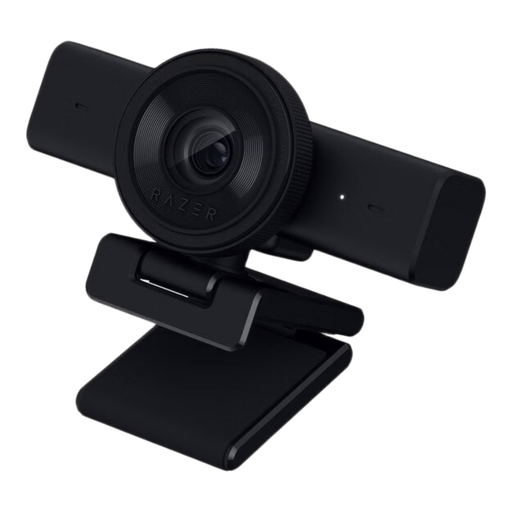 Image unavailable
Razer Kiyo V2 X-webcam
Worth considering if you’re looking for a USB-A webcam with a built-in microphone and physical privacy shutter.
The product name lists 1440p and 1080p at 60 FPS. The product information lists USB-A and support for Windows 10/11.
View on Joybuy
 Image unavailable
AOC 4K PRO Webcam with Sony IMX363 sensor
Worth considering if you’re looking for a webcam with a privacy cover and a choice of USB-A or USB-C connection.
The product name lists PDAF autofocus, two microphones, a privacy cover and a 75° field of view.
View on Joybuy
 Image unavailable
Philips 4000 Series 4K UHD Webcam, EU Version, SPL6408BT/00
An option to compare if you’re looking for a webcam with built-in microphones and a lens cover.
The product name lists autofocus, two built-in microphones and a privacy cover.
View on Joybuy
 Image unavailable
Philips 2K QHD PC Webcam, EU Version, SPL6308S/00
Worth considering if you’re looking for a webcam that can be clipped to a desktop or laptop screen.
The product name lists a noise-reduction microphone and a clip mount.
View on Joybuy
 Image unavailable
Insta360 Link 2C Standard Bundle Graphite Black
Worth considering if you want to compare automatic framing for one person or a group.
The product name lists a 4K webcam and HDR. The product information lists Auto Framing, a physical privacy switch and AI noise reduction.
View on Joybuy
Frequently asked questions
How do you check your webcam before the job interview?
Test the camera, microphone and speaker where you’ll be sitting. Microsoft Support says you can make a test call through the device settings in the Teams desktop app; according to Microsoft, this feature isn’t available in Teams on the web.
Is a privacy cover enough if there are other people in the classroom?
No. A privacy cover only blocks the lens when closed; it doesn’t control what can be heard during the interview. Keep other people and personal information out of shot, and check which microphone is active. The Dutch Data Protection Authority emphasises the need for rules on showing pupils, students and teachers on camera during video calls in education.
Can you record a job interview if pupils are in shot?
Don’t assume that you can. The Dutch Data Protection Authority notes that educational institutions must agree rules for recordings showing pupils or students and inform those concerned. This information does not give general permission to make a private recording of a job interview.
What guarantee or cooling-off period applies to an online purchase in the Netherlands?
According to the Dutch government, you’re entitled to a product that conforms to the agreement; if a product is faulty, the seller must resolve the issue. For distance purchases, the cooling-off period is usually 14 days. Check the applicable terms and any exceptions before ordering.


