Which option is right for you?

Interviewer in a busy classroom

You want the family story to remain clear while other activities are going on around the room. In that case, keeping the microphone close to the speaker may matter more than relying on claims about automatic noise reduction.

Two people talking, using a phone

Both the pupil and family member will be speaking, and you want to record their voices on a phone using two wearable microphones. The receiver connection and what’s included in the set are important here.

Class sharing recording equipment

You’re looking for a device that can record without a personal phone and be handed over after use. If the voices are identifiable, the school should also agree how the recordings will be processed and how long they will be kept.

What should you consider when choosing?

Handheld microphone for a guided interview

A good fit if: you can hold the microphone close to the storyteller or pass it between speakers. RØDE describes the Reporter as an omnidirectional dynamic interview microphone with an XLR connection.

Bear in mind: the interviewer needs to position the microphone carefully. To record using a phone or computer, you’ll need suitable additional recording equipment.

Two wireless clip-on microphones

A good fit if: two people will be speaking at the same time and you want to place a microphone on each of them. The RØDE Wireless Micro has two transmitters; DJI says a Mic Mini receiver can work with two transmitters.

Bear in mind: check exactly what’s included in the set, as well as the phone port and receiver version. The microphones need charging, and product specifications can’t predict how well noise reduction will work in your classroom.

Standalone recorder with built-in microphones

A good fit if: you want to record without a phone or computer connected. The Zoom H1essential has built-in X/Y microphones and can also be used as a USB microphone, according to Zoom.

Bear in mind: position the recorder carefully near the speakers, and check the storage, power requirements and a test recording. Built-in microphones aren’t automatically suitable for recording distant speakers in a noisy classroom.

USB desktop microphone for a fixed position

A good fit if: one person is speaking close to a computer at a fixed table. Shure lists USB-C and XLR outputs and a headphone socket for the MV7+.

Bear in mind: a microphone designed for close-up speech isn’t necessarily suitable for several people sitting apart. Also check that it works with your computer and recording app.

What to consider What should you check? Who is this important for?
Clear speech in the classroom Compare a microphone you can hold close to the speaker with a fixed or built-in microphone. If possible, make a test recording where you plan to use it. If the classroom is lively, I mainly want to be able to hear what the storyteller says when I play the recording back. Around 33% of consumers prioritise clear speech in a busy classroom.
Recording two voices Check that the version you choose includes two transmitters and a suitable receiver. A handheld microphone requires you to pass it around and position it yourself. When a pupil and family member are speaking at the same time, I want to record both voices without constantly passing the microphone between them. Around 27% of consumers prioritise recording two people talking at once.
Connecting to your recording device Make a note of your device and the ports it has. RØDE offers the Wireless Micro with USB-C or Lightning connections; an XLR microphone uses a different connection setup. If I want to use my phone or computer, the receiver needs to connect to the device I already have. Around 20% of consumers prioritise compatibility.
Recording and managing files independently Check whether the device records on its own and what storage and power it needs. Decide in advance how files will be transferred and deleted after the lesson. For shared use, I want to record without a personal phone and know who has access to the files. Around 20% of consumers prioritise standalone recording and file management.

Common pitfalls

  • Assuming a standalone microphone is a complete recorder

    The RØDE Reporter has an XLR connection, while the Zoom H1essential can record on its own. One setup doesn’t automatically do the job of the other.

    First decide what you want to record the conversation on, then check what equipment you’ll need for that setup.

  • Ordering a wireless set without checking the version

    A brand may offer different connections and set contents. The included clips and fastenings can also vary between versions.

    Check the exact bundle contents, connection and attachments against your recording device and the number of speakers.

  • Assuming a better microphone means you can skip privacy agreements

    The Dutch Data Protection Authority considers identifiable audio recordings to be personal data. Using a different microphone doesn’t change a school’s obligations when processing them.

    Before recording, discuss the purpose, applicable GDPR lawful basis, access, possible publication and retention period with the school.

Brands to consider

RØDE

RØDE offers options for both guided interviews and conversations recorded with two wireless microphones.

  • The manufacturer describes the Wireless Micro as having two clip-on transmitters, with USB-C or Lightning versions available.
  • According to RØDE, the Reporter is an omnidirectional XLR handheld microphone.
  • For the Wireless Micro, check the phone port; for the Reporter, check what XLR recording equipment you’ll need. There’s no independent classroom test demonstrating a sound-quality advantage.

DJI

The Mic Mini range could be a good fit if you need two wearable transmitters.

  • DJI says one Mic Mini receiver can work with two transmitters, and that the system has adjustable noise reduction.
  • That doesn’t mean every bundle includes two transmitters, or that noise reduction will deliver predictable results in a classroom.

Zoom

The H1essential is an option if a standalone recorder with built-in microphones better suits your needs than a microphone for a phone.

  • Zoom lists built-in X/Y microphones, recording features and the option to use it as a USB microphone.
  • Where you position the recorder still matters. The product specifications aren’t an independent measure of how clearly it will pick up distant speech in a classroom.

Shure

The MV7+ could suit a fixed recording position where one person sits close to the microphone.

  • Shure lists USB-C, XLR and a headphone socket.
  • Designed for close-up recording, it isn’t necessarily suitable for recording a whole group from a distance.

Hollyland

The LARK M2 range includes wearable options for recording a conversation wirelessly.

  • Hollyland describes mobile versions with USB-C and Lightning connections, as well as camera versions and a noise reduction feature.
  • European product information states that the current version no longer includes a magnetic rear clip. Check the exact version and included attachments before buying.

Products for this recording setup

The products below are mainly wireless sets for two people talking, along with a portable voice recorder for standalone recording.

DJI Mic Mini 2S wireless set with 2 TX, 1 RX and charging case

DJI Mic Mini 2S (2 TX + 1 RX + Charging Case)

This set is designed for recording a conversation between two speakers at the same time.

The product name lists 2 TX, 1 RX and a charging case. Check that the receiver is compatible with the recording device you plan to use.

View at Joybuy

RØDE Wireless Micro with two microphones, smartphone and camera receivers, charging case and USB-C

RØDE Wireless Micro Camera Kit, USB-C

This set could be a good fit if you want to record two speakers wirelessly and need both a smartphone receiver and a camera receiver.

The product name lists two microphones, a smartphone and camera receiver, a charging case and USB-C.

View at Joybuy

Moman MC1X(A) wireless lavalier microphone with Lightning, 2 TX and 1 RX

Moman MC1X(A) Lightning (2TX, 1RX)

This version could suit a conversation with two speakers if you need a Lightning connection.

The product name lists a Lightning version with 2 TX and 1 RX. Check that this connection is compatible with your device.

View at Joybuy
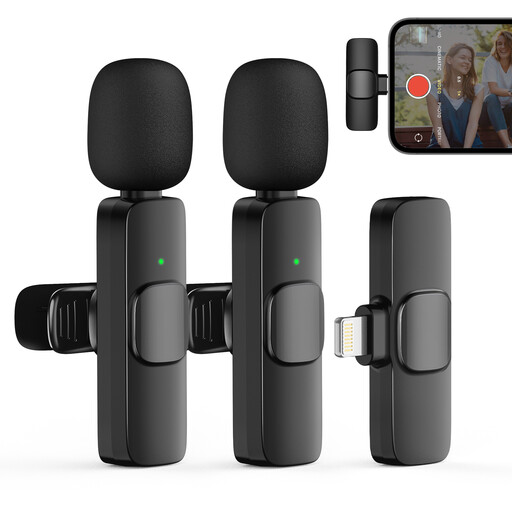
Moman CP1XA wireless lavalier microphone for iPhone with 2 TX and 1 RX

Moman CP1XA for iPhone (2TX, 1RX)

This version could suit a recording with two people talking if you’re using an iPhone.

The product name lists 2TX and 1RX. Check that the set is compatible with your iPhone and the recording setup you want.

View at Joybuy

Rexsun L357 portable digital voice recorder with 128GB and LCD screen

Rexsun L357 Portable Digital Voice Recorder, 128GB

A portable voice recorder is an option if you want to record without a separate microphone receiver.

The product name lists 128GB and an LCD screen. Check the storage and power requirements before use, and make a test recording.

View at Joybuy

Frequently asked questions

Is noise reduction enough for a noisy classroom?

Not necessarily. DJI and Hollyland describe noise reduction on the models mentioned, but that doesn’t predict how a recording will sound in your classroom. Position the microphone where the storyteller will be speaking and check the result with a short test recording.

Can I connect an XLR handheld microphone directly to my phone?

Don’t assume you can. According to RØDE, the Reporter has an XLR connection. Check what recording equipment and connections you’ll need to use it with your phone.

How should I prepare to record with a standalone recorder?

Check the power supply and storage medium, position the recorder near the speakers and make a short test recording beforehand. The Zoom H1essential has built-in microphones, records to an SD card and has a headphone output for listening back to the recording, according to Zoom.

Can identifiable voices in the classroom be recorded and published without further checks?

Not without first checking the applicable privacy rules. The Dutch Data Protection Authority classifies identifiable audio recordings as personal data; before processing them, a school must determine which GDPR lawful basis applies. According to the Dutch Data Protection Authority, publication online will usually require the consent of the people concerned.

How long can a school keep identifiable family stories?

The Dutch Data Protection Authority doesn’t specify a single retention period in the GDPR. The school must decide and justify how long it’s necessary to keep the recordings for their intended purpose, so don’t assume there’s one fixed period for these recordings.
