
Teacher with pupils recording independently
You ask children to take turns recording short character voices and playing them back straight away. Clear controls and a built-in speaker can be useful; TTS describes these features on the Easi-Speak 2.


For short takes that children record themselves and play back straight away, a simple recording microphone is a good fit. For separate dialogue clips or files you want to collect later, a voice recorder may be more suitable. If you also want to record a scene or sound effects, consider a portable stereo recorder and allow extra time for preparation. If pupils’ voices can be recognised, agree how recordings will be used and managed in line with school policy and the GDPR.
You ask children to take turns recording short character voices and playing them back straight away. Clear controls and a built-in speaker can be useful; TTS describes these features on the Easi-Speak 2.
You record different roles or conversations as files to play back or edit later. The recording format and how you transfer files are important considerations; OM SYSTEM describes mono recording on the VN-541PC and stereo recording on the WS-882.
You record scenes or sound effects as well as spoken performances, and can set aside time for preparation and editing. Zoom and Tascam describe portable stereo recorders with built-in microphones; the exact setup varies by model.
First, decide whether children will record short takes themselves or whether you want to capture several voices or a complete scene. Then choose a recording format, playback option and transfer method to suit the way you work.
| What to consider | What should you check? | Who is this important for? |
|---|---|---|
| Recording independently | Check that the record button and recording indicator are easy to understand, and that the device can play audio. | If children are recording short takes themselves, I want to be able to see quickly whether recording is in progress and play it back straight away. Around 36% of consumers say independent recording and immediate playback are their primary needs. |
| Recording dialogue | Compare mono and stereo for the microphone setup you want, and make a test recording where you plan to record. | For different roles, I want to check that voices from various positions are recorded clearly. Around 29% of consumers say dialogue is their primary recording need. |
| Recording a spoken performance | Check whether you will record one speaker separately and how much help is needed with positioning, starting and playback. | If one pupil moves around or speaks expressively, I want to tailor the microphone setup to that particular role. Around 21% of consumers mainly record individual spoken performances. |
| Managing files | Check the file format, connection and transfer to a computer; agree who can access files and how they will be stored. | If I want to find or edit takes later, I want to know in advance how to transfer and manage them. Around 14% of consumers say file management is their primary need. |
The Philips DVT1160 and DVT1170 are separate models. The same applies to the Tascam DR-05X and DR-05XP, so check the full model code before comparing specifications.
Compare the model code in the listing with the code on the manufacturer’s website.
The Philips DVT2015 can record locally; according to Philips, transcription via Sembly involves uploading files later. As the Dutch Data Protection Authority explains, an identifiable voice can be personal data.
First decide which recording features you need, then discuss cloud use separately with the school.
The recording time actually available depends on the settings and file format you choose. So a stated maximum does not automatically tell you how much space your lesson recordings will take up.
Check the recording time for the file format you plan to use, and transfer takes regularly.
TTS describes the Easi-Speak 2 as a recording microphone for short pupil contributions.
The VN-541PC is a mono voice recorder; the WS-882 is a separate model with stereo recording.
The H1essential is a portable stereo recorder for scenes; the F2 is a mono recorder with a lavalier microphone for one speaker.
The VoiceTracer DVT1170 is designed for voice recording; according to Philips, the DVT2015 offers stereo recording and a separate option for Sembly cloud transcription.
The DR-05XP is a portable stereo recorder with a 32-bit float mode for anyone wanting to record scenes or other sounds in more detail.
This selection includes portable voice recorders and an MP3 player for children. For each model, check that its recording features, controls and file transfer suit the way you work in the classroom.
 No image available
An option to compare if you’re looking for a voice recorder with transcription; check how transcription works and how files are processed.
The product name lists 64 GB of storage.
 No image available
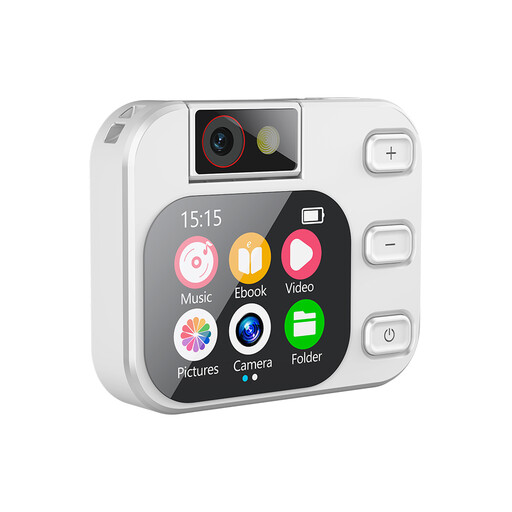
This is an MP3 player, not the same type of product as a standard voice recorder. Before buying, check that its recording feature and file transfer are suitable for classroom recordings.
The product name lists a touchscreen and A-B repeat.
 No image available
An option if you’re looking for transcription and summaries as well as recording. Check which languages are available and how recording and processing work.
The product name lists 64 GB and transcription and summaries in 118 languages.
 No image available
A portable recorder to compare if you want to save takes and find them later; check that its controls and file transfer fit your lesson routine.
The product name lists 128 GB of storage and an LCD screen.
 No image available
An option to compare if you want to start recording quickly during short turns; check how to play back recordings and transfer them to a computer.
The product name lists one-touch recording and 64 GB of storage.
Not always: mono may be enough for separate recordings of one speaker. If you want to record voices from different positions in a single take, compare a stereo model and make a test recording in the classroom first; OM SYSTEM lists mono for the VN-541PC and stereo for the WS-882.
Agree who will manage the takes, listen back to them briefly and transfer useful files using the connection on your chosen model. Check in advance which connection and file format are compatible with your computer.
According to the Dutch Data Protection Authority, an identifiable voice recording is personal data. The school must have an appropriate legal basis for processing it and inform pupils and parents. Decide in advance what the recordings are for and who will have access; assess sharing or uploading them as a separate use.
The Dutch Data Protection Authority states that personal data must not be kept for longer than necessary for its purpose. The school must therefore set an appropriate retention period; follow the applicable school policy.
For your chosen model, check which batteries, memory card or cable are included and which connections you need. The accessories required vary by device, so don’t assume that similar models come with the same items.