Who are these recording setups for?

Teacher recording pupils one at a time

For a teacher who asks pupils to record individually from a fixed position and wants to listen back before the next recording. Podcast in de Klas describes recording sessions in the classroom; Samson lists a headphone output on the Q2U for monitoring while recording.

Teacher supporting paired book reviews

For a teacher recording two pupils together who needs to choose between one tabletop setup and separate microphones. DJI describes a Mic Mini configuration with two transmitters for recording two people; Logitech G lists multiple pickup patterns for the Yeti.

Recording on the move around the classroom

For recording with a phone or tablet while pupils move between locations. DJI lists a separately available adapter for phones with a Lightning connector, so check your recording device’s port and what’s included in the set you choose.

What should you look for in a microphone for book reviews?

What to consider What should you check? Who should pay particular attention?
Clarity of a single voice Check the pickup pattern, whether you can position the microphone close to the speaker, and whether you can listen back through headphones. If I’m recording one pupil among classroom noises, I want to position the microphone deliberately near the speaker and listen back to the result. Around 33% of consumers prioritise the clarity of a single voice.
Two pupils speaking at once Check the number of transmitters and receivers, the connection to the recording device, and both voices in a test recording. For a paired book review, I want to record both pupils clearly at the same time and know whether one tabletop microphone will be enough. Around 27% of consumers prioritise conversations between two pupils.
A fixed recording position Check the computer port, the cable included, and whether the stand is stable in the chosen position. If pupils are recording one after another, I want to be able to use the microphone again quickly in the same place by the computer. Around 20% of consumers prioritise a setup that’s easy to repeat.
Recording on the move Check the phone or tablet port, any adapter required, and what’s included in the set you choose. If pupils won’t be staying at one table, I want to be able to record in different places and connect the microphone to the mobile device. Around 20% of consumers prioritise recording on the move.

Buying mistakes that can disrupt your recording

  • Assuming similar model names mean the same configuration

    Sets with similar names can differ in the number of transmitters and the accessories included. DJI, for example, offers different Mic Mini configurations; the name Mic Mini 2S alone doesn’t prove that it’s the same configuration.

    Before buying, compare the full model name, the number of transmitters and receivers, the accessories and the connection to your recording device.

  • Assuming a microphone in the middle of the table will pick everyone up equally clearly

    Where people sit and the pickup pattern affect which voices and background sounds are captured. A pattern that picks up voices from more directions won’t automatically filter out other classroom noises.

    Test the positions where pupils will actually be sitting. For an individual review, you can position the microphone deliberately close to the speaker.

  • Focusing only on the type of microphone and forgetting the connection

    USB, XLR and a receiver for mobile recording are different ways of connecting a microphone. The right connection depends on your recording device.

    First, note which device you’ll be using. Then compare its port with the microphone’s connections and accessories.

    Depending on the connection you choose, you may need a compatible cable, adapter or additional recording interface.

  • Assuming a technically successful recording can automatically be published

    A working microphone doesn’t determine the rules for processing, storing or sharing a pupil recording.

    Agree the purpose, access and retention period in line with the school’s privacy policy. Assess identifiable video separately from audio-only recordings.

Relevant brands to consider

Samson

The Q2U is a handheld microphone for a fixed speaking position, with USB and XLR connections.

  • Samson lists a dynamic cardioid capsule, a headphone output and an included desktop stand.
  • The manufacturer describes reduced background noise pickup as a product feature; this doesn’t guarantee a quiet recording in a classroom. Recording via XLR on a computer requires suitable additional equipment.

RØDE

The NT-USB Mini is suited to a fixed USB desktop setup; Wireless ME is a wireless option for recordings where the speaker won’t be staying at the table.

  • RØDE lists a detachable desktop stand and an included USB-C-to-USB-A cable for the NT-USB Mini. According to the manufacturer, Wireless ME has microphones built into both the transmitter and receiver.
  • For each model, check that the connection works with your recording device and which sounds from the wireless transmitter and receiver you want to record.

DJI

The Mic Mini range is worth considering for clip-on microphones, including for paired recordings or when pupils are moving around.

  • DJI offers configurations with one or two transmitters; the set with two transmitters, one receiver and a charging case is designed for recording two people.
  • Check the full model name and what’s included in the set. DJI lists a separately available adapter for phones with a Lightning connector.

Logitech G

The Yeti is a USB desktop microphone with adjustable pickup patterns to suit your chosen speaking setup.

  • Logitech lists multiple pickup patterns, gain control and direct headphone monitoring.
  • A pattern that picks up voices from more directions won’t automatically filter out other classroom sounds. Test the speaking positions in the room.

HyperX

The SoloCast is a USB desktop microphone for an individual speaker at a computer.

  • For the SoloCast, HyperX lists a cardioid pickup pattern, an adjustable stand and tap-to-mute controls on the microphone.
  • Check the exact SoloCast generation, as specifications vary between generations. This is a different setup from two separately worn microphones.

Microphones at Joybuy for classroom recordings

These product options are suited to fixed computer recordings and mobile or paired recordings. For each microphone, check that the connection and what’s included in the set work with the school devices and the speaking setup you need.

DJI Mic Mini 2S set with two transmitters, one receiver and charging case

DJI Mic Mini 2S (2 TX + 1 RX + Charging Case)

The two transmitters are suited to a paired recording, with each pupil using their own transmitter.

The product name lists two transmitters, one receiver and a charging case. Check that the receiver is compatible with the device you want to record on.

View at Joybuy

RØDE Wireless Micro camera kit with two microphones and receivers

RØDE Wireless Micro Camera Kit

This wireless set may suit a mobile recording or paired setup; check that the receiver is compatible with the device you’re recording on.

The product name lists two microphones, a camera receiver, a smartphone receiver and a charging case. Check your phone’s connection, especially if it has a Lightning port.

View at Joybuy

USB condenser microphone with cardioid pattern

USB Condenser Microphone

A USB microphone may suit a fixed recording position by a computer; check in advance that the connection is compatible with the school device.

The product name describes a condenser microphone with a cardioid pattern. Compare the recording position with where the pupil will be speaking.

View at Joybuy
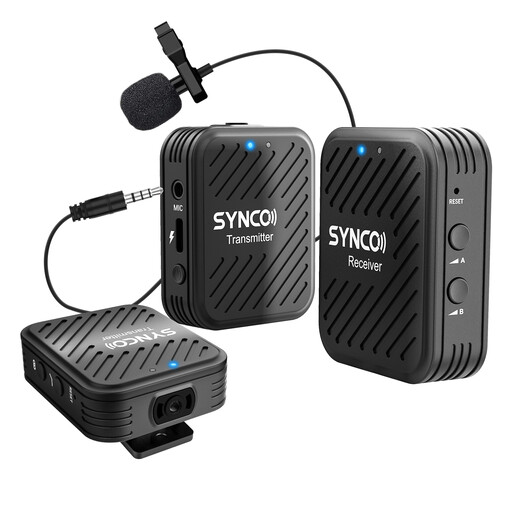
SYNCO G1(A2) wireless lavalier system with two transmitters

SYNCO G1(A2) 2.4G Dual Transmitter Lapel Mic

The two transmitters are suited to a paired recording where pupils won’t be staying beside one tabletop microphone.

The product name describes a wireless lavalier system with two transmitters. Check that the receiver is compatible with the phone, tablet or camera you’re using.

View at Joybuy

Razer Seiren V3 Mini Quartz USB microphone

Razer Seiren V3 Mini Quartz

This compact USB microphone may suit a fixed computer setup for a pupil recording individually.

The product name lists a USB connection and tap-to-mute controls. Check that the microphone works with the computer you’re using.

View at Joybuy

Frequently asked questions

Do you need to buy a separate microphone for every pupil?

Not if pupils take turns speaking from one fixed position: you can set up the same microphone again. For two voices speaking at once, test both speaking positions; a set with two transmitters is another option. DJI describes a Mic Mini configuration with two transmitters and one receiver for recording two people.

How do you connect a USB microphone and check the recording?

First, check which port the school computer has and whether the cable included will fit. RØDE supplies a USB-C-to-USB-A cable with the NT-USB Mini. Then make a short test recording and listen back to hear how the voice compares with the classroom noise.

What should you look for in a wireless set?

Before recording, check that the transmitters and receiver are compatible with each other, charged and working with the recording device. DJI Mic Mini configurations vary in the number of transmitters and whether they include a charging case, so compare the full model name and box contents.

What extra equipment and warranty rights should you consider?

Depending on your device and the set you choose, you may need a compatible cable, phone adapter, headphones or an additional recording interface. For a consumer purchase in the Netherlands, you have a legal guarantee in addition to any manufacturer’s warranty. According to ACM ConsuWijzer, the seller must put right, free of charge, a product that breaks sooner than you could reasonably expect under normal use. If a school is making the purchase, check the applicable contract terms.

Can a school keep or share a recorded book review?

That depends on the purpose and how the school uses the recording; the answer isn’t necessarily the same for every audio-only recording as it is for video. The Dutch Data Protection Authority requires schools to inform pupils and parents about the processing of personal data. For creating and publishing identifiable video footage, the AP sets out specific consent rules: consent must come from parents for pupils under 16, and from the pupil themselves from the age of 16. Assess each audio recording in line with the school’s privacy policy, including its lawful basis, access and retention period.
