A speakerphone is a good choice when someone joining remotely needs to speak with the teacher and pupils. Compare the distance to the furthest speaker with the stated range, then test the setup in the classroom. If the group is spread out, consider an expandable setup. If nobody is joining remotely, look at classroom sound amplification rather than automatically choosing a meeting speakerphone.
Which solution is right for you?
Teacher with a remote participant
This solution is for a teacher who wants voices from several seats to reach the remote participant. Measure the distances from the planned device position and test a call in your own room. Jabra and Yealink list microphone ranges for specific models.
Discussion leader with a spread-out group
This solution is for a discussion leader with speakers in different locations who wants to check whether an expandable setup is needed. EMEET describes connecting two M0 Plus devices with a cable; check that the combination you choose is suitable for the room.
Teacher with a fully present class
This solution is for a teacher whose main priority is helping pupils hear one another in the classroom. A classroom system with a microphone and speakers is different from a speakerphone for online meetings, according to Yealink’s explanation of classroom amplification.
What should you look for when choosing?
A single speakerphone on the table
A good fit when: a small group is seated around the device and someone is joining remotely. Jabra lists a maximum microphone range of 2.3 m for the Speak2 55; Yealink lists up to 2 m for the CP900.
Bear in mind: the stated ranges are manufacturer specifications, not a guarantee that people will be heard clearly in a noisy or echoing classroom.
An expandable setup
A good fit when: speakers in different locations are taking part in a conversation with someone remotely. EMEET describes connecting two M0 Plus devices with a daisy-chain cable.
Bear in mind: check which cable you need and the exact combination of devices. The manufacturer’s description does not prove that the sound will be clear from every seat in your classroom.
Classroom amplification
A good fit when: everyone is present and the aim is for the class to hear the discussion. Yealink describes a classroom system with a microphone and speakers as a solution for amplifying voices in the room.
Bear in mind: this does not automatically provide a two-way connection with a remote participant. The positioning of the equipment in the room also matters.
| What to consider |
What to look for when buying |
Who it matters most to |
| Voices from different seats |
Compare the furthest seat with the stated range of the exact model, then test it in the classroom. A manufacturer’s figure is not a measurement of your room. |
If I want an online participant to hear pupils who aren’t sitting next to the device, I’ll focus on how well it picks up voices from different parts of the room. Around 36% of consumers prioritise the distance between seats. |
| Two-way conversation |
Check whether the exact model specifies full-duplex audio and test whether both sides can hear one another. This feature alone says nothing about the room’s acoustics. |
If questions and responses are being exchanged between the class and a remote participant, I want the conversation to be easy to follow. Around 29% of consumers prioritise two-way conversation. |
| Type of audio solution |
First, establish whether anyone is joining remotely. Depending on who needs to hear and speak, compare classroom amplification with a speakerphone or a supported expandable setup. |
If everyone is in the classroom, I mainly want the group to hear one another. If speakers are spread out and an online participant is joining, picking up voices from different parts of the room matters more. Around 21% of consumers make this distinction their main consideration. |
| Connection and controls |
Check the connection options on the school laptop, any Bluetooth restrictions and the audio settings in the meeting app. Test the microphone and speaker beforehand. |
If I want to use the setup with the devices available, without the hassle of extra installation, I’ll check the connection and controls first. Around 14% of consumers prioritise ease of use. |
Common mistakes when choosing
-
Assuming the stated microphone range covers the whole class
The ranges manufacturers list for specific models are not a test in a spread-out or noisy classroom.
Measure from the planned device position to the furthest speaker, then try the setup in the classroom before relying on it.
-
Choosing a meeting speakerphone when you only need classroom amplification
Talking to someone remotely and making sure everyone in the same room can hear are two different needs.
Before choosing a product, decide whether a remote participant will be joining. If everyone is present, compare solutions for amplifying sound in the classroom.
-
Assuming Bluetooth works the same way as USB on every device
Jabra warns that a standard Bluetooth connection to a computer may not offer the same certification or sound quality as USB. Jabra lists Bluetooth for use with a smartphone or tablet.
Check the connection options on the school laptop and test both the microphone and speaker in the meeting app.
Brands to consider
Jabra
The Speak2 55 is a portable option for a small group with an online participant.
- Jabra lists four microphones, full duplex, USB-A and USB-C, and a microphone range of up to 2.3 m for the Speak2 55. Bluetooth is listed for use with a smartphone or tablet.
- These are manufacturer specifications, not the results of an independent classroom test. Check the distances between seats and bear in mind Jabra’s warning about using a standard Bluetooth connection with a computer.
HP Poly
The Sync 40 series is designed for small meeting setups with USB or Bluetooth.
- HP lists full-duplex audio and a microphone range of up to 2.5 m for the series.
- Check the exact model. The stated range does not prove that it will cover a whole classroom.
EMEET
According to EMEET, the OfficeCore M0 Plus can be expanded for speakers in more than one location.
- EMEET lists USB-C, Bluetooth, full duplex and the option to connect two devices.
- The expansion described requires a second compatible device and a cable. The manufacturer’s claim is not based on an independent test in a classroom.
Yealink
The CP900 is a portable USB and Bluetooth option for a small group.
- Yealink lists a microphone range of up to 2 m, full duplex and support for meetings with up to six people for the CP900.
- The stated group size does not automatically make this model suitable for a whole class.
AnkerWork
The PowerConf S3 is a portable USB-C and Bluetooth option if you need to move between rooms.
- AnkerWork lists six built-in microphones and up to 24 hours of talk time.
- The stated battery life says nothing about how clearly people can be heard from every seat in a classroom.
Products at Joybuy
These product choices are aimed at a small hybrid discussion, a setup for speakers in different locations, or voice amplification when everyone is in the classroom.
 No image available
Insta360 Wave AI Conference Speakerphone, Bluetooth, Black
The product title describes a Bluetooth conference speakerphone for a small hybrid discussion.
Joybuy
 No image available
Insta360 Wave AI Conference Speakerphone, Bluetooth, White
This conference speakerphone is included for discussions with speakers in several locations. Check which expansion feature and connection options apply to the model you choose.
Joybuy
 No image available
Jabra SPEAK 510 MS, Bluetooth, USB-A, Black
The title describes a portable conference room speaker for use with Bluetooth or USB-A. Check which connection works with the school laptop and meeting app.
Joybuy
 No image available
Jabra Speak2 55 MS Teams, Dark Grey
This model is suited to a small discussion with an online participant. Jabra lists four microphones, full-duplex audio and a microphone range of up to 2.3 m for the Speak2 55. Test the distances between seats in your own classroom.
Joybuy
 No image available
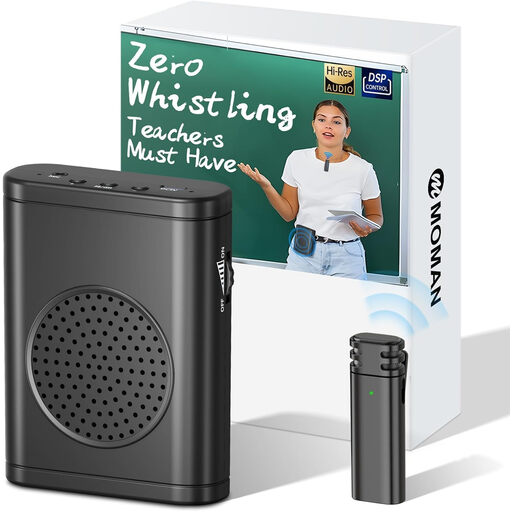
Moman S57 Voice Amplifier with Wireless Lavalier Microphone
This voice amplifier is described as suitable for teaching and presentations when everyone is present; the product title mentions a wireless lapel microphone. It is not a two-way speakerphone for remote participants.
Joybuy
Frequently asked questions
Do I need a speakerphone if everyone is in the classroom?
Not for a conversation with someone remotely. If pupils struggle to hear one another in the classroom, compare a classroom system with a microphone and speakers, and consider where the equipment will be positioned.
How do I set up a speakerphone for the discussion?
Position the device so the intended speakers are within its stated range. If necessary, select it as both the microphone and speaker in the computer and meeting app. Jabra describes this step for the Speak2 55.
What extra parts should I check for an expandable setup?
The connection of two M0 Plus devices described by EMEET requires a second compatible device and a daisy-chain cable. Before buying, check what is included with the model you choose.
Can the school share or record the book discussion online without checking first?
Don’t assume you can use the recording without restriction. According to the Dutch Data Protection Authority, schools must inform pupils and parents about the processing of personal data. The regulator says a DPIA is required for processing that involves a high privacy risk; whether this applies depends on the specific processing. If you make a recording, agree its purpose, how long it will be kept and who will have access to it.


