Switching to a different streamer won’t fix a washed-out picture caused by viewing your TV screen from an angle: viewing angle is a characteristic of the TV itself. So, first assess the screen from where you sit, then check that the comedies, subtitles, apps and controls you want are available on your chosen device. A 4K streamer doesn’t guarantee that an older title will play in 4K.
Who is this buying guide for?
Watching from the side
You watch TV from an angle on the sofa or in an armchair and want to know whether a different streamer will improve the picture. RTINGS.com explains that your TV’s viewing angle determines when the picture starts to look less accurate when viewed from off-centre.
Looking for classic comedies
You want to check in advance whether a particular comedy is available in the Netherlands and whether it has the subtitles you want. The Netflix Help Centre explains that availability and language options can vary by title.
Using an older TV with outdated apps
Your TV’s apps may no longer meet your needs, and you’re looking for a suitable streamer, remote control or connection. Check that your preferred services are supported and confirm the exact model: according to the Netflix Help Centre, Netflix may not be available on some older TVs and streaming devices.
What should you look for?
Start with the problem you actually want to solve. Viewing angle depends on the TV and where you sit, while a streamer is mainly relevant for apps, controls and connections.
| What to consider |
What should you check? |
Who is this important for? |
| Picture from the side |
View the TV from where you normally sit and check the viewing angle of the exact TV model. Also try changing the TV’s position or direction. |
If I sit at an angle, I want to know whether my TV’s picture will still look good enough. Around 33% of consumers list viewing angle as their top buying priority. |
| Comedies and subtitles |
Search for the specific title on your preferred service and check the available audio and subtitle options. The Netflix Help Centre notes that language options can vary by title. |
I want to know first whether I can find and follow the comedy I’m looking for. Around 27% of consumers prioritise title availability and subtitles. |
| Apps and controls |
Check which apps are available for the exact model variant and which remote control is included. |
If my TV’s apps no longer meet my needs, I’m looking for a device that makes it easy to access my services. Around 20% of consumers say apps and controls are their main buying concern. |
| Connection and set-up |
Check the Wi-Fi signal where you watch, the available ports and which cables are included with your chosen variant. |
I want to know in advance whether the connection and ports will work with my TV set-up. Around 20% of consumers give connection and set-up costs top priority. |
Avoid common buying mistakes
-
Buying a streamer to fix a washed-out picture from the side
Viewing angle is determined by the TV panel; a different streaming device won’t change it.
First, watch the same picture from where you sit and try repositioning the TV or your seat.
-
Assuming every streamer has the comedy you want
Availability and subtitle options can vary by title and region. A device can’t make a title available if it isn’t in the catalogue.
Before choosing a device or service, search for the exact comedy and check the subtitles available for that title.
-
Assuming model variants and cables are all the same
Ports and included cables can vary between versions. For example, with Apple TV 4K, Ethernet depends on the variant you choose.
Check the full model name, connections and box contents before placing your order.
Relevant brands
Google
The Google TV Streamer (4K) is a standalone box for anyone looking for built-in Ethernet.
- Google lists 4K output, 32 GB of storage and gigabit Ethernet for this model.
- Google says a certified HDMI 2.1 cable is sold separately. These specifications are not based on independent performance testing.
Apple
Apple TV 4K may suit you if you use Apple services or want the Siri Remote.
- Apple offers a 64 GB Wi-Fi version and a 128 GB version with Ethernet.
- Apple says HDMI cables are sold separately. Also check that the apps you want are available.
Amazon
Fire TV Sticks are compact HDMI streaming devices; the exact version determines which features and apps are available.
- The Fire TV Stick 4K Max and Fire TV Stick HD offer different versions to choose from.
- Check the output resolution and available apps for the exact model. Features of one model don’t automatically apply to another.
Xiaomi
The TV Box S (3rd Gen) is a Google TV box with a USB port and an HDMI cable included.
- Xiaomi lists 4K output and 32 GB of storage.
- The published list of ports doesn’t mention built-in Ethernet. These are manufacturer specifications, not independent test results.
Joybuy products
This selection mainly features screen solutions with streaming capabilities, including projectors and a smart TV, rather than standalone streaming sticks alone.
 No image available
CC360 FHD Smart Projector
A projector may suit you if you want to change your screen set-up and are looking for streaming apps.
The product title mentions FHD, Wi-Fi, Bluetooth, wireless projection and autofocus. It also mentions 4K support; check the actual playback resolution for the service and title you want to watch.
Joybuy
 No image available
Video Projector with WiFi 6 and Bluetooth
The product title mentions built-in apps and access to the Play Store; check whether the app for your preferred service is available.
The title lists WiFi 6, Bluetooth, automatic keystone correction, 180° rotation and HDMI compatibility.
Joybuy
 No image available
N3 Max Smart Projector
This model may be worth considering if you’re looking for a projector with the listed streaming features; check availability of the comedy you want directly with the service.
The title lists VIDAA OS, native Netflix, autofocus and keystone correction. It also mentions 1000 ISO Lumens and 4K support; this is not the same as stating that it has native 4K resolution.
Joybuy
 No image available
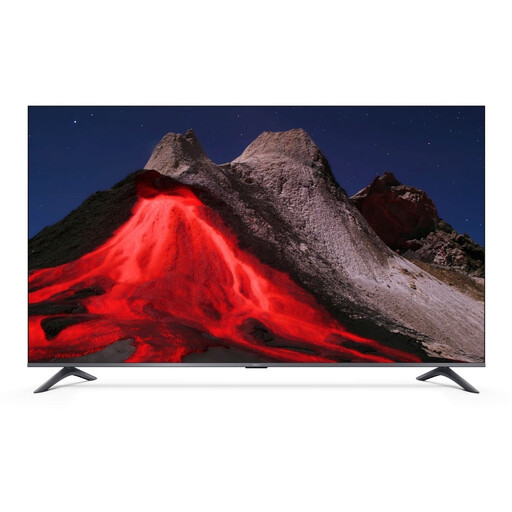
Xiaomi TV A Pro 55 (55 inch, 140 cm)
A smart TV is another option if you’d rather replace the screen and built-in TV apps than add a standalone streamer.
The product title lists 4K UHD, QLED and Google TV. Assess the TV’s viewing angle separately from where you sit.
Joybuy
 No image available
Yaber K2s Projector with Google TV
This projector may suit you if you’re considering a screen solution with Google TV; check that your preferred streaming apps are available and that the titles you want to watch can be found.
The product title lists a native resolution of 1080p as well as 4K support. It also mentions Google TV, WiFi 6, Bluetooth, native Netflix, autofocus and keystone correction.
Joybuy
Frequently asked questions
Will a 4K streamer automatically make old comedies sharper or easier to see from the side?
No, a streamer won’t change your TV’s viewing angle. Viewing angle is a characteristic of the screen. Resolution and HDR playback also depend on factors such as the title, your subscription and your equipment. First, view the TV from where you sit, then check the title’s playback information.
How can I check whether a comedy has the subtitles I want?
Open the specific title on the service you want to use and check the audio and subtitle options. According to the Netflix Help Centre, the languages available can vary by title.
What do I need to connect a standalone streamer or box?
Check that you have a spare HDMI input, a power supply and a suitable network connection. Google says a certified HDMI 2.1 cable for the Google TV Streamer is sold separately; Apple says HDMI cables aren’t included with Apple TV 4K. Xiaomi lists an HDMI cable as included with the TV Box S (3rd Gen).
What can I do if a stream keeps buffering?
Check the connection where you watch and follow the advice provided by the streaming service you’re using. The Netflix Help Centre warns that a slow or unstable internet connection can lead to lower playback quality.


