
If you want to document components
If you want to capture small markings or solder joints from a fixed position, compare the space beneath the lens and how photos are saved. The manufacturer gives the Andonstar AD407 a base measuring 20 × 12 cm.


For repeatedly capturing detailed images of small components, a stable digital microscope is a good fit. If you need both an overview of the circuit board and close-up images, a compact camera with a close-up mode is another option. A mirrorless camera with a macro lens offers a separate route if you already have a suitable camera body, but you’ll need room for the whole setup. Before choosing, measure the available space and check the working distance, lighting and any computer requirements.
If you want to capture small markings or solder joints from a fixed position, compare the space beneath the lens and how photos are saved. The manufacturer gives the Andonstar AD407 a base measuring 20 × 12 cm.
If you need to fit your equipment alongside the circuit board and sometimes take an overview shot too, compare the footprint of a microscope with that of a compact camera. Andonstar lists a base measuring 20 × 12 cm for the AD407.
If you want to use an existing camera body to photograph circuit boards, check that it works with a macro lens and that the magnification, working distance and space for lighting suit your setup. Sony and Canon offer separate macro lens options for their camera systems.
A good fit if: you mainly want to capture the same small components repeatedly without having a computer beside the circuit board.
Bear in mind: according to the manufacturer, the Andonstar AD407 has a 7-inch screen and a base measuring 20 × 12 cm; check that it will fit on your table.
A good fit if: reflections on shiny components are a concern and you have a suitable computer; Dino-Lite lists an adjustable polariser for the AM4113ZT.
Bear in mind: the manufacturer lists a resolution of 1280 × 1024 pixels and no table stand in the box contents. This model is also not specified as ESD-safe.
A good fit if: you want to switch between overview and detail shots without changing lenses; OM SYSTEM lists a microscope mode for the Tough TG-7.
Bear in mind: test whether you can frame the entire circuit board and the detail you want from the space available.
A good fit if: you already have a compatible camera body or want to use a setup with interchangeable lenses.
Bear in mind: the Sony SEL30M35 is a separate APS-C E-mount lens. Sony lists a maximum magnification of 1.0× and a working distance of 2.4 cm from the front of the lens for close-up photography.
| What to consider | What should you look for? | Who is this important for? |
|---|---|---|
| Small details | Compare the crop you want with the photo output and focusing distance. Don’t judge the detail in saved photos solely by the magnification shown on screen. | If you want to capture small markings or solder joints clearly, detail is your priority; around 31% of consumers rank this need first. |
| Table space | Measure the available surface and the height you need. With a USB microscope, allow space for a computer and a suitable stand too. | If you need to fit your equipment, circuit board and lighting into a limited workspace, the whole setup matters; around 31% of consumers prioritise table space and ease of use. |
| Reflections and lighting | Check whether you can adjust the lighting and camera angle. According to Dino-Lite, a polariser can reduce reflections on shiny objects, but it won’t necessarily eliminate every reflection. | If you’re working with shiny components, you’ll want to keep details visible without distracting glare; around 23% of consumers make reflection control their top priority. |
| Overview and detail | Test the framing at the available distance and check that you can focus on both crops without having to make major adjustments to the setup each time. | If you want to capture the whole circuit board and sometimes zoom in on a component, both types of shot matter; around 15% of consumers prioritise the overview. |
A magnified image on an HDMI monitor doesn’t, by itself, tell you how much detail the saved photo contains. Compare the photo output with the crop you need.
Start with the close-up you want to capture, and don’t base your choice solely on the highest magnification figure.
For close-up photography with the Sony SEL30M35, the stated working distance is 2.4 cm from the front of the lens. This can limit the space available for lighting.
Check both the working distance from the front of the lens and where you can position the light without obscuring the subject.
Allow extra room in your table layout for lighting and the camera setup.
For the Dino-Lite AM4113ZT, the manufacturer lists USB and computer software, but no table stand in the box contents.
Check software compatibility with your computer and plan for a suitable stand beside the circuit board.
Your chosen setup may also need space for a computer and a separate stand.
Digital microscopes with built-in screens for viewing details without having a computer on the table.
USB microscopes for use with a computer; the AM4113ZT is worth considering if reflections are a concern.
Compact cameras for taking overview shots at the same workbench.
Macro lens options for anyone who already has a suitable E-mount camera.
A mirrorless camera option with macro lenses for anyone who already has a compatible camera body or wants to build a setup they can expand.
Joybuy product picks related to this topic.
 No image available
For close-up photos, check that the crop and focus you want suit your working distance.
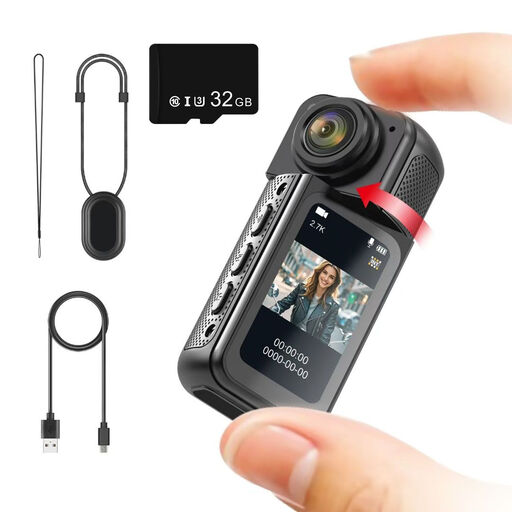
The product title lists a 180° rotating lens, magnetic mount, 1.47-inch IPS screen and included 32 GB memory card.
 No image available
Before using it to photograph circuit boards, compare the framing you want with the available working distance.
The product title describes a 2K camera with a 360° rotating lens.
 No image available
For close-up photos, check that the crop and focus you want suit your working distance.
The product title lists Wi-Fi, 64 MP, a 330° rotating lens and a 1.72-inch touchscreen; a tripod is also included.
 No image available
For circuit board photos, compare the crop you want with the available distance and room for the camera.
The product title lists a 1-inch CMOS sensor, 4K/120fps video and a 2-inch rotating touchscreen.
First, measure the space you have for the circuit board, camera base and lighting. The manufacturer lists a base measuring 20 × 12 cm for the Andonstar AD407; with a USB microscope, allow room for a computer and a suitable stand too.
For the Dino-Lite AM4113ZT, the manufacturer lists USB 2.0 and software for Windows and macOS, but no table stand in the box contents. Check that the software is compatible with your computer and allow space for a stable stand.
Close-up photography can have a shallow depth of field. Canon recommends comparing test shots taken at different aperture settings; keep the camera and circuit board steady while shooting.
It depends on the framing and focusing distance available for each shot. Before buying, test whether you can fit both the entire circuit board and the detail you want into the frame from your workspace.
When you buy online as a consumer, you generally have a statutory 14-day cooling-off period after delivery, although exceptions apply. Your statutory guarantee depends on what you could reasonably expect from the product; ACM ConsuWijzer explains that, under the applicable conditions, the seller must put a faulty product right.