
Listener who wants to place voices
You listen carefully to choral recordings from one fixed spot and can position two speakers symmetrically.


If you usually listen to choral recordings from one fixed spot, start with a stereo pair that you can place on either side of your listening position. Then choose based on the space available on your desk and how your source connects. A Wi-Fi speaker may suit you better if app control and listening in different parts of your home matter more, but check whether you’ll need two speakers for stereo.
You listen carefully to choral recordings from one fixed spot and can position two speakers symmetrically.
You want to place two speakers next to your screen without overlooking the connections or your listening position.
You’d rather play music over your home network using an app, possibly in other parts of your home too.
A good fit if: you usually listen from the same desk and can position a speaker on each side.
The trade-off: two cabinets need space, and the connections alone won’t tell you how choral voices will sound in your room.
A good fit if: you can accommodate two speakers and want to connect your computer audio via USB-C. Audioengine lists this for the A2+ Gen 3; KEF does the same for the LSX II LT.
The trade-off: check the exact model generation and cable route; the speakers in the KEF LSX II LT are connected to each other by a cable.
A good fit if: you work from one listening position and have a suitable analogue source or audio interface.
The trade-off: Genelec specifies one analogue XLR input per monitor for the 8010A, so check how many monitors you’re buying and how both channels will connect.
A good fit if: app control, playback over your home network or listening away from your usual workspace are priorities.
The trade-off: Sonos says that two Era 100 speakers can create a wider sound field. According to Sonos, you’ll need a separate Line-In Adapter to connect an analogue source.
| What to consider | What should you check? | Who is this important to? |
|---|---|---|
| Stereo positioning | Measure whether there’s room on both sides and point both speakers towards your listening position. | If I listen from one fixed spot, I want to be able to position the speakers on either side. Around 36% of consumers prioritise stereo positioning. |
| Desk space | Compare the dimensions of the exact model and leave room for the connections. | I want both speakers to fit next to my screen without the cables getting in the way. Desk space is the top priority for around 29% of consumers. |
| Connecting to your source | Compare your computer’s output with the inputs on the complete, correct-generation model. | I want to know in advance whether the speakers will connect to my computer or audio source. For around 21% of consumers, connecting to the source comes first. |
| Streaming and control | Check the supported playback method, your network and any components required for the exact speaker. | If I want to control music via an app away from my usual workspace too, easy streaming matters a lot. It’s the top priority for around 14% of consumers. |
One speaker won’t automatically give you a speaker on each side of your listening position. Sonos says that two Era 100 speakers can create a wider sound field together.
Check how many speakers are included in the offer and measure whether you have room for both.
USB-C functionality varies by model. Audioengine and KEF list USB-C audio for the models mentioned here; Sonos says you need an adapter to connect an external source to the Era 100.
Check what the port does on the exact model, not just its shape.
KEF specifies a wired connection between the speakers in the LSX II LT. The cable route may therefore affect where you can position them.
Plan the route for the supplied connection before deciding on your setup.
According to Genelec, each 8010A monitor has one analogue XLR input; the product specifications don’t necessarily describe a pair.
Check whether you’re buying one monitor or two, and how each channel will connect to your source.
The R1280DBs is an active stereo pair worth considering if you want to connect different types of source.
The A2+ Gen 3 is a compact desk system worth considering if you’re looking for USB-C audio from a computer.
The LSX II LT combines two speakers with USB-C audio and network features for a fixed stereo streaming setup.
The Era 100 is worth considering if Wi-Fi playback and control through the Sonos system matter to you.
The active 8010A studio monitor is an option for a small, fixed listening position with a suitable analogue connection.
The Joybuy options below include stereo sets and active speakers for desk or audiovisual setups. Check the contents of each set and how it connects to your source.
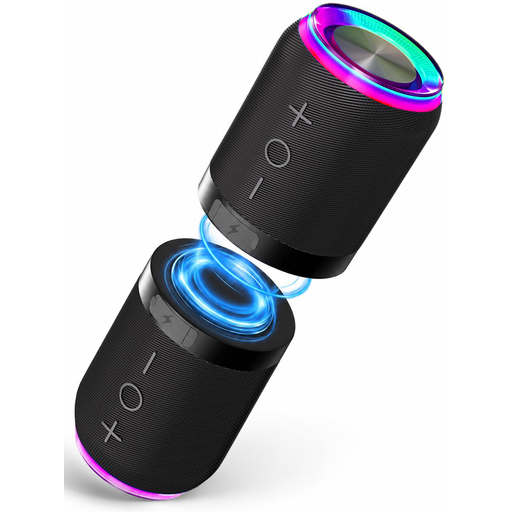 No image available
According to the product description, the two units can be separated for a stereo setup.
The product description lists Bluetooth, AUX and a TF card slot.
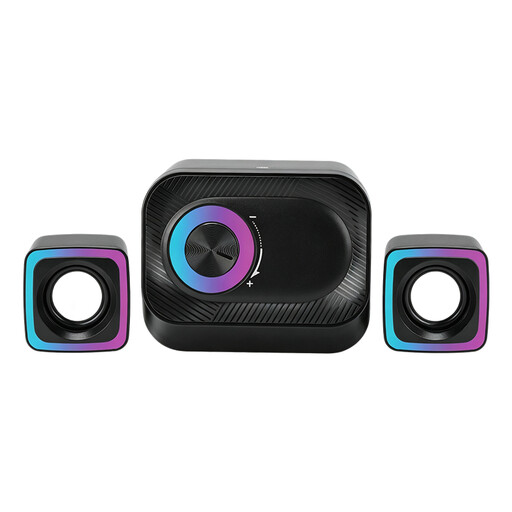 No image available
The set is described as suitable for a PC workstation and, according to the product description, includes two satellite speakers.
The product description mentions a volume control dial.
 No image available
The product description lists two separate speakers for stereo sound, designed for use on a desk.
The stated dimensions are approximately 72 × 73 × 65 mm per speaker.
 No image available
The product description lists a stereo set for listening to music on a desktop.
The stated dimensions are approximately 120 × 72 × 88 mm per speaker.
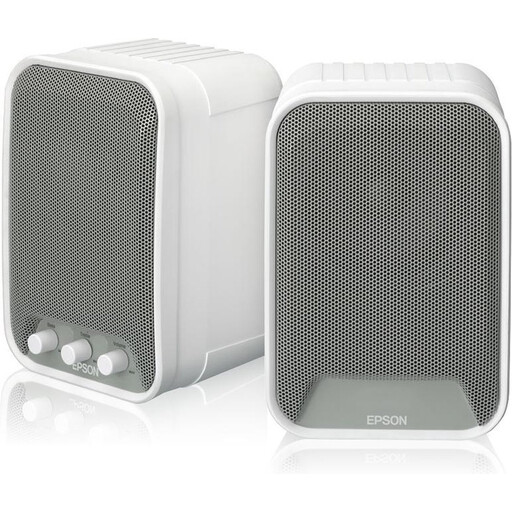 No image available
According to the product information, the set includes two active speakers with built-in amplification.
The product information lists connection to the ELPCB01 and the mounting kits supplied; check that this equipment suits your setup.
Place both speakers at the same height, point them towards where you usually sit and try to position them symmetrically. Genelec recommends an equilateral triangle for stereo positioning. Treat this as a starting point, not a guarantee of how they’ll sound in every room.
No, it depends on your computer’s outputs and the inputs on the exact model. Audioengine lists USB-C audio for the A2+ Gen 3, and KEF does the same for the LSX II LT. According to Edifier, the R1280DBs has RCA, optical and coaxial inputs, among others. Each Genelec 8010A monitor has one analogue XLR input. Before you choose, check the generation and which connection cables you’ll need.
Not if you want to position two separate speakers on the left and right. Sonos says that two Era 100 speakers can create a wider sound field together, so check that the offer includes the number of speakers you want.
First, compare your source’s output with the speakers’ input. For an external analogue source connected to the Era 100, Sonos lists a separate Line-In Adapter. If you’re buying studio monitors, also check how many speakers are included and which cables you need for both channels.
According to Dutch government information, for a standard online consumer purchase of a product, you generally have a statutory 14-day cooling-off period starting the day after delivery; exceptions may apply. The seller is also responsible for the statutory guarantee if the product does not meet what you could reasonably expect under normal use. There is no fixed general guarantee period in the Netherlands.