For a large group, screen size isn’t the only thing that matters. Choose based on the outermost seats as well as the distance to the furthest viewers. RTINGS.com suggests considering OLED for wide seating arrangements. In a room with lots of daylight, compare brightness and reflections for each model, and assess LCD and mini-LED TVs individually for their panel type and viewing angle. The Consumers’ Association recommends a comfortable viewing distance of around 2.4 times the screen diagonal, based on its own research. Use this as a starting point, and remember to check sound and power consumption too.
Who is this guide for?
A group with a wide seating arrangement
You’re watching with people spread across a wide sofa or several chairs, and want the picture to look consistent from the side too. RTINGS.com highlights viewing angle as something to consider with this kind of seating arrangement.
A host with a deep living room
You want viewers at the back of the room to follow the picture comfortably, so measure the distance to their seats before choosing a screen size. The Consumers’ Association uses viewing distance as a starting point when choosing a TV size.
A film night in a bright room
You often watch during the day, so you need to balance brightness and reflections against the viewing angle for your group. The Consumers’ Association highlights both viewing angle and reflections as factors to consider when buying a television.
What should you consider when choosing?
Start with the outermost seats and the viewing distance to the back row. Then compare how well the screen suits the light in your room, and factor in sound and power consumption too.
| What to consider |
What should you check? |
Who is this important for? |
| Viewing angle |
Check independent viewing-angle measurements for the exact model, or assess the picture from the outermost seats. RTINGS.com suggests considering OLED and IPS for wide seating arrangements, but panel type and viewing angle vary by model. |
If I’m watching from the side, I want everyone to be able to follow the picture clearly. Around 31% of consumers prioritise viewing angle. |
| Distance and screen size |
Measure from the eyes of both the closest and furthest viewers. The Consumers’ Association recommends a comfortable viewing distance of around 2.4 times the screen diagonal, based on its own research. Use this as a guide, not a hard-and-fast rule. |
If guests are sitting at the back, I want to choose a screen size that suits that viewing distance. Around 25% of consumers put the furthest seats first. |
| Daylight and reflections |
Compare the brightness and reflection handling of the exact model in conditions similar to your room. The Consumers’ Association highlights the trade-off between brightness, viewing angle and reflections. |
In daylight, I want to see the picture clearly without distracting reflections. Around 19% of consumers prioritise visibility in a bright room. |
| Sound for the group |
Check how clearly dialogue comes through from the furthest seat, and check the connections if you might want to use external audio. |
I want everyone to follow conversations and dialogue clearly, even from the back row. Around 13% of consumers prioritise speech clarity. |
| Overall running costs |
Compare the energy label for the exact models in kWh per 1,000 hours, and check separately for any installation costs. The European Commission explains that the screen label shows consumption in kWh per 1,000 hours. |
I want to consider the purchase price, installation and power consumption together. Around 12% of consumers prioritise this overall assessment. |
Common pitfalls
-
Choosing the biggest screen size and nothing else
A large screen won’t fix a loss of viewing quality for guests sitting well to the side. Measure the seating distances and check the picture from the outermost seats.
-
Assuming every mini-LED TV has a wide viewing angle
Mini-LED describes the backlighting; the LCD panel also affects the viewing angle. Sony lists the BRAVIA 5 K-65XR5 as an LCD screen with mini-LED backlighting, but the name alone won’t tell you how the picture looks from a side seat.
Compare viewing-angle information for the exact model and check the screen from the outermost seats.
-
Confusing an extended warranty product with your statutory rights
ACM ConsuWijzer explains that your statutory guarantee exists alongside any seller’s guarantee, and depends on what you could reasonably expect from the product.
Check separately what additional cover you’re buying and what rights you already have with the seller.
An optional service or insurance product may come at an extra cost.
Relevant brands
LG
LG Netherlands lists the OLED65C68LA as a 65-inch OLED screen, an option to consider if you’re comparing OLED TVs with a large screen.
- The official product specifications confirm the OLED screen and screen size of this model.
- Compare viewing angle and reflections for the specific model, and assess the picture from the outermost seats too.
Samsung
Samsung Netherlands describes Neo QLED models with mini-LED in several screen sizes. This is an LCD option to compare with OLED, for example if your room is bright.
- According to Samsung, the Neo QLED range includes models with mini-LED.
- Check the panel type and viewing angle for each model; the range name doesn’t tell you how the picture performs from every seat.
Philips
Philips Netherlands offers, among others, the 65OLED810/12 as an OLED model with Ambilight, and the separate 65MLED810/12 as a mini-LED model.
- Philips describes Ambilight as an ambient lighting feature on the OLED model.
- Ambilight alone doesn’t tell you how the picture looks from an angle. Treat OLED and mini-LED as different screen options.
Sony
Sony Netherlands lists the BRAVIA 5 K-65XR5 as a 65-inch LCD TV with mini-LED and local dimming.
- The specifications for this model list mini-LED, local dimming and 120 Hz.
- Don’t assume the viewing angle based on the model range alone; check the picture from the furthest seats to the side.
TVs for a group film night
This selection includes OLED, LED and mini-LED TVs with screen sizes of 65, 75 and 83 inches. Compare the size with your viewing distance, and check the picture from the side if your seating arrangement is wide.
 No image available
LG OLED83C67LA 83-inch OLED evo AI C6 4K Smart TV
OLED is an option worth comparing for a wide seating arrangement; check the picture on this model from the outermost seats too.
83 inches, OLED evo and 4K.
View at Joybuy
 No image available
LG OLED65C68LA 65-inch OLED evo AI C6 4K Smart TV
OLED is an option worth comparing for a wide seating arrangement; check the picture on this model from the outermost seats too.
65 inches, OLED evo and 4K.
View at Joybuy
 No image available
Hisense 65A6S 65-inch 4K UHD Smart TV
This 65-inch model is one size option to weigh up for viewers sitting at different distances; check the viewing angle of the exact model.
65 inches, 4K UHD and Dolby Vision HDR. The product name lists Game Mode Plus with VRR 60 Hz and energy class D.
View at Joybuy
 No image available
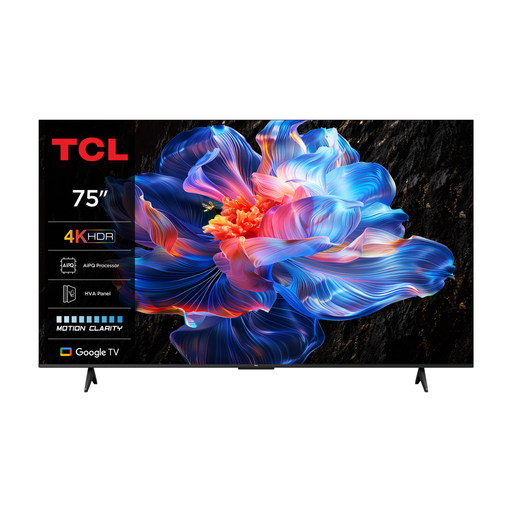
TCL 75V6C 75-inch 4K LED Smart TV
The 75-inch screen size is worth considering for viewers sitting further away; measure the seating distance and check the picture from the outermost seats.
75 inches, 4K LED and 60 Hz.
View at Joybuy
 No image available
TCL 75Q7C 75-inch 4K Mini-LED Smart TV
The 75-inch screen size is an option to compare for viewers at the back; check the distance and see how the model suits the seating arrangement in your room.
75 inches, 4K Mini-LED and 144 Hz.
View at Joybuy
Frequently asked questions
How do you choose a screen size when not everyone is sitting the same distance from the TV?
Measure from the eyes of the closest and furthest viewers. Based on its own research, the Consumers’ Association suggests around 2.4 times the screen diagonal as a starting point for comfortable viewing, not a required ratio. Remember to assess the outermost seats too.
How do you clean an OLED screen after a film night?
Follow the instructions for your model. LG advises unplugging its TVs, letting the screen cool down and gently wiping it with a soft microfibre cloth. Don’t spray water directly onto the screen.
How do you compare the power consumption of two TVs?
Compare the energy labels for the exact models you’re considering. The European Commission explains that the screen label shows consumption in kWh per 1,000 hours. Your actual costs will also depend on how long you watch and your electricity tariff.
In the Netherlands, do you still have rights after two years if a TV develops a fault during normal use?
You may do: your statutory guarantee depends on what you could reasonably expect from the product, and doesn’t automatically end when an offered seller’s guarantee expires. ACM ConsuWijzer explains that the seller is responsible for providing an appropriate solution at no cost if the fault is covered by those rights.


