
Vandaag of morgen in huis

Kwaliteit gegarandeerd

Welkomstaanbiedingen ontgrendelen: GRATIS bezorging | Tot 80% korting | Gratis 30 dagen JoyPlus-proefperiode
Download de app
Upgrading your RAM can give your PC a significant speed boost, whether you're an avid gamer, working with demanding software, or simply want smoother multitasking. But the PC memory market is a maze of specifications, model numbers, and marketing jargon. The wrong choice not only means wasted money but also a module that won't work or might even slow down your system.
As a Joybuy Product Recommendation Officer, I see where things go wrong every day. Before you invest, it's crucial to understand the most common pitfalls.
You don't need to be a tech expert to avoid these pitfalls. Pay attention to the following three core specifications to ensure you make the right purchase.
This is the most critical step. Check your motherboard or laptop specifications to see what type of RAM you need.
The required capacity depends entirely on your usage.
Speed (measured in Megahertz, MHz, or Megatransfers per second, MT/s) and CAS Latency (CL) together determine how quickly your memory responds.
A good rule of thumb is to look for a balance. For gaming RAM, for example, a DDR5 kit of 6000 MT/s with a CL of 30 is a popular and powerful combination. For a DDR4 system, 3200 MT/s with CL16 is a common, efficient choice.
Below are some RAM modules that suit different user profiles, selected based on their specifications and how they bypass the pitfalls mentioned.
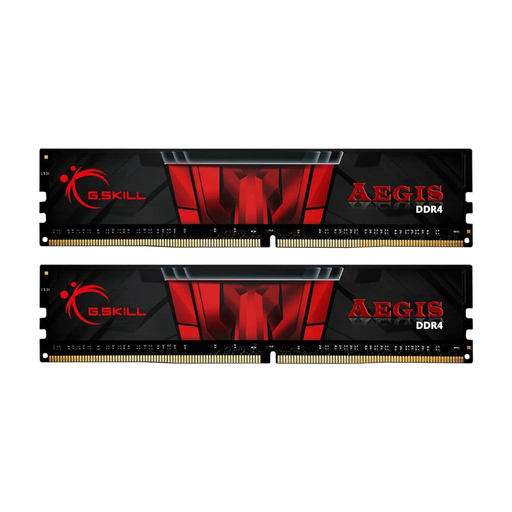
Why This Fits Their Persona: Perfect for those looking to give an existing DDR4 system an affordable yet noticeable performance boost. This 16GB kit is ideal for gaming and daily use without paying a premium.
This kit consists of two 8GB modules, allowing you to immediately benefit from dual-channel speed advantages and avoid the single-channel pitfall.
Excellent balance between speed (3200 MT/s) and low latency (CL16), a popular combination for DDR4 systems. G.Skill RAM is known for its reliability in gaming PCs.
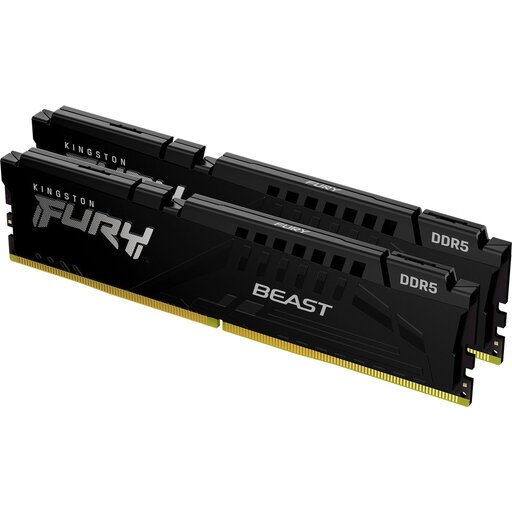
Why This Fits Their Persona: For those building a new PC or performing a major upgrade to a DDR5 platform. This 32GB kit offers ample capacity and speed for the latest games and demanding applications.
This kit offers a strong balance between high speed (5600 MT/s) and reasonable latency (CL36), preventing you from falling into the trap of a one-sided specification.
With 32GB of DDR5 memory, you are ready for the future. Kingston memory is known for its broad compatibility and reliability, which reduces the risk of issues.
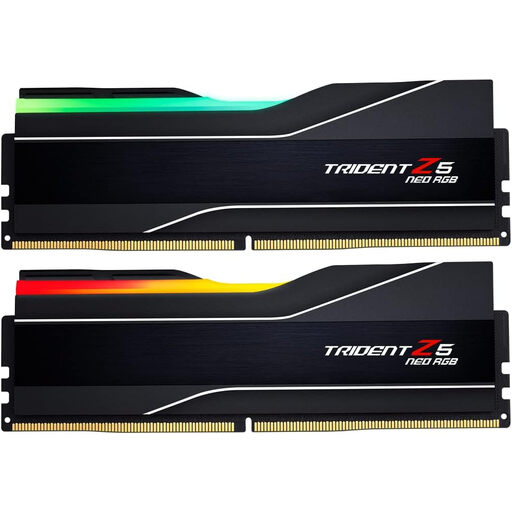
Why This Fits Their Persona: For the user who wants to get the maximum performance out of a high-end AMD system. This 64GB kit is designed for top-tier performance in gaming, streaming, and content creation.
This kit is optimized for AMD EXPO, meaning you can set the advertised speed and timings stably with a single click in the BIOS, without any manual tinkering.
An excellent combination of high speed (6000 MT/s) and very low latency (CL30). The 64GB capacity is built for the most demanding tasks of today and for years to come.
We have compiled a complete, up-to-date list of products that fully meet these strict selection criteria and local regulations.
Mixing modules from different brands, speeds, or capacities is strongly discouraged. While it might sometimes work, the system will default to the speed of the slowest module. In many cases, it leads to instability, crashes, or a PC that won't boot at all. It's always best to buy a kit of identical modules.
For a smooth gaming experience in 2026, 16GB of RAM is the baseline. However, many new, demanding games perform better with more memory. If you're building a new gaming PC or planning a major upgrade, 32GB of RAM is a wise and future-proof choice.
The difference is purely physical. DIMM (Dual In-Line Memory Module) is the standard for desktop computers. SO-DIMM (Small Outline Dual In-Line Memory Module) is a much smaller variant used in laptops, all-in-one PCs, and some compact systems. They are not interchangeable, so always check which form factor your device requires.
