
Portrait artist with an iPad
You want a pen that works with your precise iPad model, and you’re looking for features that give you control over your brush strokes. Apple Support lists compatible iPad models for each Apple Pencil generation.


Start with the exact tablet model: an iPad pen, an EMR pen and an active stylus using a different pen protocol are not interchangeable. Apple Support and STAEDTLER explain which models are compatible. Then choose based on the pressure or tilt control you want, and check that your drawing app supports those features. A battery-free EMR pen does not need charging, while other models charge via the tablet or with a cable.
You want a pen that works with your precise iPad model, and you’re looking for features that give you control over your brush strokes. Apple Support lists compatible iPad models for each Apple Pencil generation.
You’re looking for the right S Pen for your device and want to know which features work without having to charge the pen separately. Samsung lists specific Galaxy Tab families that support the S Pen Creator Edition.
You’re looking for a battery-free pen for longer drawing sessions and can check whether your screen version has an EMR digitiser. STAEDTLER states that Noris digital only works with screens using this technology.
First check compatibility with your tablet, then decide which pen input you need for portraits, and finally compare charging methods and accessories.
Apple Support explains compatibility for each iPad model, while STAEDTLER says Noris digital needs a screen with an EMR digitiser. For every pen, also check that your drawing app supports the features you want.
| What to consider | What should you check? | Who is this important for? |
|---|---|---|
| Compatibility | Check the exact tablet model and, for Noris digital, whether the screen has an EMR digitiser. | I want to keep using my current tablet and make sure the pen works with the exact model. Around 33% of consumers put compatibility first. |
| Line and brush control | Check that both the pen and the drawing app support pressure or tilt input; these features are not the same. | For portrait lines and shading, I want to know whether pressure or tilt will affect my brush strokes. Around 27% of consumers prioritise brush control. |
| Charging | Distinguish between a battery-free pen, charging via the tablet and charging with a USB-C cable. | If sockets are in short supply, I don’t want to plan unnecessary separate charging sessions. Around 27% of consumers make easy charging their top priority. |
| Nibs and accessories | Check which replacement nibs or adapters you need for your pen and tablet. | I want to factor in replacement nibs and any accessories I might need. Around 13% of consumers put these running costs first. |
Apple Pencil (USB-C) can attach magnetically to an iPad, but pairing and charging are done with a USB-C cable. Apple Pencil Pro charges magnetically when attached to a compatible iPad.
Check how the exact pen version charges; don’t assume based only on how it attaches for storage.
STAEDTLER Noris digital only works with screens that have an EMR digitiser. A similar-looking screen or a general description such as ‘tablet’ does not confirm compatibility.
Check the exact device and screen technology before choosing an EMR pen.
Tilt and pressure are different pen features. Apple Pencil (USB-C) and Logitech Crayon (USB-C) are not the same as a pressure-sensitive pen.
Check separately whether the pen and your drawing app support the input you need for your brush strokes.
Apple says you need a USB-C to Apple Pencil Adapter to pair and charge Apple Pencil (1st generation) with iPad (A16) and iPad (10th generation).
Check which accessories are included and whether you need an adapter for your combination of devices.
Apple Pencil models are designed for specific iPad generations. Choose based on your exact model and preferred charging method.
S Pen Creator Edition is a drawing pen for supported Galaxy devices. Other S Pen versions may offer different device and Bluetooth support.
Noris digital is a pencil-shaped, battery-free EMR pen for screens with a compatible digitiser.
Crayon (USB-C) is a pen for writing and sketching on supported iPads.
Inspiroy 2 is a separate drawing tablet with a pen, for anyone looking for a drawing surface to use with a computer or supported Android device.
This selection includes pens for specific tablets and pen protocols, including EMR models, compatible iPads and devices with specified active stylus protocols. Before buying, check that your exact tablet model is supported.
 No image available
An option if you use a compatible Wacom device and don’t want to charge the pen separately.
The compatible devices listed are Wacom MovinkPad 11 and Cintiq Pro 17, 22 and 27; this is not a universal tablet pen.
 No image available
An option if you use one of the reMarkable models or Kindle Scribe listed and want a pen with pressure levels.
The product name lists 4,096 pressure levels and an eraser. Compatibility is limited to reMarkable 1 and 2 and Kindle Scribe.
 No image available
An option if you use a compatible iPad and want pressure, tilt and brush controls without a separate pen charging cable.
Apple lists iPad Pro 11-inch and 13-inch (M4), iPad Air 11-inch and 13-inch (M2), and iPad mini (A17 Pro) among the compatible models. The pen pairs and charges magnetically when attached to a compatible iPad.
 No image available
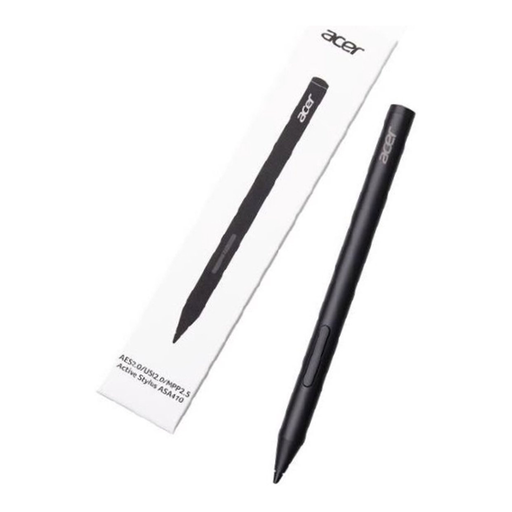
An option if your device supports one of the specified pen protocols and you’re looking for pressure-sensitive input.
The product name lists AES 2.0, USI 2.0 and MPP2.5. Compatibility is limited to devices that support one of these protocols; the AAAA battery is not included.
 No image available
An option if you have a supported iPad and want magnetic pairing and charging.
The listed compatible models include specific iPad Pro, iPad Air and iPad mini models. Apple also describes a double-tap feature for this generation that lets you switch tools.
First, find your exact tablet model and compare it with the pen manufacturer’s compatibility information. For STAEDTLER Noris digital, your screen version must also have an EMR digitiser.
Not necessarily. Apple says you can connect this pen to a compatible iPad with a USB-C cable and charge it via the iPad. The pen does need a cable and power from the tablet; attaching it magnetically won’t charge it.
Check the nib if it’s damaged or drawing becomes less reliable, and use a replacement that’s compatible with your pen. Apple sells replacement nibs for the Pencil generations listed; Samsung says replacement nibs are included with the S Pen Creator Edition.
When you buy remotely from a business, you generally have a 14-day cooling-off period; legal exceptions and the type of seller may affect this. You’re also entitled to a product that meets reasonable standards. The Dutch government says there is no fixed statutory warranty period in the Netherlands; if a product is faulty, contact the seller.