
Vandaag of morgen in huis

Kwaliteit gegarandeerd

Welkomstaanbiedingen ontgrendelen: GRATIS bezorging | Tot 80% korting | Gratis 30 dagen JoyPlus-proefperiode
Download de app
Wireless earbuds are great for music, podcasts, audiobooks and hands-free calls. Yet the choice often seems simpler than it really is. A long battery life, for example, can refer to the combined total of the earbuds and charging case, while a high IP rating doesn’t automatically mean you can swim with them.
With this practical buying guide, you can compare Bluetooth earbuds, True Wireless models, sports earbuds and open-ear designs on the features that actually make a difference in everyday use.
A box might boast a long total playtime, but always check:
The Soundcore Liberty 4 Pro, for instance, claims up to 10 hours of continuous playback. The OnePlus Buds Pro 3 lists different figures for use with and without active noise cancellation. The difference matters if you use your earbuds daily on long train journeys or in the office.
Pay attention to the exact IP rating. IPX4 offers protection against splashes, while IPX5 protects against water jets from various directions. IP68 is a higher rating, but the manufacturer’s specific conditions still apply.
So don’t automatically use water-resistant earbuds for swimming. Sweat and rain are not the same as prolonged submersion. Also check whether the charging case itself is protected; often the IP rating only applies to the earbuds.
Active noise cancellation, also known as ANC, can be particularly pleasant for constant low-frequency noise, such as train or aeroplane rumble. It’s no guarantee that all voices, bicycle bells or sudden sounds will disappear.
Claims like “blocks 99.7% of ambient noise” or “up to -50 dB” come from product marketing. According to the brand’s own research or measurements, results can vary depending on fit, environment and volume. So don’t choose ANC based on a number alone.
Good sound starts with a good fit. With in-ear TWS earbuds, silicone ear tips partially seal the ear canal. This can help with bass response and passive noise isolation, but not everyone finds it comfortable.
Look out for:
Open-ear earbuds and bone conduction headphones leave the ear canal free. This can be handy when running or walking in busy traffic, as you remain more aware of ambient sound. On the flip side, people around you may hear your music more clearly, and low tones can sound different.
Bluetooth 5.3 or 5.4 doesn’t on its own guarantee a stable connection in every situation. Also consider:
Multipoint is practical when you want to stay connected to both a laptop and a smartphone at the same time. Not every model supports this, and some features only work with certain phones or apps.
For calls, the number of microphones, their placement and software-based noise reduction all matter. A product with multiple microphones can try to reduce background noise, but actual clarity also depends on wind, traffic and the position of the earbuds.
Earbuds with a microphone are suitable for phone calls and online meetings, but check that the controls for answering and ending calls are clear.
For daily use, a combination of at least a few hours of playtime per charge and a charging case is often more practical than just a high total figure. A USB-C connection is now widely compatible. A quick-charge feature can be useful when you’re short on time while out and about.
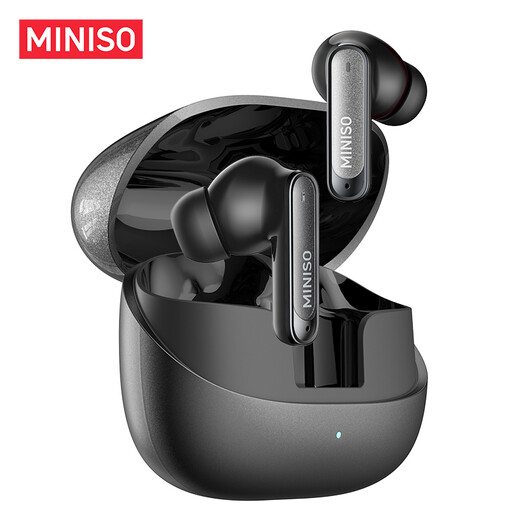
Why this fits the profile: This TWS model combines a compact design with touch controls, a built-in microphone and a stated total battery life of up to 55 hours including the case. It’s aimed at daily use, study and commuting.
The product information lists both battery life and an IPX5 rating. Just make sure the case stays dry, and treat the ANC and noise reduction figures as brand claims.
10mm dynamic driver, IPX5 and a stated quick-charge feature of 10 minutes for up to 3 hours of playback.
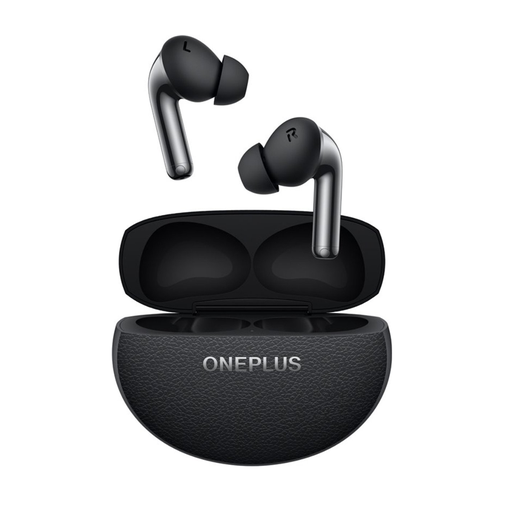
Why this fits the profile: This in-ear model is designed for music, calls and daily use, and supports Bluetooth 5.4, multipoint and multiple codecs.
The battery data distinguishes between use with and without noise cancelling. That gives a more useful picture than just a total case capacity.
Active noise cancellation, three microphones with VPU, Bluetooth 5.4 and IP55 against dust and splashes.
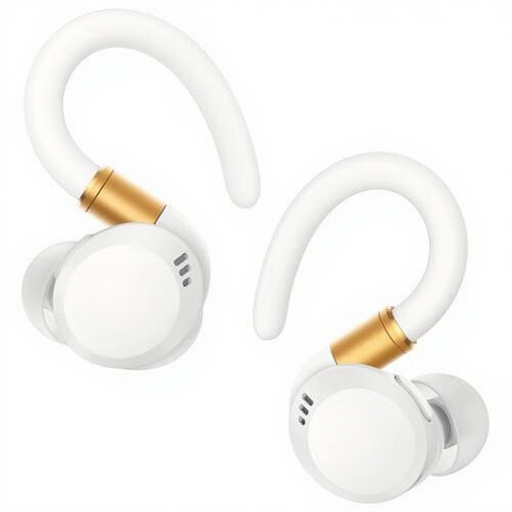
Why this fits the profile: The in-ear fit and IP68 rating suit athletes looking for a robust model for workouts and daily use.
The water and sweat resistance is specified as IP68. Always check the manual before heavy wet use and keep the charging case dry.
Up to 12 hours of continuous playback, USB-C charging and buttons for playback and volume.
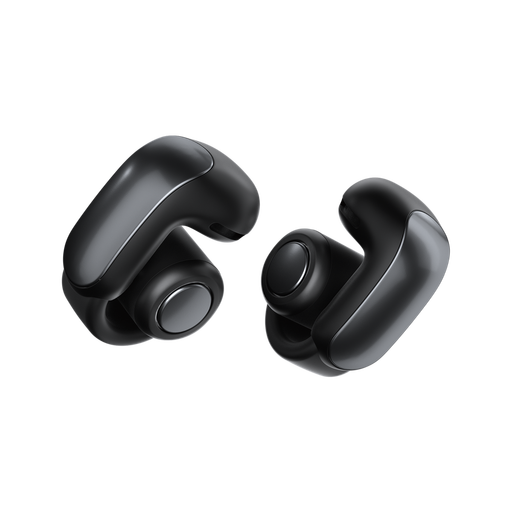
Why this fits the profile: The open-ear design keeps your ears free, making this model suitable for walking, running and situations where awareness of your surroundings matters.
The open design prevents you from being completely cut off from your surroundings. The IPX4 rating is suitable for splashes, but not for submersion.
Bluetooth 5.3, up to 7 hours of playtime and an open construction for greater awareness of ambient sound.
We’ve put together a full, up-to-date list of products that fully meet these strict selection criteria and comply with current European safety regulations.
Open your phone’s Bluetooth settings, charge the earbuds and take them out of the case. Activate pairing mode as per the manual and select the product name from the list. If they’ve been connected before, the earbuds may pair automatically. If not, delete the old Bluetooth registration and try again.
The lifespan depends on charging cycles, storage, moisture and daily volume. Battery capacity decreases over time. Store the earbuds in their case, don’t charge them in a damp environment and clean the contact points gently. Avoid using high volumes for long periods and take regular breaks.
Many models have a microphone, but call quality varies in wind and traffic. When cycling, you need to stay aware of your surroundings and follow the relevant traffic rules. Open-ear models can make ambient sound more audible, but they don’t replace attentiveness. Ride safely and keep the volume low enough to still hear important sounds.
