
Vandaag of morgen in huis

Kwaliteit gegarandeerd

Welkomstaanbiedingen ontgrendelen: GRATIS bezorging | Tot 80% korting | Gratis 30 dagen JoyPlus-proefperiode
Download de app
Wireless earbuds are great for music, calls, travel and exercise. But a long list of features doesn't automatically mean a model will suit your daily use. The key differences often come down to fit, battery measurements and compatibility.
A manufacturer might, for example, quote a total playback time including the charging case, while the actual usage time per earbud is much lower. Active noise cancellation also affects the battery. So always compare:
A model with a longer total battery life isn't automatically more practical if the earbuds run out quickly between charges or the case is bulky.
Earbuds with noise cancellation use microphones and software to reduce ambient noise. How well they work varies depending on your environment and fit. Low, constant sounds like train engines may feel different to voices or sudden noises.
Also check for a transparency mode. This lets ambient sound in when you're walking down the street, for example. Don't use ANC if you need to hear traffic or other warning signals clearly.
Wireless in-ear earbuds that don't seal properly can be less comfortable and let in more ambient noise. As a result, users sometimes turn up the volume. Check whether multiple sizes of ear tips are included and whether the shape is suitable for long-term wear.
For exercise, a suitable water resistance rating is also important. IP54 offers protection against dust and splashes according to the stated product classification. IPX5 means the product is resistant to water jets according to that classification, but this doesn't automatically make the charging case waterproof.
With Bluetooth earbuds, a recent Bluetooth version is useful for compatibility and efficiency, but the actual connection also depends on your phone, laptop and surroundings. Check whether the model works with Android, iOS or both.
A multipoint function can be handy if you want to switch between a smartphone and laptop. For gaming, a low-latency mode is relevant. Bear in mind that low latency isn't the same as better sound quality for music.
Earbuds with a microphone often use multiple microphones for voice capture and noise reduction during conversations. Look at the number of microphones and the manufacturer's description, but treat terms like "crystal-clear calls" as a product claim. Based on a brand's own research or internal measurements, performance may differ in your specific environment.
A USB-C connection is practical because the same cable is often used for your phone, tablet or laptop. Some models also support wireless charging. Compare the following data:
If you mainly listen at home or in the office, you might also consider wireless over-ear headphones. Over-ear models often have larger ear cups and a bigger battery, but they're less compact than true wireless earbuds.
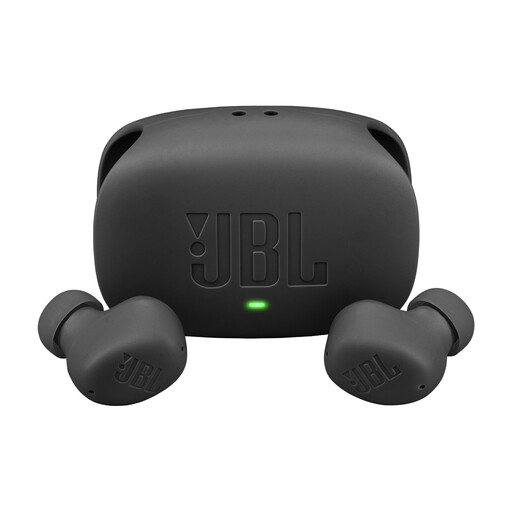
Why this fits the profile: Suitable for daily listening, calls and commuting thanks to ANC, multipoint and a charging case.
The product information separately lists the earbuds' playback time and the total duration with the case. The IP54 rating provides a concrete starting point for outdoor use.
Up to 8 hours of playback according to the specs, up to 40 hours with the case without ANC, USB-C, microphones and connection to two devices.
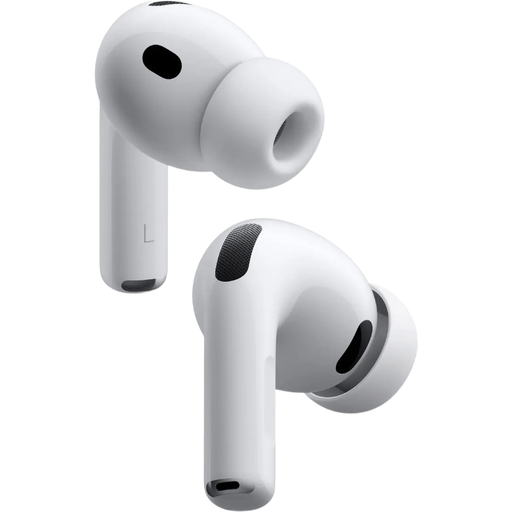
Why this fits the profile: A logical choice for users who use Apple devices and value features like ANC, spatial audio and multiple fit options.
Five sizes of silicone ear tips are listed. This helps you check the fit rather than relying solely on marketing terms around comfort.
Active noise cancellation, microphone, USB-C and, according to the product information, up to 8 hours of battery life with ANC.
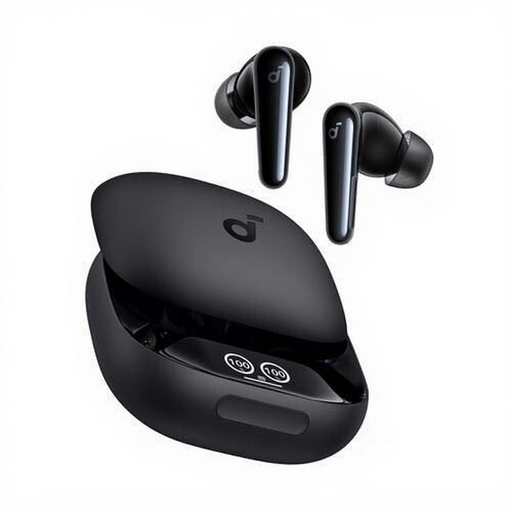
Why this fits the profile: Aimed at users who combine calls, exercise and music listening, and value on-earbud controls.
The IPX5 rating and included extra ear tips provide checkpoints for active use and fit. The charging case protects the earbuds during storage.
According to the product specifications, six microphones, dynamic drivers, touch controls, USB-C and up to 10 hours of playback.
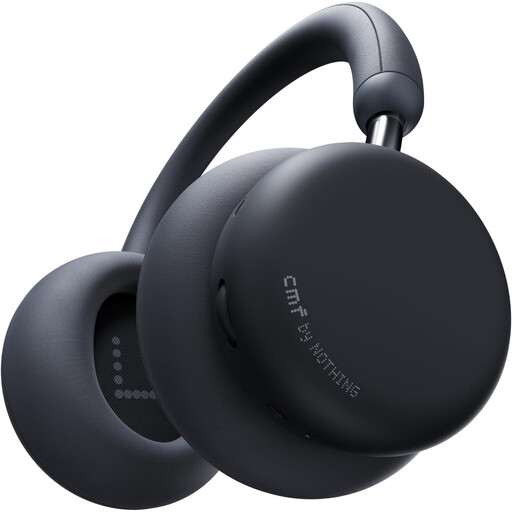
Why this fits the profile: An over-ear alternative for long listening sessions, train travel and work where a large battery matters more than a compact size.
The manufacturer separately lists battery life with and without ANC. This lets you compare the claim against your own usage scenario.
40mm drivers, LDAC and wired listening according to the product information, up to 48 hours with ANC and a fast-charge function.
We've put together a full, up-to-date list of products that fully meet these strict selection criteria and comply with current European safety regulations.
Turn on Bluetooth, open the charging case and activate pairing mode as per the instructions. Then select the name of the earbuds from the Bluetooth list. With Apple and Samsung products, extra features may be available within their own ecosystem. Check with Android or iOS which app is needed for the equaliser, firmware updates and controls.
The usage time per charge varies by model and settings. ANC, volume, codec and phone calls all affect the battery. The built-in battery is usually not designed to be replaced by the user. So store the earbuds in the case, avoid extreme heat and use a suitable USB-C charger.
That depends on the fit and IP rating. Sports earbuds with a stated splash or sweat resistance are more practical for light rain or training, but check whether that rating also applies to the charging case. Don't wear earbuds during activities where you need to hear traffic or warnings.
