
Vandaag of morgen in huis

Kwaliteit gegarandeerd

Welkomstaanbiedingen ontgrendelen: GRATIS bezorging | Tot 80% korting | Gratis 30 dagen JoyPlus-proefperiode
Download de app
A mechanical keyboard can be a pleasure to use for gaming, programming and long typing sessions. However, it’s easy to overspend on features you barely use. A flashy RGB keyboard, a wireless connection or an impressive number of switches doesn’t necessarily tell you much about everyday performance.
Instead, focus on the layout, connectivity options and how customisable the keyboard is. Below, we’ll walk you through common pitfalls and which models suit different use cases.
A 60% keyboard saves desk space, but it usually lacks dedicated arrow keys, a function row and navigation keys. Those functions are often accessible via an Fn combination. That can work well for gaming, but it’s less practical for spreadsheets, programming or editing text.
A 75% keyboard typically keeps the arrow keys and some navigation keys. An 80% or tenkeyless layout often includes a full function row. Also check whether you need a numeric keypad. If you enter a lot of numbers, you’re better off looking at a full-size model.
RGB lighting is primarily a visual feature. Before you buy, check whether the lighting is customisable per key, whether software is required, and whether the lighting can be turned off. Some models only offer preset effects.
For gaming, features like N-key rollover, a suitable polling rate and reliable software matter more. An RGB keyboard isn’t automatically a gaming keyboard with all the features you need.
“Wireless” can mean Bluetooth, 2.4 GHz or both. Bluetooth is handy for laptops, tablets and phones. For gaming, many users prefer 2.4 GHz via a dongle or a cable. A tri-mode keyboard usually combines wired use with Bluetooth and 2.4 GHz, but always check which modes are actually listed.
Also pay attention to battery capacity, charging method and where the dongle is stored. A wireless mechanical keyboard with lots of lighting may need charging more often than a model without a backlight.
Mechanical switches determine how a key responds. Linear switches typically have a smooth keystroke. Tactile switches give a noticeable bump, and clicky switches tend to be louder. The choice depends on your preference and work environment.
A hot-swappable keyboard lets you replace compatible switches without soldering. Check whether the PCB supports 3-pin, 5-pin or both types of switches. Also look at the included switch puller and instructions. Pull switches straight up and don’t use excessive force.
Check whether the model has a QWERTY US keyboard or a Dutch layout. On a US layout, the Enter, Shift and punctuation keys are positioned differently from what many Dutch users are used to. Changing the language setting in Windows or macOS won’t alter the physical keycaps.
Also consider the keyboard’s width and depth. A compact model can free up space for your mouse, but some functions require Fn combinations. A rotary knob for volume or media controls can be practical for office work, streaming and video editing.
A programmable keyboard can store functions, macros, lighting and sometimes profiles. Check whether the software works only on Windows if you use macOS or Linux. For intensive gaming, Hall Effect switches can be interesting. This technology measures the position of a magnetic switch. Features like adjustable actuation and Rapid Trigger are mentioned in product listings, but how they work in practice depends on the software and settings.
According to product listings, some Hall Effect models offer adjustable actuation from 0.01 mm and a polling rate of 8K. Treat these as technical specifications, not a guarantee of better in-game results.
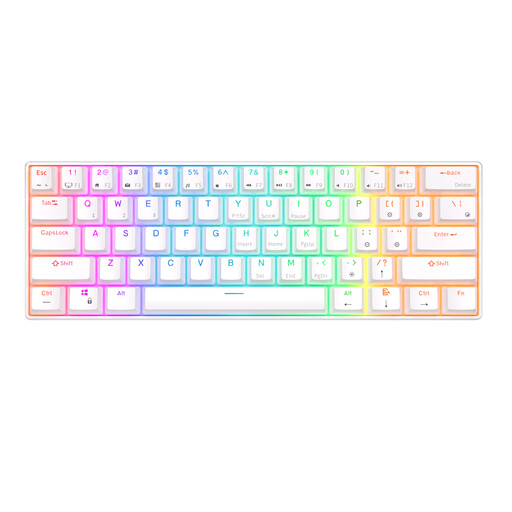
Why it fits this profile: The 61-key layout takes up minimal desk space and supports Bluetooth, Windows, iOS and Android. That suits a small gaming or home office setup.
The product listing mentions three Bluetooth devices, a detachable USB cable and hot-swappable switches. Just check whether the 60% layout works for your daily tasks.
61 keys, Bluetooth, USB connection, RGB lighting and a stated battery capacity of 1450 mAh.

Why it fits this profile: The 80% layout offers more keys than a 60% model, while tri-mode connectivity gives you the flexibility of wired and wireless use.
The product listing specifies QWERTY US, hot-swap, PBT keycaps and three connection modes. Check beforehand whether the US layout and desired software work with your devices.
Gasket mount, programmable rotary knob, PBT keycaps, hot-swap switches and a stated battery capacity of 4000 mAh.
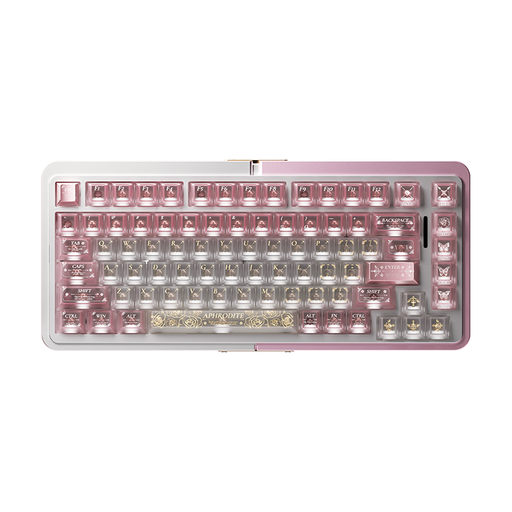
Why it fits this profile: According to the product listing, this wired model focuses on Hall Effect switches, Rapid Trigger and esports use. The 75% layout keeps the arrow keys available.
The product specifications mention Hall Effect, hot-swap and a wired mode. That makes the features more concrete than a general claim about gaming performance.
75% size, aluminium case as per the product name, TTC magnetic switches and Rapid Trigger mentioned in the product listing.
We’ve put together a full, up-to-date list of products that fully meet these strict selection criteria and comply with current European safety regulations.
The lifespan depends on switch type, usage, maintenance and build quality. Manufacturers may state a certain number of keystrokes, but that’s not a guarantee for the entire keyboard. Dust, liquid, cable damage and worn keycaps can cause problems sooner. Keep the keyboard dry and clean it gently with a soft, dry cloth.
Yes, but pay attention to noise levels and switch choice. Linear or silent switches can be more suitable for a shared workspace than clicky switches. A 75% or 80% model often offers a practical balance between desk space and available keys. With a QWERTY US keyboard, do check whether the layout matches your daily use.
The main recurring task is charging the battery. Actual battery life depends on factors like RGB lighting, connection mode and battery capacity. If you don’t want to plan charging sessions, you can use a model with a USB cable or keep a tri-mode keyboard connected while working. Also factor in any software you might need for settings and macros.
