For choir recordings, a compact stereo pair is a sensible choice if you can make space for two similar positions on either side of where you listen. Genelec points out that similar reflections on both sides help create an accurate stereo image. Choose an active pair if you don’t want a separate amplifier, a passive pair if you already have suitable amplification, or a single wireless speaker if simplicity and saving space are more important. Also check that the connections are compatible with your music source and find out what additional components you’ll need.
Which setup is right for you?
Attentive choir listener
You want to follow individual voices and choir sections in space, and may be able to place two speakers near your listening position. The room and similar placement on the left and right are part of the equation; Genelec explains why similar reflections from both speakers matter.
Listener with limited space
You need to fit speakers on a shelf or mount them on the wall, and want the setup to work in a small living room. DALI says the passive KUPID can be placed on a shelf or mounted on the wall using the supplied bracket.
Listener with an existing music source
You want to connect a phone, computer or CD player, for example. Check the output on your source and the input on the exact speaker model: KEF lists USB-C and HDMI ARC among the connections on the LSX II LT, while Sonos describes a separate adapter for connecting an external audio source to the Era 100.
What should you consider when choosing?
With a stereo pair, it’s not just about whether the speakers physically fit: check that you can place them in similar positions on the left and right of where you listen. Genelec explains why similar reflections from both speakers matter.
| What to consider |
What should you check? |
Who should pay particular attention? |
| Spatial placement of voices |
Check whether you can position two speakers on the left and right of your listening spot at a similar height and distance. |
If I want to follow voices and choir sections on the left and right, I first check whether a symmetrical setup will work in my room. Around 36% of consumers give spatial placement their highest priority. |
| Placement in a small room |
Measure the available shelf or wall space and assess the setup from your usual seat. |
If floor stands won’t fit, I want to know where the speakers can be safely placed or mounted, and how the room affects the setup. Around 29% of consumers put available space first. |
| Connection to your music source |
Note the output on your source and check which input, cable and any setup are needed for the exact model. |
If I want to listen from my phone, computer or CD player, I check that the connection works directly before buying. Around 21% of consumers make source compatibility their main buying criterion. |
| Complete setup |
Include the number of speakers you need, any amplification, cables, mounting hardware and adapters in your comparison. |
If I need a complete stereo setup, I don’t compare a single speaker with a pair without checking; I also look at which components I still need. Around 14% of consumers prioritise the total purchase cost. |
Common buying mistakes
-
Comparing one speaker with a stereo pair
A single Sonos Era 100 is not the same as a pair; Sonos says that two Era 100 speakers can be used together to create a wider soundstage.
Compare setups with the same number of speakers and check whether two units can work as a stereo pair.
A setup with two separate speakers may require a second unit.
-
Treating a passive speaker as a complete playback system
The DALI KUPID is passive, so it needs suitable amplification.
Check what equipment you already have before comparing a passive pair with an active pair.
If you don’t already have the necessary components, your setup may also need an amplifier, a connection to your source and speaker cables.
-
Assuming USB-C is always an audio input
The function of a connection depends on the exact speaker model. For an external audio source on the Era 100, Sonos describes a separate Line-In Adapter.
Check what the port does and compare it with the output on your music source before choosing cables or adapters.
Connecting an external analogue source to an Era 100 may require a separate adapter and audio cable.
-
Overlooking the room and speaker placement
According to Genelec, the surroundings and speaker placement affect what you hear from your listening position.
Check whether you can create a suitable left-right setup and assess it from your usual seat.
Brands to consider
Argon Audio
Argon Audio describes the FENRIS A4 as a compact active stereo pair for anyone looking to use connections such as Bluetooth or HDMI ARC.
- Argon Audio lists Bluetooth 5.0, HDMI ARC and a phono input; compare these connections with your own source.
- Manufacturer claims about sound quality are not the same as an independent listening test.
KEF
KEF describes the LSX II LT as a compact active stereo system with streaming and wired connectivity options.
- KEF lists AirPlay 2, Google Cast, Bluetooth, USB-C and HDMI ARC.
- KEF specifies a C-Link cable between the speakers; check that it works with your intended placement. Descriptions of the sound are manufacturer claims.
Sonos
The Era 100 is worth considering if you’re looking for Wi-Fi playback and app control. Sonos says that two units can be used together to create a wider soundstage.
- Sonos lists Wi-Fi, Bluetooth and a USB-C line-in connection for the Era 100.
- According to Sonos, Wi-Fi and the app are needed for the initial setup; connecting an external analogue source requires a separate adapter.
DALI
DALI describes the KUPID as a compact passive speaker for anyone who already has an amplifier or wants to choose one separately.
- DALI says it can be placed on a shelf or mounted on a wall using the supplied bracket.
- As the KUPID is passive, the setup needs suitable amplification; DALI’s descriptions of the sound are manufacturer claims.
Edifier
Edifier Netherlands describes the R1280DB as an active pair with Bluetooth and several wired inputs.
- Edifier Netherlands lists RCA/AUX, optical, coaxial and Bluetooth, plus a cable between the speakers.
- Check the specifications for the R1280DB itself; specifications for the R1280DBs are not automatically the same.
Joybuy products
This selection includes passive and active speaker pairs, a compact 2.0 set and a single portable Bluetooth speaker.
 No image available
HiVi-Swans DIY3.1 passive bookshelf speakers, 6.5-inch, one pair
A passive pair to consider if you have two speaker positions and suitable amplification.
The product title specifies one pair of passive bookshelf speakers measuring 6.5 inches.
View at Joybuy
 No image available
HiVi-Swans D3.1MKII passive bookshelf speakers, 6.5-inch, one pair
This passive pair suits a stereo setup if you already have the necessary amplification or plan to choose it separately.
The product title specifies one pair of passive bookshelf speakers measuring 6.5 inches.
A separate amplifier is required.
View at Joybuy
 No image available
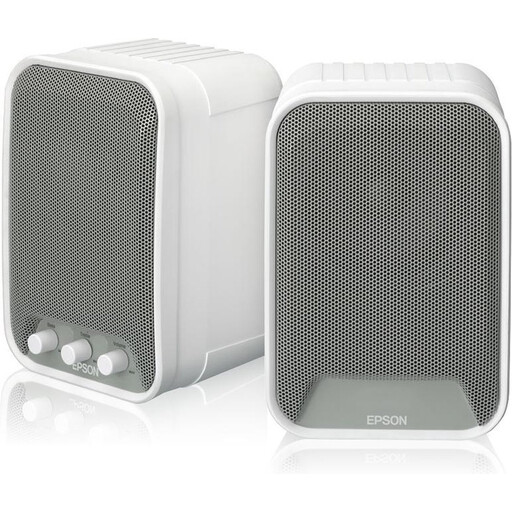
Epson ELPSP02 active speakers, 2 x 15W
An active speaker pair to consider if you want two speakers without adding a separate amplifier.
The product title specifies active speakers with a power output of 2 x 15W.
View at Joybuy
 No image available
Edifier G1500 computer speakers, Bluetooth 5.3, USB and 3,5mm AUX
This set is worth considering if you’re looking for a compact 2.0 setup and one of the listed connections suits your source.
The product title specifies Bluetooth 5.3, USB and a 3,5mm AUX connection.
View at Joybuy
 No image available
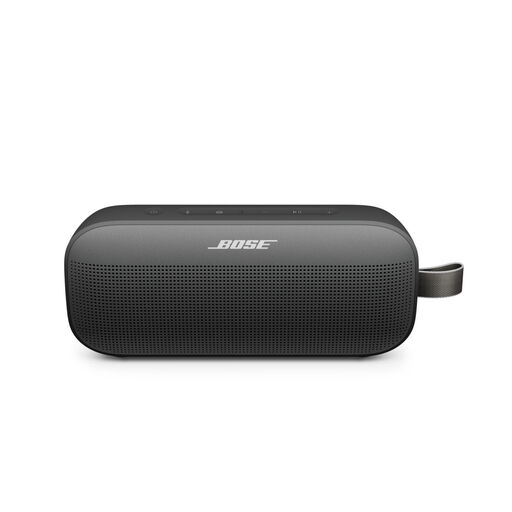
Bose SoundLink Flex, 2nd Gen, Black
A single portable Bluetooth speaker to consider if one speaker is a better fit for the space available.
The product title specifies a portable SoundLink Flex 2nd Gen speaker in Black. It is not supplied as a pair.
View at Joybuy
Frequently asked questions
Do I always need to buy two speakers for choir recordings?
No. A single speaker can be practical if simplicity and available space are your priorities. A stereo pair needs two suitable positions on the left and right; check whether that setup works in your room and how it sounds from where you listen.
Can I use a Sonos Era 100 directly over Bluetooth without Wi-Fi?
No. According to Sonos, you must first set up an Era 100 on Wi-Fi using the Sonos app. You can then switch to Bluetooth.
How do I connect a CD player to a Sonos Era 100?
Sonos describes connecting it with a separate Line-In Adapter and a suitable cable. Check which audio output your CD player has before choosing the adapter and cable.
Do I have a cooling-off period when buying online in the Netherlands?
For eligible distance purchases from a business, the Netherlands Authority for Consumers and Markets says you usually have a 14-day cooling-off period. Check the terms of your specific purchase; any more generous returns policy is not the same as this statutory cooling-off period.
What guarantee applies to a speaker I buy in the Netherlands?
According to the Netherlands Authority for Consumers and Markets, you’re entitled to a product that works as it should, and you should contact the seller if there’s a fault. The Netherlands has no fixed statutory guarantee period that applies to all products; a manufacturer’s guarantee is additional.


