
Mixer who wants to see the whole choir timeline
You want to view recordings, edits and windows side by side. A wide screen could suit you, provided there’s enough room on your desk; Samsung points out that larger screens take up more space.


If you mainly want to see the timeline and several windows side by side while mixing, an ultrawide screen may suit your workflow. If vertical workspace and fitting the monitor on a less wide desk matter more, 4K is an alternative. LG and Philips list a resolution of 3440 × 1440 pixels for the ultrawide models mentioned; Dell lists 3840 × 2160 pixels for the P2725QE. Check readability using your own scaling settings: a different screen won’t fix stuttering caused by storage that can’t read or write large audio files quickly enough (Ableton).
You want to view recordings, edits and windows side by side. A wide screen could suit you, provided there’s enough room on your desk; Samsung points out that larger screens take up more space.
You switch between an overview of the tracks and detailed editing. Pay attention to scaling and track height; Logic Pro, for example, offers zoom settings for tracks and the track area.
You want to position the screen comfortably and check that video, peripherals and, if needed, laptop charging work through the connections. Check the capabilities of both your computer and the screen you choose.
A good fit if: you want to see your timeline and several windows side by side, and your desk is wide enough.
Trade-off: the vertical resolution is 1440 pixels; readable workspace also depends on scaling and track height. LG and Philips list this resolution for the models mentioned.
A good fit if: you want more vertical pixel space without a 34-inch ultrawide screen. Dell lists this resolution for the P2725QE.
Trade-off: a higher resolution doesn’t guarantee that you’ll see more readable controls without adjusting your settings; check how text and meters look at your preferred scaling level.
| What to consider | What to look for | Especially useful if |
|---|---|---|
| Timeline and windows | Compare the aspect ratio, screen width and available desk space. LG lists the 34WQ75C-B as 816,7 mm wide including the stand. | If I want to keep the timeline and extra windows side by side while mixing, I first check the available width; around 33% of consumers prioritise seeing the timeline at a glance. |
| Readable tracks and controls | Assess a session at a readable scale for you, and compare both the overall view and detailed editing. Logic Pro lets you adjust track zoom. | If I want to see lots of tracks without making text or meters too small, I test the scaling and track height; around 27% of consumers prioritise readable track space. |
| Workspace and positioning | Measure the space and check adjustability, viewing position and reflections. LG lists height and tilt adjustment for the 34WQ75C-B. | If I spend long sessions editing at a fixed workstation, I want to position the screen comfortably; around 20% of consumers prioritise workstation setup. |
| Connections and large files | Check video over USB-C, the required charging power and connections for peripherals on both devices. Assess storage performance separately from the monitor; Ableton links disk overload when using several large audio files to insufficient read or write speeds. | If I want to connect my laptop and peripherals to the screen, I check compatibility first; around 20% of consumers prioritise connectivity. |
Text and symbols can look too small at certain scaling settings. Track height in your audio software also affects how much information you can see at once.
Open a representative session, set a readable scaling level and compare the overview with detailed editing before you decide.
A large screen can take up more desk space than you have available. Remember to include the stand in your measurements.
Measure the available width and viewing space, and check the dimensions and adjustment options of the exact model.
A monitor’s maximum charging power doesn’t tell you whether your computer supports video through that connection or how much power your laptop needs.
Check your laptop’s video output and charging requirements, the monitor’s connections and the requirements of your audio equipment.
A monitor doesn’t change your storage’s read or write speeds. Ableton explains that using several large audio files can cause problems if storage can’t read or write them quickly enough.
Investigate your storage and audio project separately from your choice of screen space.
According to LG Netherlands, the 34WQ75C-B is a 34-inch ultrawide option with a USB-C hub.
According to Dell, the P2725QE offers a 27-inch 4K option with a USB-C hub.
According to Philips, the 346E2CUAE/00 is a 34-inch ultrawide model with USB-C and an ergonomic stand.
This Joybuy selection includes ultrawide and 4K monitors for anyone who wants to see more of the timeline, more windows or more vertical workspace while mixing.
 Image unavailable
A good fit if you’re looking for an ultrawide screen to view the timeline and windows side by side.
34 inch; WQHD; VA panel; 1800R curvature; 120 Hz.
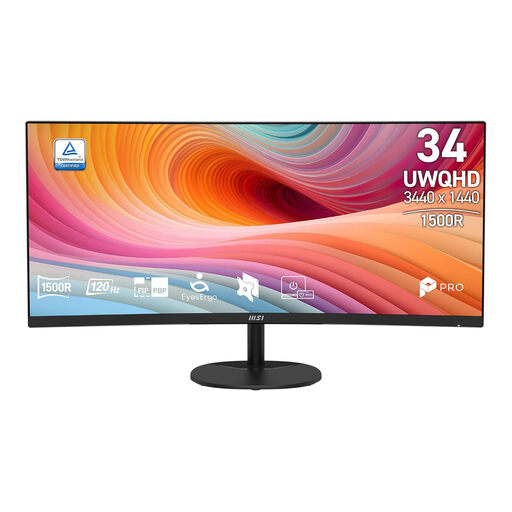 Image unavailable
A good fit if you’re looking for a wide workspace for the timeline and several windows.
34 inch; UWQHD; VA panel; 120 Hz; 1500R curvature.
 Image unavailable
A good fit if you’re looking for a 27-inch 4K screen as an alternative to an ultrawide layout.
27 inch; 4K; IPS panel; 60 Hz; 5 ms.
 Image unavailable
A good fit if you’re looking for a very large workspace to view the timeline and windows side by side.
44,5 inch; 3440 × 1440 pixels; OLED panel.
 Image unavailable
A good fit if you’re looking for a 32-inch 4K screen with more vertical pixel space than an ultrawide 3440 × 1440 layout.
32 inch; VA panel; 3000R curvature; 3840 × 2160 pixels; HDR10.
No. A monitor doesn’t change the read or write speed of your audio drive. Ableton explains that using several large audio files at the same time can lead to disk overload if storage can’t read or write them quickly enough.
Open a representative session and first set a readable screen scaling level. Then assess both the overall view and a zoomed-in track. Logic Pro supports separate track zoom and track area zoom; the result depends on your software and settings.
Position it so that text and meters are easy to read, and avoid distracting reflections. Arboportaal identifies readability, reflections and ambient light as points to consider when working with screens; requirements for employers and employees do not automatically apply as a legal obligation to someone mixing at home as a hobby.
According to ACM ConsuWijzer, for a standard online consumer purchase you generally have a statutory cooling-off period of up to 14 days after delivery, subject to exceptions. Your statutory guarantee is separate from any manufacturer’s or extended warranty: if a product doesn’t do what you could reasonably expect, the seller is responsible for providing an appropriate solution.