Who is this buying guide for?

Parents who want to keep the volume low

You want songs to be clearly audible without them suddenly playing too loudly. Compare the volume controls on the audio source and speaker; if your child will be operating it, check whether you can set a maximum volume. Tonies and Yoto explain how to set volume limits on their players.

Families with an independent listener

Your child wants to start songs independently using a figure or card. Check the age recommendation, the language of the content and what’s needed for the initial set-up. Tonies explains how to play Tonies, while Yoto uses physical cards.

Parents with existing playlists

You already have the children’s songs you want on a phone or another audio source and are mainly looking for a straightforward speaker. In that case, you may not need a separate card or figure-based system.

What should you look for when buying?

Standard Bluetooth speaker

A good fit if: you manage the playlist from a phone or tablet and your child doesn’t need to choose songs independently. JBL describes Bluetooth playback for the Go Essential 2.

Keep in mind: you’ll need a paired audio source; JBL’s product specifications don’t confirm a parent-settable volume limit.

Children’s audio player with physical content

A good fit if: your child needs to be able to start songs independently. Toniebox 2 works with Tonies; Yoto Mini (2024 Edition) uses cards. Both brands explain how to set volume limits.

Keep in mind: check the age recommendation, language and individual content. Tonies says Wi-Fi is needed for set-up and for playing a Tonie for the first time; Yoto warns that children under three should only use the Mini under supervision.

Smart speaker with voice control

A good fit if: you want to use voice control and operate the speaker through an app. Google describes volume control by voice, touch and through the Home app.

Keep in mind: check that your preferred music and family features are available in the Netherlands. Google says some parental voice assistant features are only available in the US and in English.

What to consider What should you check? Who is this important for?
Adjusting the volume Check the volume controls on the speaker and audio source. Listen at the intended spot to find the lowest usable setting; a set limit is not a measurement of sound level. If I want to prevent songs from suddenly playing too loudly, I check the controls on both devices. Around 36% of consumers prioritise volume control above all else.
Independent operation Compare how your child can control playback and volume. Check the age recommendation for both the player and any separate content. If my child needs to be able to start a song independently, I look at the controls as well as the age warnings. Around 29% of consumers prioritise independent operation.
Songs you want Check the language and track list for the chosen card or Tonie. See what content is included and what you may need to buy separately. If I’m looking for particular Dutch-language songs, I want to find out first whether that specific content is available. Around 21% of consumers prioritise their preferred songs above all else.
Easy to take with you Check whether you can connect your existing audio source via Bluetooth and whether the stated battery life suits your needs. JBL lists up to five hours of playback for the Go Essential 2. If I want to use my existing playlist in different places, I look for a simple portable option. Around 14% of consumers prioritise portable playback above all else.

Common pitfalls

  • Mistaking a volume percentage for a safe sound level

    A volume limit or percentage is a device setting, not a measurement of the sound level where your child is listening. Distance, the audio source and the content being played also make a difference. VeiligheidNL warns that loud sound can damage your hearing.

    Set both the source and the player to a low level, then check the sound with the songs you want to play at the spot where your child will be listening. Don’t treat a percentage as a decibel reading.

  • Choosing a children’s speaker without checking for the songs you want

    A player doesn’t automatically include the Dutch-language songs you’re looking for. Available content depends on the Tonie or card you choose.

    Before buying, check the language, track list and included content. If you’re using your own audio, also check what options are available with your chosen system.

  • Choosing a card player for independent use by a child under three

    For the Mini (2024 Edition), Yoto warns about small parts and recommends supervision for children under three. Age recommendations can vary between products.

    Read the warnings for both the player and any separate content, and follow the instructions on the packaging.

Brands to consider

tonies

Toniebox 2 is designed for children who want to start songs and stories using physical Tonies.

  • Tonies lists a volume limit and sleep timer; the manufacturer says Toniebox 2 is suitable from one year old.
  • Wi-Fi is needed for set-up and for playing content for the first time. Check the language and content of each Tonie you’re interested in.

Yoto

Yoto Mini (2024 Edition) uses cards and can also play audio via Bluetooth.

  • Yoto explains how to set a volume limit through the app and create customisable cards for your own audio.
  • Yoto warns that the Mini isn’t suitable as a toy for independent use by children under 36 months and recommends supervision for children under three. Also check the language and content of the cards.

JBL

The Go Essential 2 is a Bluetooth option if a parent chooses songs from a phone or tablet.

  • JBL lists Bluetooth and up to five hours of playback for this model.
  • The product specifications provided don’t confirm a parent-settable volume limit or a measured sound level at the lowest setting.

Sony

The SRS-XB100 is a compact Bluetooth option for anyone who wants to manage the audio source themselves.

  • Sony describes this model as having Bluetooth and a carrying strap.
  • These features don’t confirm a child-specific volume limit or that the speaker is suitable for independent use by a child.

Google

Nest speakers are an option for families specifically looking for voice control and operation through the Home app.

  • Google describes volume control by voice, touch and through the Home app.
  • Google says some parental voice assistant features are only available in the US and in English. Don’t assume these features are available in a Dutch household.

Joybuy products

This selection includes portable Bluetooth speakers and portable music players with a speaker function. Check how your preferred songs sound at a low setting where your child will be listening, and whether the player you choose suits the person who’ll be controlling the music.

Tribit XSound Go portable Bluetooth speaker, BTS58, black, 2026 Version

Tribit XSound Go portable Bluetooth speaker, BTS58, black, 2026 Version

An option if you want to play songs from a connected audio source and move the speaker around.

The product name lists Bluetooth and the BTS58 version in black.

Check how the lowest usable setting sounds where your child will be listening.

View at Joybuy
Tribit StormBox Mini Plus portable Bluetooth speaker, BTS33, green

Tribit StormBox Mini Plus, BTS33, green

A portable Bluetooth speaker for playing music from a connected device.

The product name lists Bluetooth 5.4 and the green finish.

Check how the lowest usable setting sounds where your child will be listening.

View at Joybuy
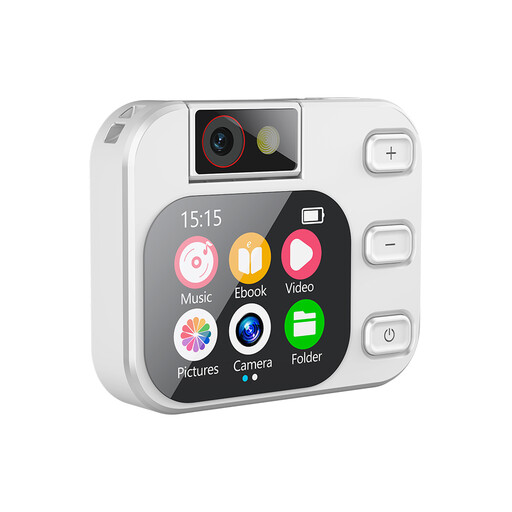
NAXSIR MP3 player for children with touchscreen and 180° rotating camera

NAXSIR MP3 player for children with touchscreen and 180° rotating camera

A portable music player to consider if your child needs to be able to play audio from their own device.

The product name lists a touchscreen, a 180° rotating camera and Bluetooth.

Check the age recommendation and how to control the volume before letting a child use the device.

View at Joybuy
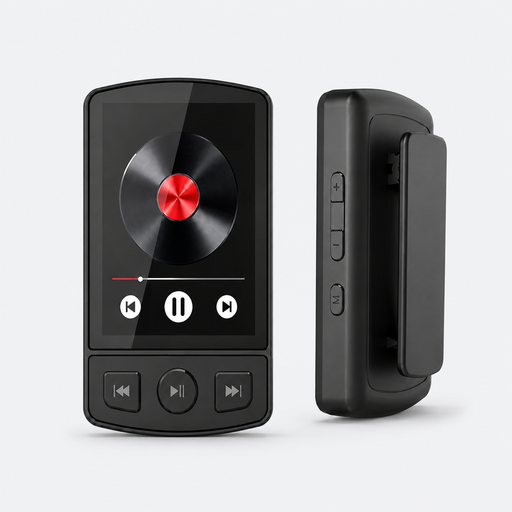
MP3 player with Bluetooth 5.2, clip, 64 GB and speaker

MP3 player with Bluetooth 5.2, clip and 64 GB

A music player with a speaker function to consider if you want to play music from a portable device.

The product name lists 64 GB, Bluetooth 5.2, a clip, FM radio and a speaker.

Check how your preferred songs sound at a low setting where your child will be listening.

View at Joybuy
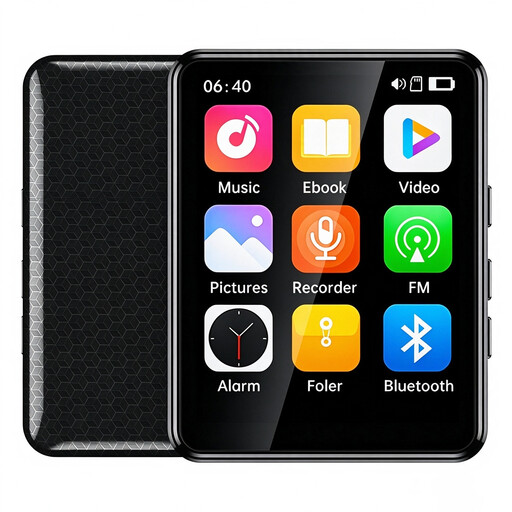
VIELLAN MP3 player with 2.4-inch colour touchscreen and 64 GB memory

VIELLAN MP3 player with 2.4-inch colour touchscreen and 64 GB

A portable music player with a speaker function to consider if you want to play music from your own device.

The product name lists a 2.4-inch colour touchscreen, 64 GB memory, Bluetooth and a speaker. The stated battery life is up to 10 hours.

Check how to control the volume and how your preferred songs sound at a low setting.

View at Joybuy

Frequently asked questions

Does a volume limit prove that the lowest setting is suitable for a child’s bedroom?

No. A stated volume limit caps a setting, but it doesn’t give an independently measured sound level where your child is listening. Set both the speaker and audio source to a low level and check the sound there with the songs you want to play; VeiligheidNL warns about the risks of loud, prolonged exposure to sound.

Can you use a children’s player without Wi-Fi after the initial set-up?

It depends on the player and the feature. Tonies says Wi-Fi is needed to set up Toniebox 2 and the first time you play a Tonie. Yoto describes offline playback after content has been downloaded to the player; check what you need to set up for your chosen model beforehand.

Do you need to buy content as well as the player?

It depends on the songs you want and what comes with the player. Toniebox 2 uses Tonies and Yoto uses cards, among other things; Yoto also describes customisable cards for your own audio. Before buying, check what content is included, what language it’s in and what you may need to buy separately.

What if the speaker breaks too quickly during normal use?

In the Netherlands, you have a legal guarantee in addition to any manufacturer’s warranty. ACM ConsuWijzer explains that there’s no fixed two-year period: what you can expect depends on factors including the product and normal use. Contact the seller if the product isn’t as it should be.

What should you look for if a young child will use the speaker as a toy?

Follow the age warning on the packaging and check for small parts and cords. The NVWA explains that toys have safety and labelling requirements, with stricter rules for toys intended for children under three. For the Mini (2024 Edition), Yoto gives a warning for children under 36 months; Tonies says Toniebox 2 is suitable from one year old. A standard speaker isn’t automatically a toy.
