
Charging just your earbuds’ case
You’re looking for a dedicated charging spot beside your bed. First, check that your exact case supports wireless charging; a Qi charging pad is only suitable if the case has this feature.


Before choosing a charging station, check that your exact charging case supports wireless charging; otherwise, you’ll need a suitable cable. One charging pad is enough if you only need a dedicated spot for the case. To charge a phone or watch at the same time, you’ll need separate, compatible charging spots. Beside your bed, look for a hard, clear surface, check what power supply is included, and make sure the exact model and adapter carry the applicable CE marking.
You’re looking for a dedicated charging spot beside your bed. First, check that your exact case supports wireless charging; a Qi charging pad is only suitable if the case has this feature.
You want to charge two devices at once, so you’ll need a suitable spot for each. Check that the earbuds’ charging spot isn’t designed for a phone or watch instead.
Think about placing it on a hard, clear surface, and consider features such as an indicator light or fan, which may be noticeable in the bedroom.
First check whether the case supports wireless charging, then decide how many devices need their own charging spot at the same time. Also check the power supply and whether the set-up will work on a clear, hard surface beside your bed.
| What to consider | What should you look for? | Who is this important for? |
|---|---|---|
| Case compatibility | Check that the exact model supports wireless charging and that the charging spot is designed for earbud cases. | If I mainly want to avoid choosing a charging pad that won’t work with my case, compatibility comes first. Around 36% of consumers say case compatibility is their main concern when buying. |
| A suitable, quiet spot | Choose a hard, clear surface and check whether the model has an indicator light or fan. | If I’m charging beside my bed, I want a clear spot without lights or noise that might disturb me. Around 29% of consumers prioritise safe placement and a peaceful sleeping environment. |
| Number of charging spots | Check which devices fit on each charging spot; a phone charging spot isn’t automatically suitable for an earbud case. | If I want to charge my case at the same time as a phone or watch, I need a suitable spot for each device. Around 21% of consumers say simultaneous charging is their main concern. |
| Power supply included | Check whether the exact model comes with a mains adapter and cable, and what power supply is recommended. | If I’m looking for a complete set, I want to know before buying whether I’ll need a suitable adapter as well. Around 14% of consumers say the included power supply is their main concern when buying. |
Whether your earbuds can charge wirelessly depends on the exact charging case. So a charging pad may not be suitable, even if the earbuds themselves are wireless.
Check the specifications for your exact model and case before choosing a charging station. If wireless charging isn’t supported, look for a suitable cable.
On the Belkin WIZ028vfBK, the Qi2 phone charging pad is different from the separate AirPods spot, for which Belkin specifies up to 5 W.
Read the specifications for each charging spot. The stated phone charging power doesn’t tell you how quickly earbuds will charge.
The contents of the box vary by version. Samsung lists the Galaxy Wireless Charger Duo EP-P5400BBEGEU as a version without a mains adapter.
Compare the full model number and the contents of the box. You may need to buy a suitable adapter separately for this Samsung version.
A spot beside the bed isn’t automatically suitable for charging. Bedding can restrict the clear space around your devices.
Use a hard, clear surface and follow the safety instructions for the charger and case. Brandweer Twente recommends charging during the day where possible, so you’re nearby if needed.
Offers, among other things, a dedicated Qi charging pad for wirelessly chargeable earbud cases, as well as a separate magnetic charger for anyone who also wants to charge a phone.
The Galaxy Wireless Charger Duo EP-P5400BBEGEU is designed to charge a compatible Galaxy Buds case alongside a second device.
The BoostCharge WIZ028vfBK combines a magnetic phone stand with a separate Qi charging pad for AirPods.
The 3-in-1 Cube with MagSafe Y1811 is designed as a compact, foldable set-up for iPhone, Apple Watch and AirPods.
These Joybuy products are for anyone who wants to charge other devices as well as earbuds. Check which devices and cases fit the charging spots on each version.
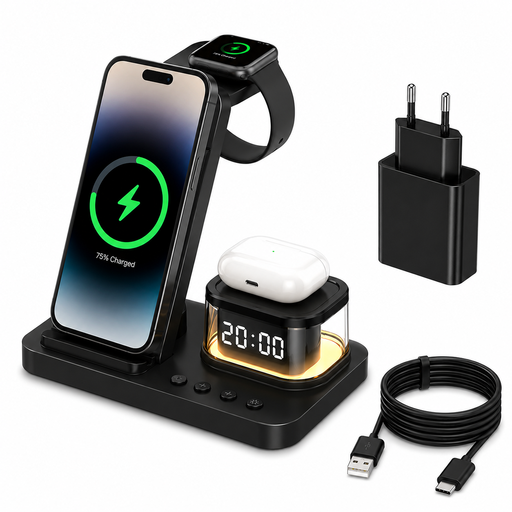 Image unavailable
A good fit if you want to charge a smartphone and smartwatch alongside your earbuds, all in one set-up.
The product description lists charging spots for wireless headphones, smartphones and smartwatches. The product name specifies 15 W, USB-C and a 20 W adapter; check whether the headphone spot is suitable for your case.
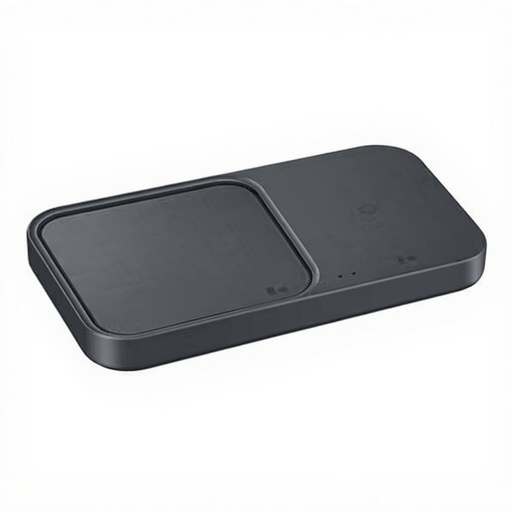 Image unavailable
A good fit if you want to charge earbuds alongside other devices on a charging station with multiple spots.
The product description lists wireless charging for headphones, smartphones and smartwatches; the product name specifies that a cable is included. Check which devices and cases fit each charging spot.
No. For the Galaxy Buds described by Samsung, you first put the earbuds in their charging case. Then place the closed case on a compatible wireless charger or connect it with a cable. Check the instructions for your exact model.
Place the charger on a hard, clear surface and follow the instructions for the charger and case. Brandweer Twente recommends charging during the day where possible, so you’re nearby if needed.
It depends on the version. Samsung says the Galaxy Wireless Charger Duo EP-P5400BBEGEU comes without an adapter; Belkin lists a 36 W adapter and cable for the WIZ028vfBK. Check the packaging and the full model number of the version you’re choosing.
Samsung recommends wiping away moisture or sweat before putting Galaxy Buds back in their charging case. For other brands, follow the manufacturer’s care instructions.
No. The Netherlands Food and Consumer Product Safety Authority describes the applicable CE marking as mandatory for electrical products sold in the Netherlands; CE is the manufacturer’s declaration. The Wireless Power Consortium describes Qi certification as a separate certification. Check the applicable marking on the exact charger and any adapter supplied with it.