
Owner of a USB-rechargeable fan
Wants to check first that the USB connection, cable and power supply are suitable for their fan model. The fan manual is the best guide.


For a fan that charges via USB according to its manual, a USB charger may be suitable if the connector and power supply match. If the fan needs its own dock, choose one designed for the exact model only. Then decide how many ports you need and find a dry spot where the charger can sit uncovered. The Netherlands Food and Consumer Product Safety Authority says CE marking is compulsory for electrical charging stations placed on the Dutch market; check the marking on the specific product.
Wants to check first that the USB connection, cable and power supply are suitable for their fan model. The fan manual is the best guide.
Needs a dock or battery pack designed for the exact model generation; a USB charging station is not automatically a suitable alternative.
Wants to connect other devices as well as the fan, and is looking for a dry, tidy spot where the charger can dissipate heat. Brandweer Nederland advises placing chargers in an unobstructed position.
Choose this when: your fan manual allows USB charging and the connection and power supply match.
Consider: the stated total power does not necessarily tell you how much power is available from the fan's port.
Choose this when: the manufacturer specifies a dedicated dock or battery pack for your fan model.
Consider: docks can vary between model generations; for example, Duux excludes the Whisper Flex² from the dock for the Whisper Flex (Ultimate) Gen 2.
Choose this when: you already have an undamaged charger that your fan manual says is suitable.
Consider: this won't give you extra ports for other devices.
| What to consider | What should you check? | Who is this important for? |
|---|---|---|
| Compatibility | Check the exact fan model, charging input and required power supply; compare a dock with the manufacturer's compatibility list. | If I want to charge my fan on the kitchen counter, I first want to know whether the connection and model are compatible. Around 33% of consumers put compatibility first. |
| Safe charging spot | Choose a dry spot away from splashes and leave the charger unobstructed; don't use a damaged cable or charger. Brandweer Nederland recommends leaving space around the charger to dissipate heat. | For a charging spot in the kitchen, I want to avoid moisture and be able to leave the charger unobstructed. Around 27% of consumers prioritise a dry, safe location. |
| Charging multiple devices | Count the USB-A and USB-C connections you need, and check the stated power per port or port combination. | If I also want to connect other devices to the same charging point, I check the types of ports and the power available when they’re used at the same time. Around 20% of consumers say charging multiple devices is their main consideration. |
| Space and cable | Measure the space and check that the power cable reaches the dry charging spot without covering the charger. | On a small kitchen counter, I want to know whether the power strip and cable will fit neatly. Around 20% of consumers prioritise a suitable set-up and saving space. |
A USB charger isn't automatically suitable for every fan; some models need a dock designed specifically for them.
Make a note of the model number and check the manual or compatibility list before choosing a charger or dock.
Power can vary by port or port combination. SwitchBot specifies a 5 V USB-C input for the Standing Circulator Fan and says it doesn't support fast charging; this doesn't tell you anything about other fans.
Compare your fan's required input with the specifications of the port you want to use.
Moisture and insufficient space around the charger are important considerations when setting up a charging spot on the kitchen counter. Brandweer Nederland recommends leaving the charger unobstructed so heat can escape.
First choose a dry spot away from splashes and make sure the charger won't be covered.
A model name such as Anker 543 can refer to different model numbers. Anker lists one USB-C port for the A2045; the Joybuy listing for the A2046 specifies two USB-C ports.
Check the full model number and port layout before choosing a product.
Desktop chargers for anyone who might want to use a suitable USB fan alongside other devices.
Multi-port desktop chargers with different combinations of USB-C and USB-A connections.
Docks and battery packs for specific Whisper Flex fans, not designed as universal USB chargers.
USB chargers for multiple devices, with the exact model number determining the version.
Desk-focused USB chargers for situations where devices with higher power requirements are also connected.
The Joybuy options below are power strips or desk sockets with USB ports. Before buying, check whether your fan manual allows USB charging and whether the connection and power supply match.
 No image available
Could be suitable if your fan charges via a compatible USB-A or USB-C connection and you want to connect other devices too.
The product name lists 4 sockets, 3 USB-A ports, 2 Type-C ports and a 3 m cable. Keep the power strip away from water and moisture.
 No image available
Could be a good option if your fan charges via a suitable USB connection and you want to connect other devices as well.
The product name lists 3 USB-A ports, 1 Type-C port, multiple sockets and a 1.5 m cable. Keep the power strip away from moisture.
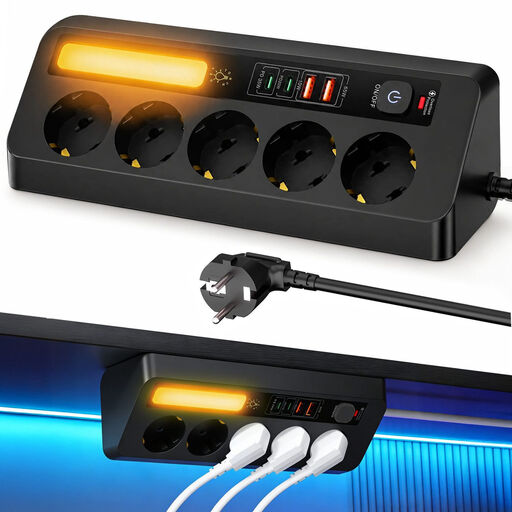 No image available
Could be suitable if your fan charges via a USB port and you need several connections in one place.
The product name lists 5 sockets, 4 USB ports, PD 35 W and a 2 m cable. Check that the available space and cable route work for your charging spot.
 No image available
Could be useful if you want to create a permanent USB charging spot at the edge of a tabletop and your fan manual allows USB charging.
The product name lists USB-C and USB-A ports. This model attaches to a tabletop with a clamp rather than sitting loose on the surface.
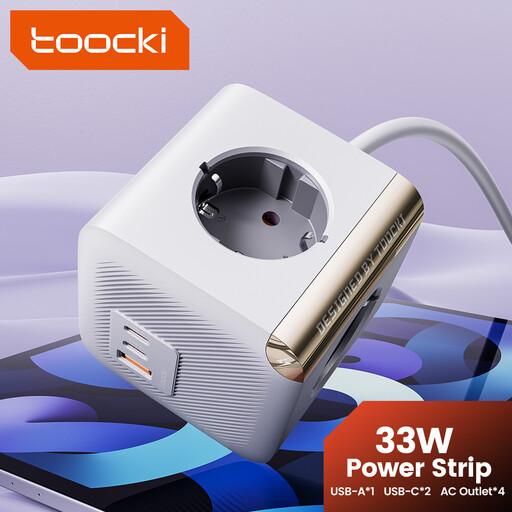 No image available
Could be suitable if your fan manual says it charges via USB-C and you want to connect other devices in the same place too.
The product name lists 4 sockets and 2 Type-C ports. Keep the power strip away from water and areas with high humidity.
No. First check your fan model's manual and power specifications. SwitchBot lists a 5 V USB-C input for the Standing Circulator Fan, which doesn't support fast charging; this doesn't automatically apply to other fans.
Choose a dry spot on the kitchen counter, away from splashes, and leave the charger unobstructed so heat can escape. Brandweer Nederland provides this as safety advice; it doesn't guarantee that a particular set-up is risk-free.
No. Check the exact model and generation. Duux lists the DXCFBP06 as suitable for the specified Whisper Flex² models and explicitly excludes the Whisper Flex² from the dock for the Whisper Flex (Ultimate) Gen 2.
For electrical products placed on the Dutch market, the Netherlands Food and Consumer Product Safety Authority states that CE marking is compulsory. Check the marking on the specific product; a CE marking on its own isn't an independent test of how the product performs in use.
In the Netherlands, according to ACM ConsuWijzer, the seller must resolve the issue free of charge if a product breaks sooner during normal use than you could reasonably have expected. A stated manufacturer's warranty doesn't replace this legal right.