
Vandaag of morgen in huis

Kwaliteit gegarandeerd

Welkomstaanbiedingen ontgrendelen: GRATIS bezorging | Tot 80% korting | Gratis 30 dagen JoyPlus-proefperiode
Download de app
A slow charger, a tangle of cables, or a dead battery at the worst possible moment. We've all been there. The market for chargers and adapters is vast, but it's filled with marketing promises that don't always deliver. Before you invest in a new charger, it's crucial to know what to look for to avoid wasting money on a product that underperforms or even damages your devices.
As a Joybuy Product Recommendation Officer, I'm here to help you cut through the noise. Here are the most common pitfalls and the specifications that truly matter.
Many chargers look alike, but the differences under the hood are significant. Don't fall into these common traps:
To make an informed choice, focus on the technical specifications that count. Don't be distracted by marketing jargon.
The power of a charger, expressed in watts (W), determines its maximum charging speed. However, your device must also be able to receive this power. Check the specifications of your phone or laptop.
A charger that supports both PD and QC offers the broadest compatibility.
USB-C is the future, but many of our cables and older devices still use the traditional USB-A port. A good adapter for today and tomorrow has a mix of both.
A multiport adapter with, for example, two USB-C and two USB-A ports offers maximum flexibility.
Look beyond the basic functionality. Modern technology offers specific advantages.
Below are some products that align well with different user profiles, based on their objective specifications.
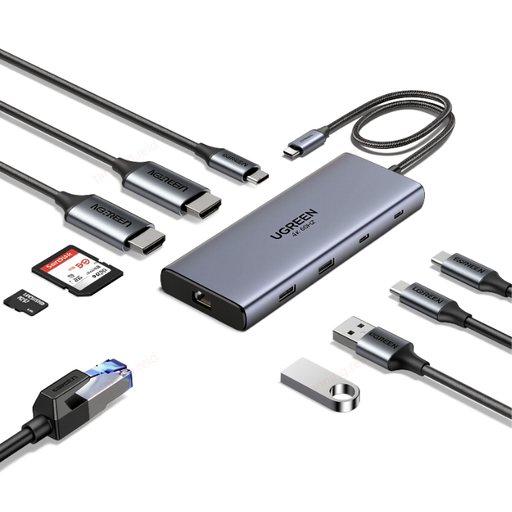
Why This Fits Their Persona: This hub transforms a single USB-C port on your laptop into a complete workstation. Ideal for those who want a clutter-free desk while connecting an external display, stable internet, and multiple accessories.
This is the ultimate solution to the "one port is enough" misconception. It provides 10 specific, functional ports instead of a single, limited charger.
100W Power Delivery pass-through charging (charges your laptop at full speed) and a Gigabit Ethernet port for a stable internet connection.
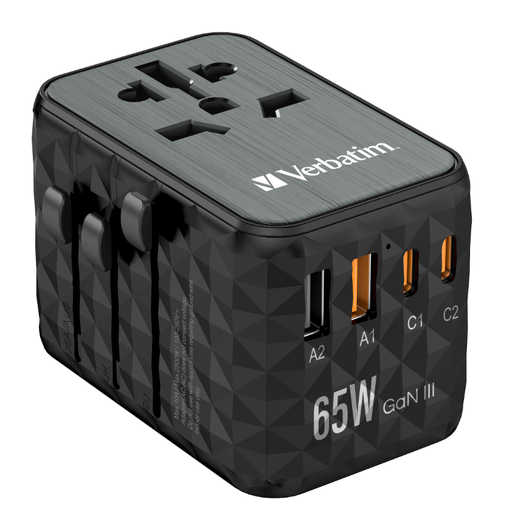
Why This Fits Their Persona: One adapter for all your travels. With support for outlets in over 180 countries and four ports, you can charge all your devices simultaneously, from laptop to phone, wherever you are.
This product is certified and from a reputable brand, avoiding the pitfall of unsafe bargains. The GaN technology is a concrete technical improvement, not a vague marketing claim.
Compact and lightweight thanks to GaN III technology. Delivers 65W Power Delivery, powerful enough for most laptops, and has 4 ports to charge multiple devices at once.
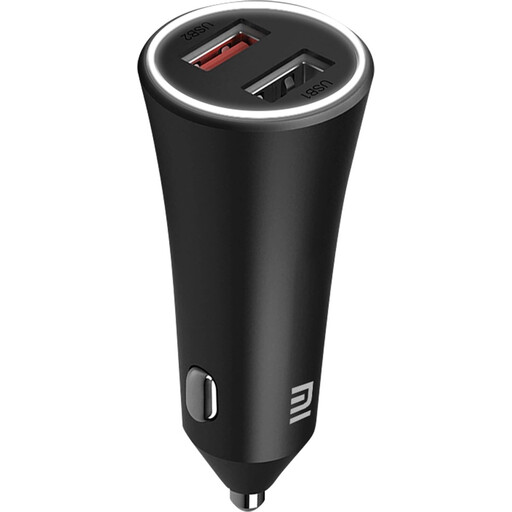
Why This Fits Their Persona: For those who spend a lot of time in the car and want to arrive with a full battery. This car charger powers two devices at once, so both you and your passenger can stay connected.
This product delivers a concrete power output (37W total) and is CE certified. It avoids the pitfalls of vague charging claims and unsafe, unbranded alternatives.
Two USB-A ports with smart power distribution. According to Xiaomi, the charger detects the connected device and automatically adjusts the power output for an efficient charging session.
Didn't find what you were looking for? We've compiled a complete, up-to-date list of products that meet these selection criteria and relevant safety standards.
Not necessarily. The most important thing is the right match between the charger and your device. A 100W charger is overkill and more expensive if your phone can only handle 25W. Pay attention to the wattage (W), the supported charging protocol (PD/QC), and a CE mark instead of just looking at the price.
No, that's a common mistake. Check the required wattage of your laptop (often found on the original charger, typically 45W, 65W, or higher). A USB-C charger with insufficient wattage will charge your laptop very slowly or not at all. Choose a charger with Power Delivery (PD) that provides at least the same wattage as your laptop's original charger.
A GaN charger uses Gallium Nitride instead of traditional silicon. This allows the charger to be made smaller, lighter, and more energy-efficient, while producing less heat. You don't necessarily need one, but if you're looking for a powerful charger that fits easily in your bag, for travel or on the go, then a GaN charger is a very practical choice.
