Who are these speakers for?

Chamber music listener at a desk

Wants to follow the different instrumental parts from their chair and has room to position a pair either side of the screen. Genelec recommends a symmetrical arrangement around the listening position for monitor placement.

Computer listener with limited desk space

Looking for speakers that fit on the desk and connect to their available source. Dimensions and input types vary by model, so check these details before you choose.

Listener with a fixed streaming setup

Wants to play music from an existing app or network source and checks whether the setup requires a pair, a connecting cable or an adapter. KEF and Sonos describe different connection options for the models mentioned here.

What should you look for when buying?

Active stereo pair for your desk

Best if: you mainly listen from a computer and have room for two speakers.

Keep in mind: the analogue input must match your computer or audio source output. The manufacturer's description is not an independent listening test for chamber music.

Two separate compact studio monitors

Best if: you want to put together your own stereo pair and have a suitable analogue source or interface.

Keep in mind: the Genelec 8010A is packaged as a single monitor, so check what you need for two channels.

Integrated streaming stereo pair

Best if: you want to stream over a network and can position two speakers apart.

Keep in mind: a dedicated cable connects the two KEF LSX II LT speakers. Also check the connections on the exact model.

Expandable smart speaker setup

Best if: app or Wi-Fi control is your priority and you may want to pair two Sonos Era 100 speakers.

Keep in mind: a second speaker is a separate purchase. Sonos lists a separately available adapter for connecting a line-level source.

Passive bookshelf speakers

Best if: you already have a suitable amplifier or want to choose your speakers and amplifier separately.

Keep in mind: passive speakers need external amplification. Check that they are compatible with your amplifier.

Consideration What to look for Who is this important to?
Chamber music stereo image Check that you can position two speakers and that they are placed in a similar way to your left and right from your listening position. When I listen to chamber music from one fixed chair, I want to position a pair on the left and right so I can follow the instruments in the stereo image. Around 28% of consumers put stereo positioning above other buying priorities.
Desk space and speaker placement Measure the available width and depth either side of your screen, and allow for the cabinet dimensions and cable routing. With a desk that is already full, I want to know whether two speakers will really fit beside my screen. Around 22% of consumers prioritise desk space when choosing.
Connection to your music source Compare the output on your computer or player with the input on the exact model, and check whether you need an adapter. If I want to use my existing computer or player, I want to know in advance whether I can connect it directly. Around 22% of consumers make source compatibility their top buying priority.
Complete setup Check what is included in the box and whether you need a second speaker, amplifier or adapter for two channels. I want to know what I need for a working system, not just what comes with one speaker or a separate pair. Around 17% of consumers consider the complete setup first.
Listening in a shared home Assess the setup at your usual listening volume and, if necessary, agree how you will use it with housemates or neighbours. When I live with others, I want to enjoy music without causing unnecessary disturbance. Around 11% of consumers put consideration for housemates or neighbours first.

Common buying pitfalls

  • Assuming a single monitor is a stereo pair

    Genelec states that the 8010A package contains one monitor. One unit is not automatically a left-and-right pair.

    Check how many speakers you need and how you will connect both channels to your source.

  • Assuming ‘wireless’ means ‘no cable between the speakers’

    KEF says that the two LSX II LT speakers are connected by a dedicated cable.

    Before you buy, check whether you can route this cable along or across your desk, and make sure you have the exact model in mind.

  • Choosing a passive speaker pair without an amplifier

    DALI describes passive speakers as loudspeakers that connect to an external amplifier.

    Check whether you already have a suitable amplifier and whether it will work with the speakers you are considering.

  • Assuming a USB-C port is a universal computer audio input

    The KEF LSX II LT lists USB-C as an input. For a line-level source, Sonos describes a separately available adapter for the Era 100. So the same port name does not automatically mean the same connection method.

    For the exact model, compare the function of the connection with your source's output.

Brands to compare

These brands illustrate different ways to put together a desk setup for chamber music. The features below apply to the product ranges mentioned and are not a judgement on every model from each brand.

Edifier

The MR4 is an active option for a wired stereo pair on your desk.

  • Edifier lists TRS, RCA and AUX inputs, as well as a headphone output, for the MR4.
  • The manufacturer lists monitor and music modes; this does not independently confirm that one mode sounds better for all chamber music recordings.

Genelec

The 8010A is a compact, single active monitor for anyone putting together their own two-channel setup and source connection.

  • Genelec specifies dimensions of 195 × 121 × 115 mm including Iso-Pod, and one analogue XLR input per 8010A.
  • The package contains one monitor. The stated frequency response does not describe performance on every desk.

KEF

The LSX II LT is an integrated pair for anyone looking for streaming and a computer connection in one system.

  • KEF lists USB-C and HDMI ARC among the inputs.
  • KEF says a dedicated cable connects the LSX II LT speakers. Don't confuse this model with the LSX II.

Sonos

The Era 100 is an option for app, Wi-Fi or Bluetooth control.

  • Sonos says you can pair a second Era 100 with the first.
  • Sonos lists a separately available adapter for a line-level source. One speaker is not the same as a pair of speakers in separate positions.

DALI

The passive speaker range is a good fit if you already have an amplifier or want to replace components separately.

  • DALI describes being able to replace the speaker and amplifier separately as an advantage of passive loudspeakers.
  • External amplification is required. Check that a specific model is compatible with your amplifier.

Speakers for desk use

These Joybuy products are aimed at desk use, including wired PC speakers, a passive bookshelf pair and a computer speaker option. For each model, check that the connections, amplification requirements and complete setup suit your source and listening position.
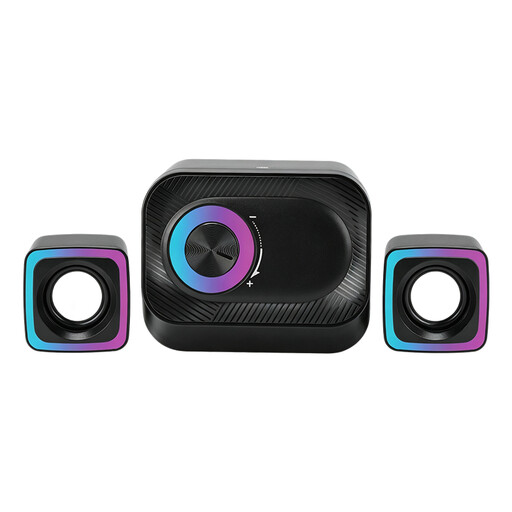
Wired 3-piece PC speaker system with volume control and RGB lighting

Wired 3-piece PC speaker system with volume control and RGB lighting

A wired PC system with two satellite speakers for anyone looking to position a pair around their desk.

The product description lists a volume control and RGB lighting.

View at Joybuy

Compact stereo speakers for desktop use with coloured LED lighting

Compact stereo speakers for desktop use with coloured LED lighting

A desktop stereo set for anyone looking for a compact pair on their desk.

The stated dimensions are approximately 120 × 72 × 88 mm per speaker.

View at Joybuy

HiVi-Swans DIY3.1 passive bookshelf speakers, pair with 6.5-inch drivers

HiVi-Swans DIY3.1 passive bookshelf speakers, pair, 6.5-inch

A passive pair for anyone using a separate amplifier or looking to choose speakers and amplification separately.

The product description lists a 2-way bass-reflex design with 6.5-inch and 28 mm drivers. A separate amplifier is required.

View at Joybuy

Edifier G1500 computer speakers with RGB lighting

Edifier G1500 computer speakers

A 2.0 stereo set for computer use, with several listed connection options.

The product description lists Bluetooth 5.3, USB and 3.5 mm AUX. USB power is also mentioned.

View at Joybuy

Frequently asked questions

How should you position two speakers when listening from one spot at your desk?

Position them as symmetrically as possible and angle them towards your listening position. Genelec recommends a 60° angle between the left and right monitor, with the listener at the point of an equilateral triangle. Treat this as placement advice, not a guarantee of how they will sound in your room; walls and reflections also play a part.

Can you connect a computer directly to the USB-C port on a Sonos Era 100?

Don't assume you can. For a line-level source, Sonos describes a connection using a separately available Sonos adapter. First check which audio output your computer has and how you want to play your music.

Can you play music at home without limits while working during the day?

Don't assume that the time of day gives you permission to play music without limits. The Dutch government says that noise nuisance to neighbours may be covered by the General Municipal By-law (APV) in many municipalities. The local rules or agreements that apply depend on your circumstances; the Dutch government advises speaking to your neighbours first to agree how to deal with noise.

Do you still have rights in the Netherlands after the manufacturer's warranty expires?

Yes, you may. The Dutch government says that consumers are entitled to a product that works as it should, and that there is no fixed statutory warranty period in the Netherlands. If a product is faulty, the retailer is your point of contact; whether a specific defect is covered by these rights depends on the circumstances.

Which product safety rules apply to wireless speakers in the Netherlands?

Relevant European safety requirements apply to electrical equipment. For equipment with Wi-Fi or Bluetooth, Dutch government information also refers to rules for radio equipment. CE marking and an EU Declaration of Conformity are required when a product falls within the scope of the relevant requirements. A product listing alone does not prove that a specific item meets them.
