For an overview shot of a whole tile, the right angle of view, a parallel set-up and even lighting matter more than maximum macro magnification. For small glaze or relief details, the magnification offered by a true macro lens can be useful. Check the camera mount and the clearance in front of the lens, too: a short working distance can make it harder to position your lighting, while a longer focal length may require more distance. Reflections and colour rendition also depend on using the right lighting set-up; changing your lens won’t solve these issues on its own.
Who is this relevant for?
Tile maker taking overview shots
You want to capture the pattern and edges of complete tiles consistently. So start by assessing the angle of view, your set-up and the lighting, rather than focusing only on the macro label. Kamera Express also recommends macro lenses for flat subjects; with tiles, it’s still important to check that the whole tile will fit in the frame from your shooting distance.
Maker showcasing glaze details
You want to capture small surface textures in close-up. Compare the maximum magnification with the size of the details you want to show, and allow for the space you’ll need to position lighting in front of the lens.
Maker of glossy ceramics
You want the colour and sheen to remain recognisable without reflections obscuring the design. The Canadian Conservation Institute explains how the direction of light affects the way colour, reflections and surface texture appear. Getty notes that different types of light can change colour rendition within the same subject.
What should you look for when choosing?
| What to consider |
What should you check? |
Who is this important for? |
| Fitting a whole tile in the frame |
Check the angle of view on your camera and whether the entire tile will fit in the frame and stay in focus from your available shooting distance. |
I want to show the pattern and edges of a complete tile. Around 30% of consumers prioritise a sharp overview of the whole tile. |
| Small glaze details |
Compare the maximum magnification with the size of the details, and check how much working space remains in front of the lens. |
If small crazing or relief details are the main focus, magnification is crucial. Around 30% of consumers focus on these small details. |
| Sheen and colour |
Consider whether you have room to use different lighting directions and include a neutral colour reference in the same lighting set-up. |
I want to show the glaze colour while also controlling which reflections or textures are visible. Around 20% of consumers prioritise colour and sheen rendition. |
| Mount and set-up space |
Check the exact lens mount and version, as well as the distance you’ll need for both detail shots and a whole tile. |
If my camera and shooting location limit my choice, the lens needs to work with both. Around 20% of consumers prioritise their camera mount and available set-up space. |
Buying pitfalls
-
Assuming every lens with ‘macro’ in its name offers 1:1 magnification
Canon lists a maximum magnification of 0.5× for the RF 85mm F2 Macro IS STM and 1.4× for the RF 100mm F2.8L Macro IS USM. This difference matters if you want to show very small details in close-up.
Compare the maximum magnification of the exact lens version, and consider whether you need that level of magnification for your tile overview or detail shots.
-
Comparing only the minimum focusing distance
When shooting close up, there may be very little clearance between the front of the lens and the tile. Nikon gives a distance of around 5 cm between the front of the lens and the subject when shooting very close with the NIKKOR Z MC 50mm f/2.8.
Check the working distance at the magnification you want to use, and make sure you can still position your planned lighting.
-
Blaming reflections or colour differences on the lens alone
The direction of light affects which sheen and textures are visible. Getty warns that combining light sources with different colour temperatures can change colour rendition within a subject.
Test your lighting set-up and white balance with your existing equipment before choosing a different lens for this reason alone. Nikon School explains how to use a neutral reference for white balance.
Brands to compare
Nikon
For Nikon Z cameras, Nikon lists the NIKKOR Z MC 50mm f/2.8 as a 50mm lens with maximum 1:1 magnification.
- Nikon states that there is around 5 cm of space between the front of this lens and the subject when shooting very close.
- This short working distance can limit how you position lighting around a glossy tile. Also check the angle of view for your Z FX or Z DX camera.
Sony
The Sony FE 90mm F2.8 Macro G OSS, model SEL90M28G, is designed for Sony E-mount cameras; Sony lists a maximum magnification of 1.0×.
- Sony gives this model a working distance of around 13 cm, leaving space in front of the lens for detail shots.
- The 90mm angle of view may require you to move the camera further back to fit a whole tile in the frame.
Canon
For Canon RF cameras, relevant options include the RF 85mm F2 Macro IS STM and the RF 100mm F2.8L Macro IS USM.
- Canon lists maximum magnification of 0.5× for the RF 85mm and 1.4× for the RF 100mm, so the two models don’t offer the same maximum macro range.
- Stabilisation is no substitute for a fixed, parallel set-up or careful lighting when photographing a tile.
Sigma
Sigma lists maximum 1:1 magnification for the 105mm F2.8 DG DN MACRO | Art, with separate versions for Sony E- and L-Mount cameras.
- Sigma gives a minimum focusing distance of 29.5 cm.
- Check that you choose the right mount and have enough distance for both detail shots and a whole tile.
OM SYSTEM
The M.Zuiko Digital ED 60mm F2.8 Macro is designed for the Micro Four Thirds system; OM SYSTEM lists maximum 1:1 magnification.
- OM SYSTEM lists a weight of 185 g and a minimum focusing distance of 0.19 m.
- The stated angle of view is equivalent to 120mm on 35mm format; this is not the physical focal length. Check how much distance you have for an overview shot.
Joybuy products
These Joybuy products are Sony E lenses for close-up and product photography. Their stated magnification is limited for very small details, so compare it with the crop you need for your portfolio.
 No image available
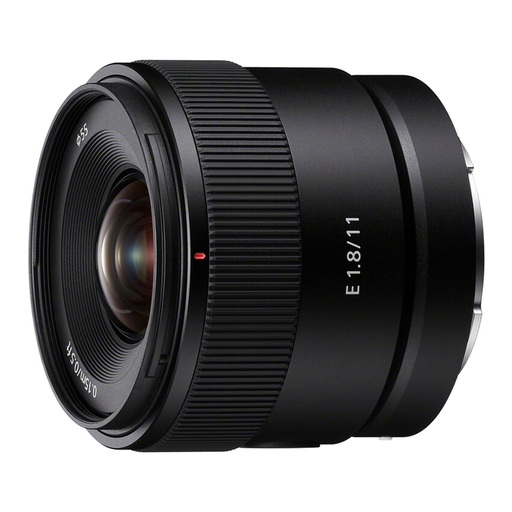
Sony E 11mm F1.8 APS-C Wide Angle Prime Lens (SEL11F18)
This ultra-wide-angle lens is worth considering if you’re after a wide shot; its stated magnification is limited for small relief details.
Sony E mount, APS-C, 11 mm, F1.8 and a 104° angle of view.
Minimum focusing distance: 0.15 m. Stated magnification: 0.13× AF / 0.20× MF.
View at Joybuy
 No image available
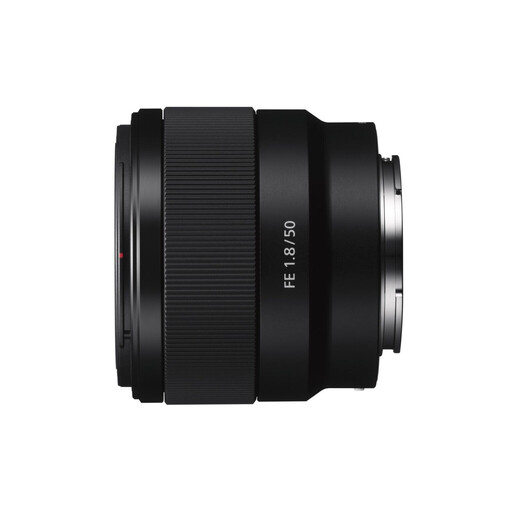
Sony E 50mm f/1.8 OSS Black
The product name refers to product and close-up photography; its stated magnification limits its capabilities for very small details.
Sony E mount, 50 mm and f/1.8.
Minimum focusing distance: 39 cm. Stated magnification: 0.16.
View at Joybuy
Frequently asked questions
Do you need 1:1 magnification to photograph the whole tile?
No. Maximum magnification is mainly relevant if you want to show small details in close-up. For an overview shot, first check whether the whole tile will fit in the frame and stay in focus with your camera, lens and available shooting distance.
What’s the difference between minimum focusing distance and working distance?
Working distance is the clear space in front of the lens, so it’s a practical consideration when positioning lights. Sony gives the SEL90M28G a minimum focusing distance of 28 cm and a working distance of around 13 cm; these measurements don’t mean the same thing.
How can you photograph the same tile to show both its colour and texture?
If needed, take separate shots: use even lighting for colour and pattern, then try a different lighting direction to show the sheen or relief. The Canadian Conservation Institute explains that even lighting can hide surface texture. For documentary shots, keep the type of light and colour reference consistent.
What Dutch returns and warranty rights apply to a lens bought online?
According to ACM ConsuWijzer, consumers buying online generally have a statutory 14-day cooling-off period from delivery, subject to exceptions. You also have statutory rights against the seller if a product is faulty; this does not automatically mean a fixed two-year warranty. If you’re buying as a business, check the applicable terms separately, as these consumer rules don’t necessarily apply.


