
Makers who want to show glaze colours accurately
You photograph your own ceramics for an online shop and want to assess colour differences between pieces under a repeatable lighting setup.


Start with the lighting, reflections and white balance: a more expensive camera won’t automatically capture glaze colours accurately. A mirrorless camera gives you the flexibility to choose a lens for wider shots or fine details; a compact camera with a macro mode may suit you if you want close-ups without a separate lens. Test it with your own ceramics to check that the framing and colour workflow meet your needs.
You photograph your own ceramics for an online shop and want to assess colour differences between pieces under a repeatable lighting setup.
You want to photograph small glaze textures as well as the full shape, filling the frame with the details. That’s why you’re considering the lens or macro mode.
You regularly take new product photos and want to use consistent framing and a repeatable process for each new piece.
First, work out whether colour consistency, reflections, close-ups or repeatable batch photography is your biggest challenge. Then choose a camera and lens to suit.
A good fit if: you mainly photograph whole bowls and vases and want the option to use a different lens later.
Bear in mind: Canon states that the RF-S 18–45 mm achieves a maximum magnification of 0.16× at 45 mm with autofocus; you may need a different lens for small details.
A good fit if: you want small glaze textures to fill the frame.
Bear in mind: Canon lists a maximum magnification of 1:2 for the RF 35 mm F1.8 MACRO IS STM; Nikon lists 0.67× for the Z DX MC 35 mm f/1.7, with around 7.2 cm between the subject and the front of the lens at the closest focusing distance. This can limit the space available for lighting.
A good fit if: you want to take close-ups without changing lenses.
Bear in mind: check that the built-in macro mode gives you the framing you want and that the files suit your editing workflow.
A good fit if: your current camera already gives you the framing you want and changing light or reflections are the main things getting in the way of your photos.
Bear in mind: a consistent lighting setup, tripod and colour reference take preparation. Test the results with your own matt and glossy pieces.
| What to consider | What should you check? | Who is this important for? |
|---|---|---|
| Accurate glaze colours | Check the white balance settings and file formats for the exact model. Take a reference shot under the same lighting and compare the final image with the piece. | If I want to show glaze colours consistently across my online shop photos, I mainly need a reliable colour workflow. Around 36% of consumers name colour consistency as their top buying priority. |
| Reflections on glossy pieces | Test your lighting setup with both a glossy and a matt piece. Check that reflections don’t overpower the surface while still allowing the shine to show. | When I photograph glossy vases, I want to control bright reflections without making the surface look flat. Around 29% of consumers name manageable reflections as their top priority. |
| Small glaze details | Compare the maximum magnification and working distance of the actual lens. Also check which lens is included in the kit. | If I want small textures to fill the frame, I consider both magnification and the space available for my lighting. Around 21% of consumers put detail magnification first. |
| Repeatable product photography | Check that you can frame your shots comfortably from a tripod, keep your settings consistent and work with the files in your editing workflow. | When photographing lots of new pieces, I want to repeat my process and framing without having to set everything up again each time. Around 14% of consumers name batch photography as their top buying priority. |
More megapixels won’t automatically correct a colour cast caused by changing light. If your lighting setup changes, you may need to retake your photos or repeat the colour correction.
First, test a consistent lighting setup and white balance reference with your own glazes. Then check whether your current camera gives you enough detail and the framing you want.
Allow extra time for retaking photos and correcting colours.
A kit zoom and a separate macro lens can offer different magnification levels. The kit name alone doesn’t tell you whether the lens is suitable for your smallest glaze details.
Check exactly what’s included in the kit and compare the magnification and working distance of the lens you’re actually buying.
You may need a separate lens; also allow for the space your lighting takes up around the subject.
KVK explains that business buyers are generally protected differently from consumers, and that the circumstances can affect which rules apply.
Before checking out, confirm whether you’re buying as a private individual or as a business, and check the terms that apply to your purchase.
The EOS R50 with an RF-S standard zoom is an option for wider shots; a separate compatible RF macro lens is an option for details.
The Z50II kit with a standard zoom is designed for wider shots; the separate Z DX MC 35 mm f/1.7 lens is an option for close-up detail work.
The TG-7 has a fixed lens and a microscope mode for close-ups without changing lenses.
The ZV-E10 II with interchangeable E-mount lenses is an option if you want to create product videos as well as product photos.
This Joybuy selection includes compact cameras and cameras with zoom lenses for framing ceramic products. Assess colour and shine under your own lighting setup: the type of camera or number of megapixels alone doesn’t prove colour accuracy.
 Image unavailable
The zoom may suit you if you want to try different framings for wider shots; check for yourself that the framing shows your ceramics as intended.
The product name lists 12× optical zoom, 64 MP, 4K and WiFi.
 Image unavailable
This pocket camera may suit you if you’re looking for a compact camera for photos and video; try it with your own pieces to see whether it captures the details you want.
The product name lists 4K, 44 MP and 16× digital zoom. The description mentions autofocus.
 Image unavailable
The zoom lens may suit you if you want to try different framings for product photos; check that it captures the details you want to show.
The product information lists a 24.2 MP APS-C sensor, a Sony E mount and a 16–50 mm kit lens.
 Image unavailable
The zoom lens listed may be useful if you want to adjust the framing for different ceramic pieces; check the framing with your own products.
The product information lists a 24.2 MP sensor, Sony E mount, electronic viewfinder and a 3-inch touchscreen.
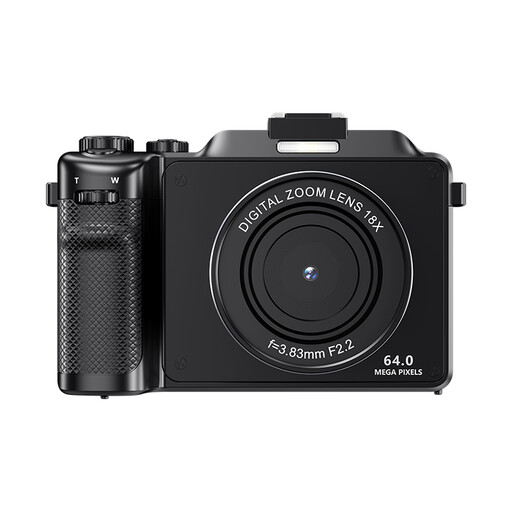 Image unavailable
Autofocus is mentioned in the product information; test it with your own ceramics to see whether the camera captures the details you want.
The product name lists 4K and 64 MP. The description mentions 18× digital zoom and warns that this may reduce image quality.
No, not necessarily. First, keep the lighting consistent, set the white balance deliberately and, if needed, use a neutral reference under the same light. Then check whether your current camera gives you enough detail and the framing you want. A reference card or RAW function alone won’t guarantee a perfect result on every screen.
Use a tripod to keep the camera position and framing consistent, and take a reference shot under your chosen lighting for your colour workflow. Check each new piece to make sure its shape and shine are visible; the same camera position won’t necessarily work for every reflective surface.
It depends on the framing you want and the magnification of the lens you’re using. Compare the maximum magnification and working distance of the exact lens, and check which lens is included in a kit. A standard zoom doesn’t automatically come with a separate macro lens.
Don’t assume they do. KVK explains that business buyers are generally protected differently from consumers, although consumer protection may apply in some cases. Before buying, check the capacity in which you’re placing the order and which terms apply.
Give consumers clear and accurate information about what you’re selling. The Netherlands Authority for Consumers and Markets warns against misleading consumers when selling to them. KVK points out that using a photo from the internet without permission may infringe copyright, so check that you’re allowed to use it.