
Vandaag of morgen in huis

Kwaliteit gegarandeerd

Welkomstaanbiedingen ontgrendelen: GRATIS bezorging | Tot 80% korting | Gratis 30 dagen JoyPlus-proefperiode
Download de app
Driving a car from before 2018? Chances are you have a reliable vehicle, but the technology on the dashboard feels a bit outdated. Navigating with your phone on a small mount, dealing with the hassle of cables for music, and no dashcam for extra safety. Replacing the entire car stereo is often an expensive and invasive job.
Fortunately, there's a simple solution: a CarPlay screen with a dashcam. This is an all-in-one device that you simply place on your dashboard. It gives you instant access to modern features like Apple CarPlay and Android Auto, while a built-in camera records your drives. In this article, we'll help you make the right choice with practical buying advice and a selection of popular models.
Before you make a choice, there are a few key points to consider. These will ensure you choose a system that's a perfect fit for you and your car.
Most portable screens are designed for ease of use. They are powered by your car's 12V-24V cigarette lighter socket, which means you don't have to cut any wires or dismantle the dashboard. This type of universal car display is suitable for almost any vehicle, from a city car to a delivery van. Pay attention to the included mounting bracket: a sturdy, adjustable base ensures the screen remains stable and doesn't obstruct your view of the road.
A larger screen is more pleasant for navigation. A size around 10.26 inches offers a good overview without being too dominant. The resolution is also important; an HD screen (for example, 1600x600 pixels) provides sharp maps and a clear interface.
For the dashcam function, image quality is crucial. A 4K car dashcam captures license plates and details more sharply than a standard HD camera. Many kits are sold as a reverse camera kit, which includes a second camera for the rear of the car. This not only helps in recording incidents behind you but is also a huge help when parking.
The convenience of wireless CarPlay or a portable Android Auto screen is a major advantage. After a one-time pairing via Bluetooth and Wi-Fi, your phone connects automatically as soon as you get in the car. You can immediately start navigating, streaming music, or making hands-free calls without taking your phone out of your pocket. Check if the model supports dual-band Wi-Fi (2.4G/5G) for a faster and more stable connection.
Based on functionality and ease of installation, we have highlighted some interesting options for you.

Why it stands out: This is a complete car upgrade kit in one package. You get a large touchscreen for CarPlay/Android Auto, a built-in 4K front dashcam, and a 1080p reverse camera. Even a 64GB memory card is included, so you're ready to go right out of the box.
Benefits:
Who is this for? For drivers seeking a complete and integrated solution. If you want both modern navigation and a reliable camera system without any hassle, this is an excellent choice.
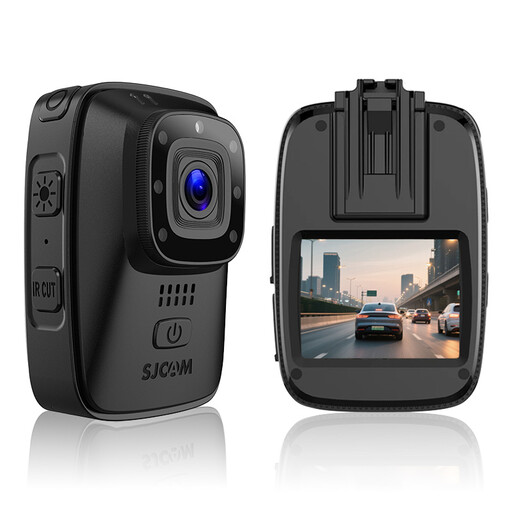
Why it stands out: The SJCAM A10 is not a traditional CarPlay screen, but a highly versatile camera. You can use it as a dashcam in your car, but also as a bodycam for work or other activities. Its long battery life and rugged housing make it unique.
Benefits:
Who is this for? For users looking for a compact, robust recording solution that is useful both inside and outside the car. Ideal for security personnel, delivery drivers, or adventurers who want to record their drives and activities.
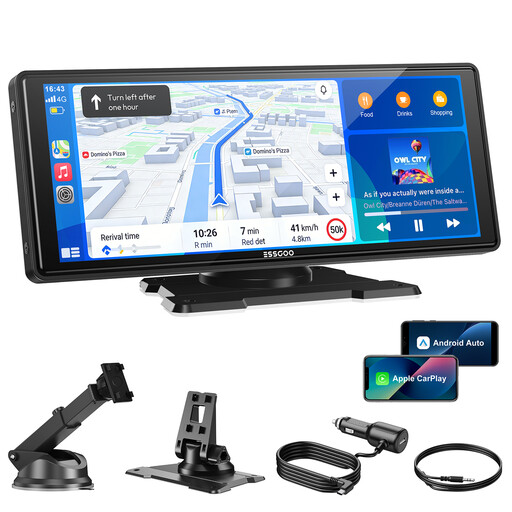
Why it stands out: This model focuses entirely on a superior infotainment experience. It doesn't have a built-in dashcam but excels in connectivity and image quality. The dual-band Wi-Fi ensures a very stable wireless CarPlay and Android Auto connection.
Benefits:
Who is this for? For the driver who is primarily looking for a large, fast, and modern screen for navigation and media. If a built-in dashcam isn't a priority, this model offers an excellent CarPlay/Android Auto experience.
Didn't find the perfect model for your situation? No worries. More variants and options are available to suit different needs and budgets. For a broader overview of car displays and accessories, you can take a look at our Dashboard Displays category.
1. How do I install a CarPlay screen with a dashcam? Installation is typically very simple. You attach the screen to your dashboard with the included mount. Then, you plug the power cable into your car's cigarette lighter socket. For an optional reverse camera, you'll need to run a cable to the back of the car, which can usually be tucked away along the car's interior trim.
2. Will a universal car display fit in my older car? Yes, as long as your car has a standard 12V or 24V cigarette lighter socket, a universal display will be compatible. This applies to the vast majority of cars, trucks, and vans built after circa 1990.
3. How do I get audio from the CarPlay screen to play through my car's speakers? Most screens offer multiple options to send audio to your existing sound system:
