
Vandaag of morgen in huis

Kwaliteit gegarandeerd

Welkomstaanbiedingen ontgrendelen: GRATIS bezorging | Tot 80% korting | Gratis 30 dagen JoyPlus-proefperiode
Download de app
Driving a car that's a few years old? Chances are the engine is still in great shape, but the dashboard feels hopelessly outdated. No large screen for navigation, no simple way to stream music, and certainly no dash cam for extra safety. Having a completely new infotainment system installed is often expensive and complex. Fortunately, there's a smart solution: a portable CarPlay screen with a dash cam.
These all-in-one devices promise a modern, hassle-free upgrade. But the market is flooded with models that overpromise and underdeliver. Before you invest, it's crucial to understand the common pitfalls that lead to frustration and wasted money.
Many drivers fall for the same marketing traps. Here are the three main problems to watch out for:
wireless android auto and CarPlay but use outdated Bluetooth or single-band Wi-Fi technology. The result? The connection stutters or constantly drops, precisely when you need navigation the most.4K dashcam with carplay sounds impressive, but resolution alone means nothing. Models with a cheap lens and an inferior image sensor produce unusable, grainy footage at night or in backlit conditions, making it impossible to read a license plate.plug and play carplay is appealing, but the reality is sometimes different. Hiding the cable for the rear camera or finding a stable power source can be unexpectedly complicated, forcing you to end up at a garage anyway.To avoid a bad purchase, it's better to focus on a few concrete, verifiable specifications. These determine whether an auto upgrade scherm is worth the money.
A navigation and dashcam in one is useless if the connection is unreliable. For a smooth wireless experience with Apple CarPlay or Android Auto, a stable data connection is crucial.
A dash cam is for your safety. The footage must be clear under all conditions.
A true plug and play carplay system should be installable by yourself within minutes.
Not everyone has the same needs. Below are some popular choices, matched to specific user profiles.
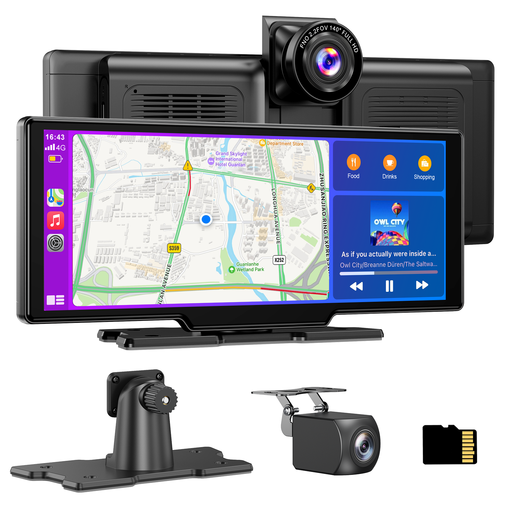
Why This Fits Their Persona: Ideal for those who want to modernise an older car in one go. This device combines a large touchscreen for navigation and media with a full-featured 4K dash cam, without the need for a complex installation.
This model uses dual-band Wi-Fi for a stable wireless connection. The installation is truly plug-and-play via the 12V socket, and the included 64GB card prevents the "hidden cost" of a separate purchase.
Complete navigation and dashcam in one solution. Supports wireless CarPlay & Android Auto and comes with both a 4K front camera and a 1080p rear camera.
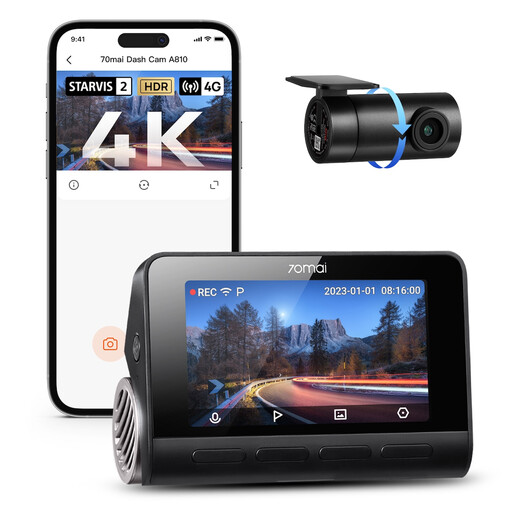
Why This Fits Their Persona: For those who demand the absolute highest standards in image quality and evidence recording. This is not a CarPlay screen, but a specialised dash cam that excels at capturing details, day and night.
This model bypasses the "fake 4K" trap by using a high-quality Sony STARVIS 2 sensor. According to 70mai, their Night Owl Vision technology provides superior clarity in the dark, guaranteeing image quality.
Excellent night vision thanks to the combination of an advanced sensor and Dual-HDR. Offers advanced parking surveillance with AI motion detection (requires a separate hardwire kit).
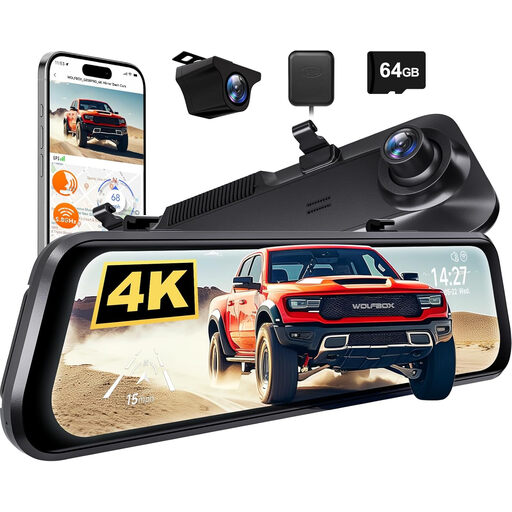
Why This Fits Their Persona: Perfect for those who want a clutter-free dashboard. This system replaces your existing rearview mirror with a smart mirror featuring a built-in 12-inch touchscreen and a 4K dash cam.
This model avoids the "messy installation" pitfall by offering an integrated solution. It looks like an original part of the car, with no separate screens on the dashboard. The 4K camera ensures sharp footage.
Offers a seamless, factory-look. The large 12-inch screen functions as a digital rearview mirror, providing a much wider rear view than a traditional mirror. Includes ADAS features for lane assistance.
We have compiled a complete, up-to-date list of products that fully meet these strict selection criteria and local regulations.
Yes, using a portable screen is permitted, provided it does not obstruct your view of the road and is securely mounted. By law, you are not allowed to hold a mobile electronic device while driving. A fixed-mounted screen that you operate hands-free (e.g., via voice control) is not covered by this rule. Therefore, ensure the mount is secure and the screen is not in your direct line of sight.
The reliability heavily depends on the technology used. Always choose a model that offers dual-band Wi-Fi (with 5GHz support). This minimises the risk of interference and ensures a stable, fast data transfer, which is essential for apps like Google Maps, Waze, or other navigation services. Models that only operate on 2.4GHz are significantly less reliable in busy urban environments.
Virtually all modern dash cams, including systems integrated into a CarPlay screen, use loop recording. This means the system automatically overwrites the oldest, unlocked video files once the card is full. Important recordings, such as those triggered by sudden braking or a collision (detected by the G-sensor), are automatically locked and will not be overwritten. This ensures you always have the most recent footage available without having to manually clear the card.
