
Vandaag of morgen in huis

Kwaliteit gegarandeerd

Welkomstaanbiedingen ontgrendelen: GRATIS bezorging | Tot 80% korting | Gratis 30 dagen JoyPlus-proefperiode
Download de app
Driving a car made before 2017? There's a good chance you're missing modern features like Apple CarPlay, Android Auto, and a built-in dash cam. Having a completely new infotainment system installed is often expensive and complex. Fortunately, there's a practical solution: a universal CarPlay screen that you can easily install yourself. But the market is flooded with options that promise more than they deliver. As a Joybuy Product Recommendation Officer, I'll help you make the right choices and avoid common pitfalls.
Before you make a purchase, it's important to know what can go wrong. Many screens look good on paper but fail in practice.
wireless CarPlay screen that constantly loses its connection. This often happens due to outdated Bluetooth or Wi-Fi chips. The result is stuttering music, dropped navigation, and the frustration of repeatedly having to re-pair your phone.To avoid the problems above, there are a few technical specifications you should always check. These determine the user experience and the longevity of your car upgrade screen.
The smooth operation of Apple CarPlay and Android Auto depends on the wireless technology. Pay attention to the following points:
The quality of the screen and the cameras is crucial. A portable car navigation screen must be clearly legible, and the dash cam must provide reliable footage.
car screen with a reverse camera with at least 1080p resolution and a waterproof design (IP67 rating) makes parking and maneuvering safer.The whole point of a portable screen is simplicity. Opt for a 'plug-and-play' model that you power via the 12V-24V cigarette lighter socket. A sturdy, adjustable mount for the dashboard or windscreen is a must, ensuring the screen is securely fixed and doesn't obstruct your view.
Not every screen is right for every driver. Below is a selection of products tailored to different needs, based on their specifications.
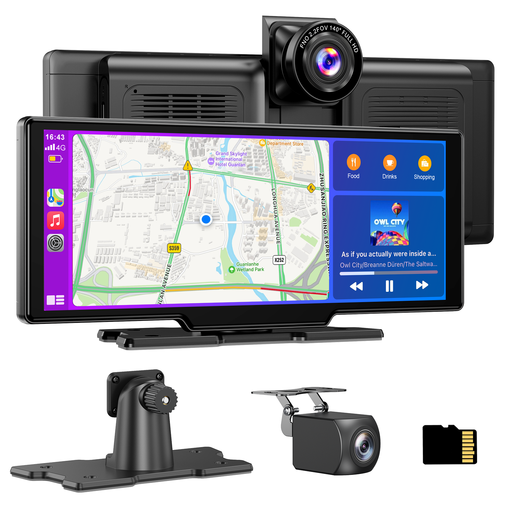
Why This Fits Their Persona: Ideal for the driver seeking a complete and integrated solution. This device combines wireless CarPlay/Android Auto with a high-quality 4K dash cam and a 1080p reverse camera in one package. No fussing with separate devices.
The 4K resolution of the front camera ensures sharp, usable footage. Support for dual-band Wi-Fi minimises connection issues with CarPlay and Android Auto.
Includes a 64GB TF card, so it's ready to use out of the box. The combination of a 10.26-inch HD screen and a complete camera set offers great value.
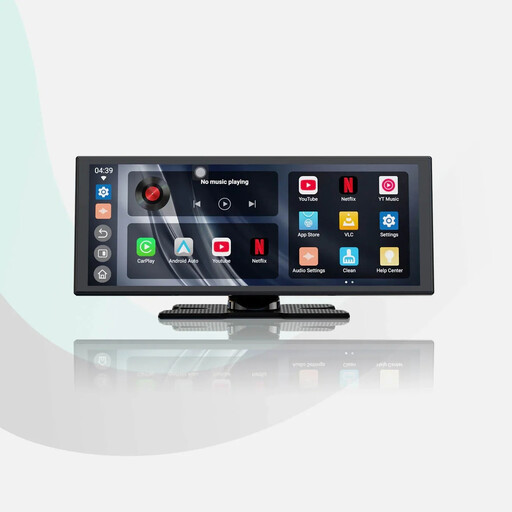
Why This Fits Their Persona: For those who want more than just navigation. This screen runs on Android 13, allowing you to use apps like YouTube and Netflix directly on the screen (via a Wi-Fi hotspot). Ideal for breaks or long journeys.
The large 11.4-inch HD screen (1920x720) is sharp and responsive, avoiding the pitfall of a slow and distracting screen. According to the manufacturer, dual Wi-Fi and Bluetooth ensure a stable connection.
Built-in Android system for streaming apps. Includes a 1080p reverse camera. Note: this model does not have a built-in front dash cam.
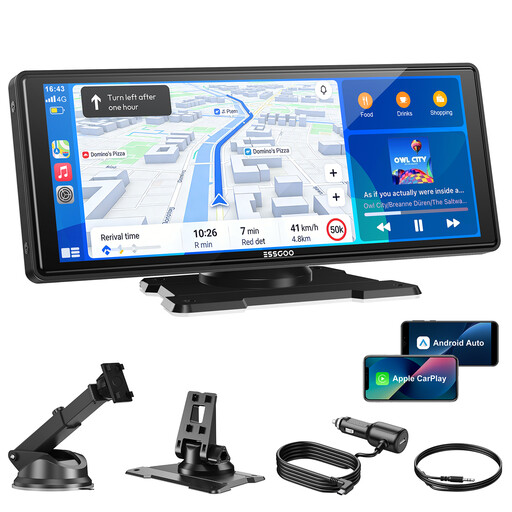
Why This Fits Their Persona: Perfect for those who primarily want a modern, large navigation and media screen without immediately investing in an integrated dash cam. It offers the core features (wireless CarPlay/Android Auto) on a large, clear screen.
This model focuses on the basics and does them well. With dual-band Wi-Fi and Bluetooth 5.3, it tackles the pitfall of an unstable connection. The large 10.26-inch HD screen is a significant upgrade.
Offers excellent value for money for its core functionality. It is ready for a reverse camera, which you can add later.
We've compiled a complete, up-to-date list of products that fully meet these strict selection criteria.
Yes, for most 'plug-and-play' models, it is. You attach the mount to your dashboard or windscreen, plug the power cord into the cigarette lighter socket, and pair your phone via Bluetooth and Wi-Fi. A reverse camera often requires some extra work to neatly route the cable to the back of the car.
Most portable screens offer multiple options to transmit audio to your car stereo:
The lifespan depends on the build quality and usage. A good model with solid construction and effective heat dissipation can last for years. Pay attention to the operating temperature specified by the manufacturer; a wide range (e.g., -20°C to +65°C) indicates a more robust design. Avoid prolonged exposure to direct sunlight to prevent overheating of internal components.
