
Vandaag of morgen in huis

Kwaliteit gegarandeerd

Welkomstaanbiedingen ontgrendelen: GRATIS bezorging | Tot 80% korting | Gratis 30 dagen JoyPlus-proefperiode
Download de app
Do you drive a car made before 2018? If so, you're likely missing out on modern conveniences like Apple CarPlay or Android Auto. Navigating with your phone on a wobbly mount, dealing with messy cables, and missing calls is both inconvenient and unsafe. A CarPlay screen seems like the perfect solution to upgrade your older car, but the market is flooded with models that overpromise and underdeliver.
As a Joybuy Product Recommendation Officer, I see the issues buyers face daily. Before you invest in an upgrade, it's crucial to understand the common pitfalls that can render your purchase useless.
The 3 pitfalls of choosing an external CarPlay screen:
To avoid a bad purchase, focus on a few concrete specifications. These determine whether a car screen for navigation and media is a valuable addition or a source of frustration.
The choice between a wired and wireless connection is critical. A wired connection is typically more stable and charges your phone at the same time. However, a wireless connection offers far more convenience: you get in the car, and your phone connects automatically.
If you opt for wireless, check if the screen supports dual-band Wi-Fi (2.4G/5G). A 5GHz connection is faster and much less prone to interference than the crowded 2.4GHz band, resulting in a more stable wireless Android Auto or CarPlay experience.
For an external CarPlay display, readability is essential. Pay attention to these two points:
An integrated dashcam is a smart addition. It combines two devices into one, which saves dashboard space and is often more cost-effective. When considering this, look for:
Not everyone has the same needs. Below are several options tailored to different user profiles.
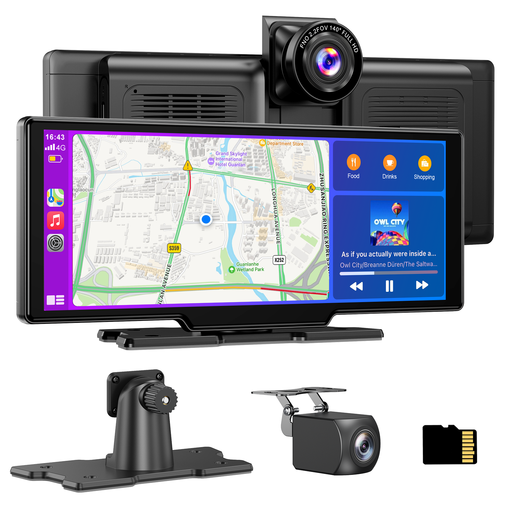
Why This Fits Their Persona: Ideal for drivers (including lease drivers) who want a complete, instant upgrade without permanent modifications. This is the fastest way to upgrade an older car with CarPlay.
This model uses dual-band Wi-Fi for a stable wireless connection. The 10.26-inch HD screen (1600x600) is bright, and the installation is truly plug and play via the 12V socket.
Combines a portable CarPlay screen with a 4K front and 1080p rear dashcam. Includes a 64GB TF card, so it's ready to use right out of the box.
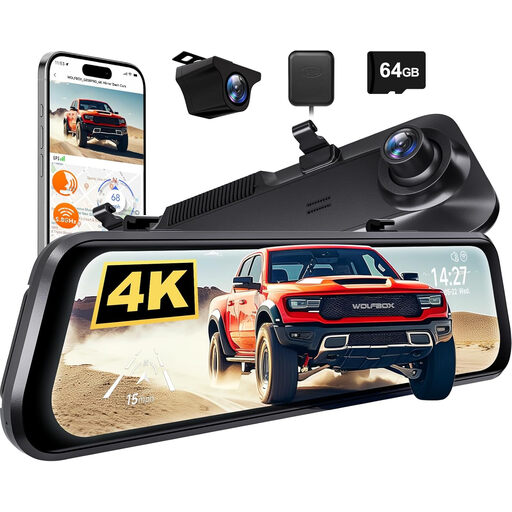
Why This Fits Their Persona: For the driver who prioritises recording quality and advanced safety features above all else. This isn't a CarPlay screen, but a premium tech upgrade that replaces the rearview mirror with a smart display.
This device focuses on one task and does it exceptionally well: recording. It avoids the pitfall of being a 'jack-of-all-trades' that excels at none. The specs are clearly focused on camera quality and reliability.
Offers 4K recording quality and driver-assistance systems (ADAS/BSD) that actively warn of danger. The 12-inch mirror display provides a much wider and clearer view of the traffic behind you than a standard mirror.
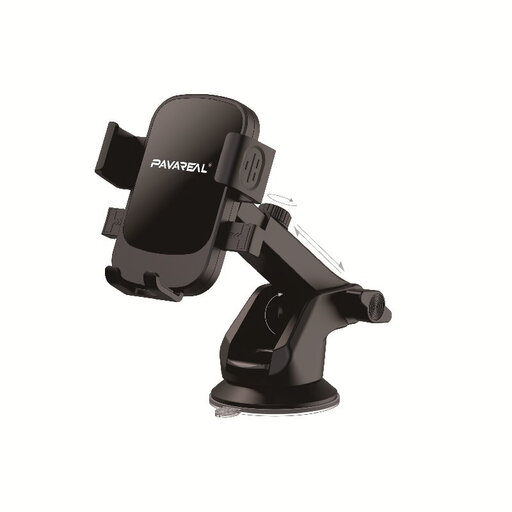
Why This Fits Their Persona: For those not yet ready to invest in a full screen but who want a stable and safe way to use their smartphone for navigation and music. The foundation of any upgrade is a good mount.
This is a purely mechanical solution. No electronics means no risk of bad connections or unreadable screens. It does one thing: hold your phone securely. Simplicity and reliability.
Extremely low cost and universal compatibility. The strong suction cup and adjustable arm ensure stable positioning on the dashboard or windshield, preventing your phone from vibrating while driving.
Upgrading your car is a very personal choice. You might be looking for a different screen size, a specific dashcam feature, or another mounting option.
Yes, most portable screens are designed to be universal. They attach to the dashboard or windshield with a suction cup or an adhesive mount. Power is supplied via the standard 12V-24V cigarette lighter socket found in virtually every car. This makes them an excellent solution to upgrade an older car with CarPlay without any permanent modifications.
Most models offer several options for this. The most common are:
For many drivers, yes. It integrates two important functions into a single device. This not only saves money compared to buying two separate devices but also keeps your dashboard tidy and free from extra cables and mounts. You get modern connectivity and added safety in one package.
