
Someone copying footage with limited desk space
You want to transfer dashcam clips without taking up space with a large hub. Start by checking the card format, USB port and dimensions of the reader.


Choose a card reader that matches your dashcam’s card format and the USB port on the device you’re copying the footage to. A compact reader with a single microSD slot keeps your desk clutter-free; extra slots, a second connector type or UHS-II are mainly useful if you’ll actually use those features. Open and check an important copy before deleting the original.
You want to transfer dashcam clips without taking up space with a large hub. Start by checking the card format, USB port and dimensions of the reader.
You want to save a recording before the dashcam card is used again. A reader gives you access to the file; you’ll need to make and check the copy yourself.
You often copy a lot of footage or use different card formats and USB ports. Compare the supported slots and connectors, not just the stated peak speed.
Start with the card format and USB port, then see whether extra connections or speed suit the way you’ll use the reader.
| What to consider | What should you look for? | Who is this important for? |
|---|---|---|
| Card and port compatibility | Check that the slot fits your dashcam card and that the connector fits the USB port on your computer or phone. | If I want to copy clips without an extra adapter, the card and connection need to fit directly. Around 36% of consumers focus mainly on card and port compatibility. |
| Keeping the original clip | Copy it to a destination with enough space, open the copy and safely eject the reader before disconnecting it. | If a recording is important, I want to check that the copy works before using the card again. Around 29% of consumers prioritise keeping and checking the clip. |
| Extra slots and connectors | Choose SD and microSD slots or USB-A and USB-C only if you use both formats or ports; check whether you can insert cards at the same time. | If I use different devices or card formats, I don’t want to keep reaching for a different reader. Around 21% of consumers focus on versatility without unnecessary desk accessories. |
| Transferring lots of clips | Check the card interface, the reader’s capabilities and the USB connection on the destination device; a stated peak speed doesn’t guarantee a particular copy time. | If I often transfer a lot of footage, I want to know whether the card and device can make use of the reader’s interface. Around 14% of consumers focus mainly on transfer time. |
The card needs to fit in a compatible slot for you to open the files.
Check the card format on the card itself or in your dashcam’s manual, then compare it with the slots on the exact model you’re considering.
The connector, USB interface and card interface are different parts of the connection. The card and destination device also affect transfer speeds.
Compare the supported interfaces of the card, reader and computer. A UHS-II reader is most relevant if you also use a compatible UHS-II card.
The number of slots doesn’t necessarily tell you whether you can insert or access two cards at the same time.
Check the model’s instructions if using two cards at once is important to you.
A card reader doesn’t check for you that the recording has been saved properly to the destination.
Open the copied clip before deleting the original. Microsoft advises safely ejecting removable hardware in Windows before disconnecting it to prevent data loss.
Kingston’s MobileLite Plus microSD Reader is a USB-A reader for microSDHC and microSDXC cards. UHS-II support is most relevant when used with a compatible card.
The MobileMate USB 3.0 is a USB-A reader for microSD with UHS-I. The QuickFlow microSD Reader has a USB-C connection and, according to SanDisk, supports UHS-I and UHS-II cards.
According to Hama, the USB-C Card Reader 00200131 has slots for SDHC/SDXC and microSDHC/microSDXC cards.
The Dual-Slot USB-A/C Reader is designed for use with devices that have USB-A or USB-C and, according to Lexar, has SD and microSD slots.
The RDC3 is a USB-C card reader with an SD slot and a microSD slot.
These products offer a range of card reader features, including options combined with USB-C hubs or other devices. Before buying, check that the listed card format matches your dashcam card and that the connection suits your computer or phone.
 No image available
Could be suitable if you use a USB-C device and also want to read an SD or TF card; check that the card format matches your dashcam card.
The title lists a 7-in-1 hub with HDMI, 100W PD charging, three USB 3.0 ports and an SD/TF card reader.
 No image available
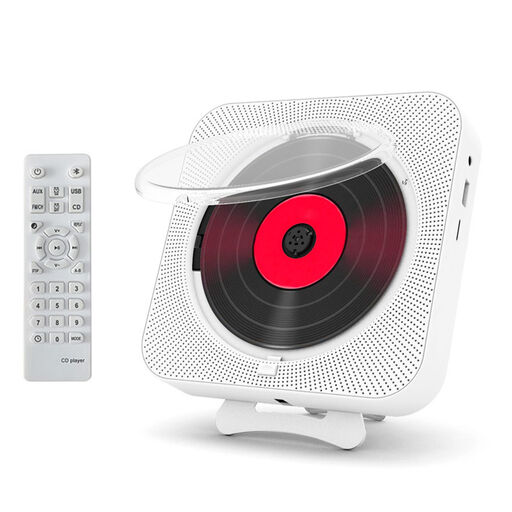
This option combines a TF card reader with an external CD player; check that the card and other features meet your needs.
The product title lists Bluetooth 5.0, 10 W speakers, FM radio, an LED display and remote control.
 No image available
Could be suitable if you use a UHS-II SDHC or SDXC card; check that your dashcam’s card format matches the listed card types.
The product title lists two slots and UHS-II support. The product information mentions an included USB-C cable.
 No image available
Could be suitable if you use a USB-C device and want to read SD or microSD cards; check that your dashcam card is supported.
The product information lists support for SD and microSD cards. The title lists USB Type-C and 10000 Mbit/s.
Check the card format on the card itself or in your dashcam’s manual, then compare it with the reader’s supported slots. An SD slot and a microSD slot aren’t the same; also check that the USB connector fits your computer or phone.
First check that the clip you want is saved to the destination and that you can open it. Microsoft advises safely ejecting removable hardware in Windows before disconnecting it to prevent data loss.
No. ACM ConsuWijzer explains that statutory rights exist alongside any manufacturer’s or seller’s warranty. If a product develops a fault sooner than you could reasonably expect with normal use, the seller is responsible for providing an appropriate solution; there isn’t one fixed statutory warranty period for every card reader.
Not necessarily. The Dutch Data Protection Authority explains that identifiable people in footage count as personal data. The exception for personal or household use assumes that footage stays private or is shared only with a very limited group. That exception doesn’t apply to wider sharing, which means the relevant GDPR legal basis must be considered. This is separate from keeping a private backup on your own device.