
People using different computers at work
You take a dashcam card to workstations that may have USB-A or USB-C ports, and want a reader that fits a port you’re allowed to use. UGREEN lists both connections for model 50706.


Choose a card reader with a slot that fits your dashcam card and a connection you’re allowed to use at work. If you switch between computers with USB-A and USB-C, a reader with both connector types could be useful; UHS-II is mainly relevant if your microSD card also supports that interface. Save the copy somewhere permitted where you can manage access, and safely eject the card when you’re finished.
You take a dashcam card to workstations that may have USB-A or USB-C ports, and want a reader that fits a port you’re allowed to use. UGREEN lists both connections for model 50706.
You copy clips that may show identifiable people and want to decide who can access the saved files. The Dutch Data Protection Authority considers images of identifiable people to be personal data.
You regularly transfer a large number of clips and want the reader’s interface to match your microSD card’s interface. The SD Association distinguishes between bus speed and a card’s actual performance.
First, check that the reader supports your card and the computer port you’re allowed to use. Then consider storage management, and look at the UHS interface if transfer time matters.
| What to consider | What to look for when buying | Who is this important for? |
|---|---|---|
| Card format and compatibility | Check that the reader supports microSDHC or microSDXC and your card’s capacity. For a larger card, check the specifications for the exact version. | If I want to read my dashcam card directly, its format and capacity need to be supported by the reader. Around 33% of consumers say card compatibility is their main reason for buying. |
| Connection on the work computer | Check which USB port is available and whether the workplace allows you to use your own reader and storage. | If I switch between computers with different ports, I don’t want to bring the wrong connector. Around 27% of consumers prioritise a connector that fits their computer. |
| Control over saved copies | Find out in advance where files can be stored and who can access them. Check that the copy has transferred before deleting the original files. | If I’m copying footage of identifiable people, I want to know where it will be stored and who can access it. Around 27% of consumers say controlled storage is their main reason for buying. |
| Transferring lots of clips | Compare your card’s UHS interface with that of the microSD slot. Don’t treat stated maximum speeds as a measure of copy time at your workplace. | When transferring lots of clips, I want to know whether my card and reader support the same interface. Around 13% of consumers prioritise reducing transfer time. |
The SD Association distinguishes between bus speed and a card’s actual performance. Speed doesn’t depend solely on the rating shown on the reader.
Compare the UHS interfaces of both the card and the microSD slot. Treat stated maximum speeds as specifications, not as a measure of performance at your workplace.
Transcend says the RDF5 cannot use SD and microSD cards at the same time; UGREEN says simultaneous use is supported by the version of model 50706 reviewed.
If you need to use two cards at once, check that the exact model supports this.
If both cards can’t be inserted at the same time, processing them takes extra steps.
Clips showing identifiable people contain personal data. On a shared computer, other people may be able to access files left behind.
The Dutch Data Protection Authority emphasises that organisations must restrict access to the personal data they process. Use an approved storage location, check where temporary copies are saved and who can access them.
UGREEN’s Dutch and European product pages list different supported capacities for model 50706. For the Baseus version reviewed, the product specifications list USB-A; general information about other USB-C versions doesn’t confirm that this model has a USB-C connection.
Check the model number, card capacity and connector type of the version you plan to use.
Model 50706 is an option if you need USB-A and USB-C at different workstations and want to read SD and microSD cards.
The MobileLite Plus microSD is a USB-A option for microSD cards, including UHS-II cards.
The RDF5 is a USB-A option for reading SD and microSD cards one at a time.
The USB-C 7-in-1 hub reviewed combines a card reader with extra connections, making it suitable for a workstation where you need more than just a card reader.
The Lite Series USB-A reader is an option for reading SD and microSD cards one at a time.
These product options are USB-C hubs and card reader accessories for reading SD or microSD cards at a USB-C workstation.
 No image available
An option if you need extra connections as well as a card reader at a USB-C workstation.
The product name lists HDMI 4K@30Hz, 100W PD, 3x USB 3.0 5Gbps and an SD/TF card reader.
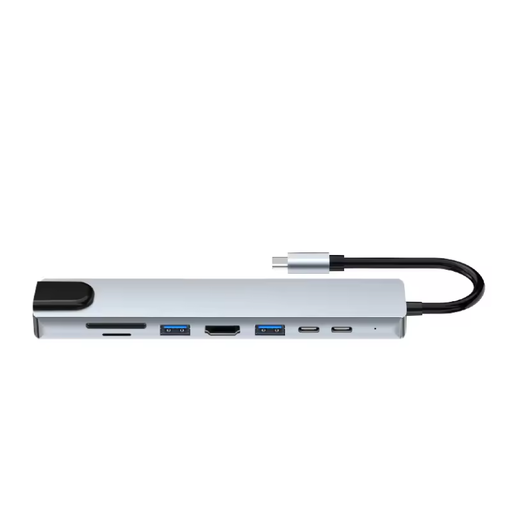 No image available
An option if you’re looking for multiple connections as well as an SD and microSD card reader for a USB-C workstation.
The product name lists HDMI 4K, Ethernet RJ45, 3x USB 3.0, SD, microSD and a USB-C charging function.
 No image available
An option if you’re looking for an external DVD drive as well as a way to read SD or TF cards.
The product name lists USB 3.0 and Type-C.
 No image available
An option if you’re looking for a card reader for SDHC or SDXC cards with UHS-II.
The product name lists two slots and UHS-II.
 No image available
An option if you’re looking for a hub with an SD and microSD card reader for a USB Type-C workstation.
The product name lists 10000 Mbit/s and the colour silver.
Copy the files you need to an approved storage location and check the copy before deleting the original files. Garmin recommends transferring saved footage from the Dash Cam Mini for permanent storage; this advice applies to that model. In Windows, safely eject removable storage according to Microsoft’s instructions.
No, not necessarily: check that both your microSD card and the slot support UHS-II. Kingston lists UHS-II and UHS-I support for the MobileLite Plus microSD, while Transcend says a UHS-II card runs at UHS-I speed in the RDF5. The SD Association also distinguishes between interface speed and a card’s actual performance.
No. According to the Dutch government, there is no fixed term for the statutory warranty in the Netherlands. You’re entitled to a product that works as it should, taking into account what you can reasonably expect from it. The manufacturer’s warranty is separate.
Don’t assume that you can. The Dutch Data Protection Authority considers images of identifiable people to be personal data and says that recording and publishing them is not automatically allowed. Organisations processing personal data need to prevent unauthorised access; the applicable obligations depend on who processes the footage and why. A card reader does not, by itself, give you permission to share footage.
That depends on the version and the workplace rules. Transcend describes the RDF5 as plug-and-play, and Baseus says the same of the Lite Series reader reviewed. Also check whether the shared computer allows external storage; product features don’t tell you what the local workplace policy allows.