Joybuy Insights

How to Choose a Car Diagnostic Tool and Avoid Costly Mistakes

A warning light on your dashboard. It's a familiar scenario that immediately raises questions: what's wrong, and how much will the repair cost? A car diagnostic tool, also known as an OBD2 scanner, puts you back in control. It allows you to read your car's fault codes yourself and often even fix simple problems. But the market is flooded with options, and making the wrong choice can quickly lead to frustration and wasted money.

Before making a purchase, it's important to recognise the most common pitfalls. Many cheap devices entice you with a low initial price but hide crucial disadvantages that only become apparent after purchase.

  • The Subscription Trap: Hidden costs are a common problem. A fault code reader might seem like a bargain until you discover that advanced features or even updates for new car models are locked behind an expensive annual subscription.
  • Limited System Access: Many basic scanners only read the engine control module (ECM). That's enough to reset a check engine light, but modern cars have dozens of other systems like ABS (brakes), SRS (airbags), and the transmission. A fault in one of these systems will remain invisible to a simple scanner.
  • Vague Codes Without Context: A device that only displays a code like 'P0420' doesn't help a DIYer much. Without a clear explanation or repair advice, you're still left searching online or visiting a garage.

What to Look For: The Core Specifications

To avoid a bad purchase, it's essential to look beyond the marketing promises. Pay attention to the following three technical specifications that determine whether a car diagnostic tool is truly right for your needs.

1. System Diagnostics: Engine Only or a Full Scan?

The most important question is which systems you want to be able to read.

  • Basic OBD2/EOBD: This function is mandatory for all cars (petrol from 2001, diesel from 2004) and focuses purely on emission-related engine faults. Ideal if you only want to check the engine management system.
  • Full System Diagnostics: These devices communicate with all electronic modules in the car. Think of the brakes (ABS), airbags (SRS), transmission (TCM), air conditioning (HVAC), and more. This is indispensable for serious diagnostics and for tracking down non-engine-related problems.

2. Function Level: From Resetting to Coding

Not every diagnostic tool can do the same thing. The functionality determines what you can actually do.

  • Reset Functions: Besides clearing fault codes, service functions are crucial for maintenance. Popular functions include resetting the oil service, registering a new battery (BMS), opening the electronic parking brake (EPB) for brake pad replacement, and calibrating the steering angle sensor (SAS).
  • Bidirectional Control (Active Test): This allows the scanner to send commands to the car to test components. For example, you can turn on the cooling fan or test a fuel injector without disassembling parts. This is a powerful feature for quickly pinpointing the cause of a problem.
  • ECU Coding: This is an advanced feature that allows you to modify the car's software. Think of activating hidden options or programming a new module after replacement. This is typically reserved for professional mechanics and very experienced hobbyists.

3. Compatibility and Updates: Protocols and Future-Proofing

A car is constantly evolving, and your scanner needs to keep up.

  • Protocols: Ensure the scanner supports modern protocols like CAN FD and DoIP. These are required for many new models from manufacturers like General Motors, BMW, and Jaguar Land Rover. Without this support, you won't be able to read newer cars, or only to a limited extent.
  • Connectivity: Do you opt for a handheld tablet with its own screen or a compact Bluetooth dongle that works with a car diagnostic app on your smartphone? A dongle is portable and often cheaper, while a tablet is more robust and not dependent on your phone.
  • Update Policy: Check how the manufacturer handles software updates. Are they free for life, or do you pay a subscription fee after a year? Free updates are a major advantage and keep your tool relevant without recurring costs.

Our Top Product Recommendations

Based on these criteria, we have selected a few popular choices that suit different user profiles.
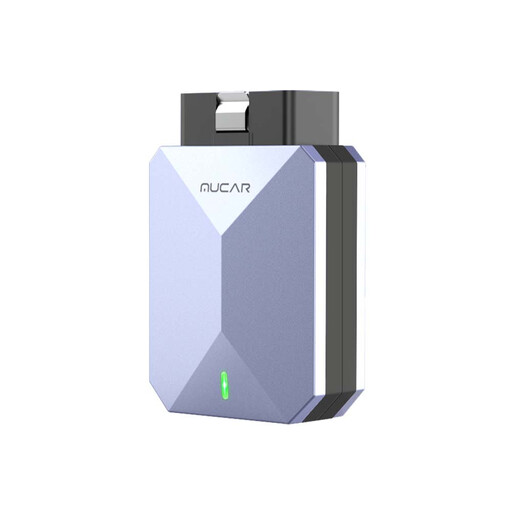
MATCH FOR: The Savvy Homeowner
MUCAR BT200 MAX OBD2 Diagnostic Scanner

MUCAR BT200 MAX OBD2 Diagnostic Scanner

Why This Fits Their Persona: Perfect for the DIYer who wants to do more than just reset a check engine light. This Bluetooth dongle turns your smartphone into a powerful diagnostic tool. Ideal for performing basic maintenance and diagnosing issues across all major car systems.

How It Avoids the Trap

Offers lifetime free updates for full system diagnostics, allowing you to dodge the subscription trap. The AI assistant provides explanations for fault codes, solving the problem of vague codes.

Key Advantage & Pros

Supports full system diagnostics and 15+ reset functions. Support for the CAN-FD protocol also makes it suitable for newer GM vehicles.
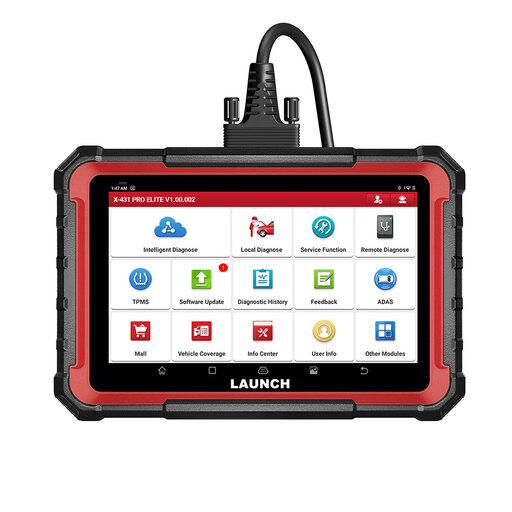
MATCH FOR: The Serious Hobbyist / Independent Mechanic
LAUNCH X431 PRO ELITE 8 inch Car Diagnostic Tool

LAUNCH X431 PRO ELITE 8 inch Car Diagnostic Tool

Why This Fits Their Persona: For those who want to dig deeper and perform complex repairs and maintenance themselves. This tablet scanner offers advanced features normally only found in professional garages, such as bidirectional control and ECU coding.

How It Avoids the Trap

It offers very broad vehicle and system coverage (OE-level), so you won't run into the limitations of a basic scanner. The update policy is transparent: 2 years free, after which the device remains fully functional.

Key Advantage & Pros

Powerful hardware with an 8-inch touchscreen. Supports bidirectional control, ECU coding, and over 31 service functions. Compatible with CAN FD and DoIP protocols.
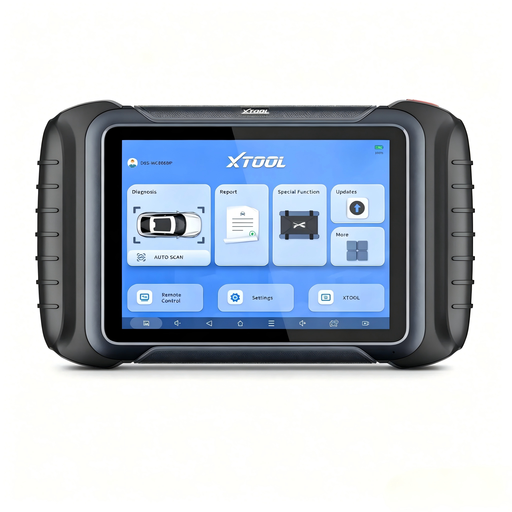
MATCH FOR: The Professional Workshop
XTOOL D8S Bidirectional OBD2 Scanner with Topology Mapping

XTOOL D8S Bidirectional OBD2 Scanner with Topology Mapping

Why This Fits Their Persona: Designed for the professional mechanic who needs efficiency and in-depth diagnostic power. The topology mapping provides a visual overview of the communication between all modules, significantly reducing diagnosis time.

How It Avoids the Trap

This is a professional investment with a clear return. Advanced features like topology mapping and PMI functionality go far beyond what standard scanners offer, justifying the higher price.

Key Advantage & Pros

Offers intelligent topology mapping for a quick overview of system faults. It has over 42 service functions, advanced ECU coding, and supports CAN FD/DoIP.

Looking for more options?

We have compiled a complete, up-to-date list of products that fully meet these strict selection criteria and local regulations.

## Frequently Asked Questions

1. Do I need an app to read my car's diagnostics?

That depends on the type of device. There are two main types:

  • Bluetooth/Wi-Fi dongles: These compact adapters plug into the OBD2 port and connect wirelessly to an app on your smartphone or tablet. This is a flexible and often budget-friendly solution.
  • Handheld scanners: These are all-in-one devices with their own screen and software. They are ready to use out of the box, don't require a phone, and are often more robustly built for workshop use.

2. What is the difference between an OBD2 scanner and a full system diagnostic tool?

A standard OBD2 scanner can only read the engine management system, focusing on emission-related faults. A device with full system diagnostics can communicate with all electronic modules in the car, such as the ABS brake system, airbags, automatic transmission, air conditioning, and more. This provides a much more complete picture of your vehicle's health.

3. Will a diagnostic tool work on any car?

Most diagnostic tools work on virtually all cars produced after a certain date, thanks to the standardised OBD2/EOBD port. In the EU, this applies to petrol cars from 2001 and diesel cars from 2004. For older cars, you often need brand-specific adapters (OBD1). For the very latest cars, it's important that the scanner supports modern protocols like CAN FD and DoIP. Always check the manufacturer's compatibility list before making a purchase.
