
Vandaag of morgen in huis

Kwaliteit gegarandeerd

Welkomstaanbiedingen ontgrendelen: GRATIS bezorging | Tot 80% korting | Gratis 30 dagen JoyPlus-proefperiode
Download de app
A warning light on your dashboard. It's a familiar scenario that often leads to a costly garage bill. With your own car diagnostic tool, you can diagnose the problem yourself, reset a check engine light, and even perform minor maintenance. But the market for these devices is confusing. Many models promise the world but deliver only frustration in practice.
As a Joybuy Product Recommendation Officer, I'm here to help you make the right choices. We'll look past the marketing and focus on what truly matters. Here are the three most common pitfalls and how to avoid them.
A budget-friendly OBD2 scanner seems like a smart buy, until you have to pay extra for updates or even basic functions after a year. Many manufacturers lure you in with a low initial price but then lock you into expensive annual subscriptions. Without these updates, your device quickly becomes obsolete and won't work on newer car models.
How to avoid this: Specifically look for a car diagnostic tool with lifetime free updates. This is often clearly stated and guarantees you can use the device for years without unexpected costs.
The term "universal" or "for all car brands" is often misused. A simple car fault code reader can indeed read generic engine codes (OBD2/EOBD) on most cars made after 2004. But if you want to diagnose a specific fault in the ABS, airbag, or transmission, you need a device that can scan all systems. Many cheap scanners can't do this, meaning you'll end up at the garage anyway.
How to avoid this: Check if the device explicitly supports "full system diagnostics" or "diagnostics of all systems" (like ECM, TCM, ABS, SRS). This is the difference between a simple code reader and a full-fledged diagnostic tool.
Features like ECU coding and bi-directional control sound impressive, but on budget models, they are often very limited. They might only work on a handful of older car models or require complex procedures without clear instructions. You pay for a professional label but don't get the functionality you expect.
How to avoid this: Be realistic. True, reliable bi-directional control and ECU coding are typically found in mid-range and higher-end models. Read the specifications carefully and look for support for modern protocols like CAN FD and DoIP, which are necessary for modern vehicles.
To avoid a bad purchase, it's important to understand a few key specifications.
A standard fault code reader only focuses on the engine control module (ECM). This is fine for reading and resetting a check engine light. However, if you want more, such as diagnosing problems with the automatic transmission (TCM), the anti-lock braking system (ABS), or the airbag (SRS), you need a scanner that supports all systems. These devices communicate with all the electronic control units (ECUs) in your car.
Cars are becoming increasingly complex. New models use advanced communication protocols like CAN FD (used by GM and Ford after 2020, among others) and DoIP (used by BMW, Jaguar, Land Rover, among others). A diagnostic tool without support for these protocols and without regular software updates is not future-proof. A model with lifetime free updates is therefore a wise investment.
Below is a selection of diagnostic tools tailored to different user profiles.
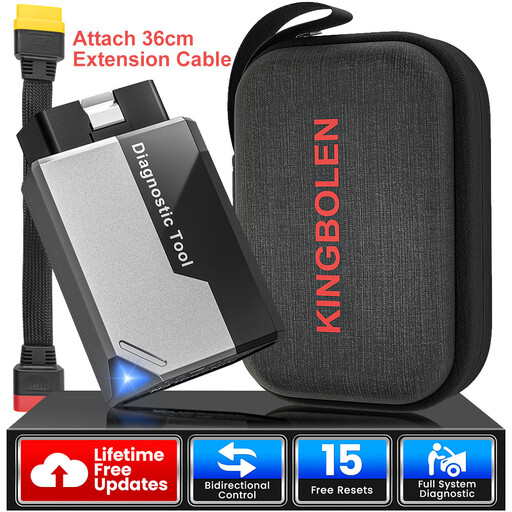
Why This Fits Their Persona: Ideal for those who want to start with more serious diagnostics without a large budget. This compact bluetooth adapter turns your smartphone into a powerful diagnostic tool. You can not only read engine codes but also scan all systems and even perform basic bi-directional tests.
This model tackles the subscription trap head-on with lifetime free updates for all system diagnostics and 15 reset functions. You pay once and are set for the future.
Offers diagnostics of all systems and supports the CAN-FD protocol, which is exceptional in this price range. The combination of features and lifetime updates provides excellent value.
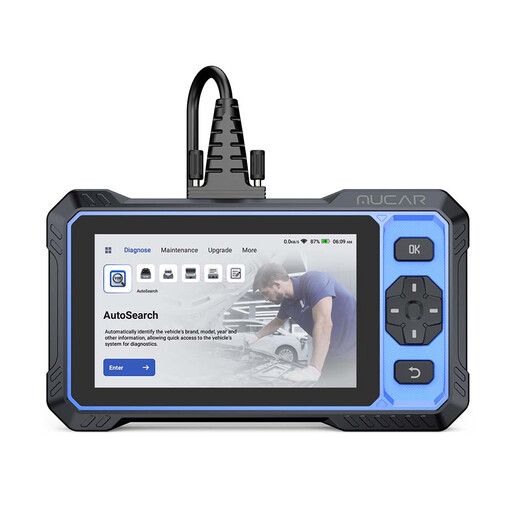
Why This Fits Their Persona: For the hobbyist who wants to do more than just read codes. This is an all-in-one handheld device with its own touchscreen. It offers OE-level system diagnostics, bi-directional control, and an extensive set of service functions for serious maintenance and troubleshooting.
With lifetime free updates and support for CAN-FD and FCA AutoAuth, this device delivers on its "professional" promises without hidden costs or limited compatibility.
The combination of full system diagnostics, active tests (bi-directional control), and 20+ reset functions in a rugged device with free updates is a strong proposition for this price.
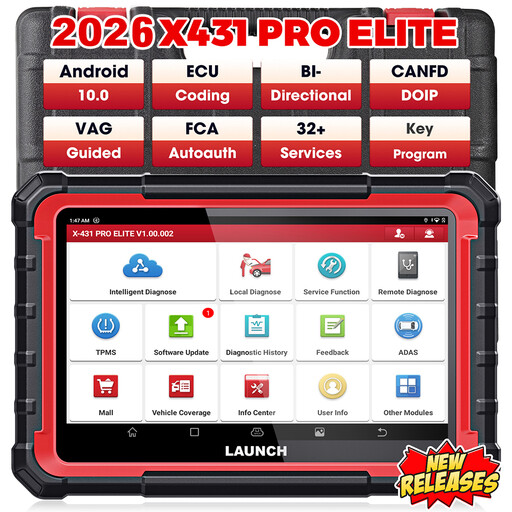
Why This Fits Their Persona: This is a full-featured diagnostic tablet for the demanding user or small workshop. It offers advanced functions normally found only in dealer-level equipment, such as ECU coding, comprehensive bi-directional control, and support for the latest protocols.
This device delivers on its "professional" promise. The ECU coding and active tests are extensive and reliable. The 2 years of free updates give you access to the latest vehicle data.
Supports both CAN FD and DoIP protocols, making it compatible with the very latest vehicles. The OE-Level diagnostics and 31+ service functions make this a highly capable tool.
We have compiled a complete, up-to-date list of products that fully meet these strict selection criteria and local regulations.
Not always. A basic OBD2 scanner works on most petrol cars from 2001 and diesel cars from 2004 for engine-related fault codes. For reading other systems like ABS, airbag, or transmission, and for specific reset functions, compatibility depends on the make, model, and year. Always check the manufacturer's vehicle coverage list before purchasing, especially if you need a tool for a specific brand or model.
A Bluetooth dongle is compact and uses your smartphone as its screen and interface. This is often a cost-effective starting point, but functionality depends on the app. A hand-held device is an all-in-one solution with its own screen and software. They are often more rugged, faster, and typically offer more extensive diagnostic functions and a more stable connection, making them better suited for more intensive or professional use.
For most basic functions, like reading and clearing fault codes, no internet connection is needed. However, a connection is required to download software updates. For advanced functions like online ECU coding or accessing online repair information, a stable internet connection is essential during use.
