
Vandaag of morgen in huis

Kwaliteit gegarandeerd

Welkomstaanbiedingen ontgrendelen: GRATIS bezorging | Tot 80% korting | Gratis 30 dagen JoyPlus-proefperiode
Download de app
A professional car diagnostic scanner can do much more than simply clear an engine warning light. With the right device, you can read fault codes, view live data, check vehicle systems and perform certain maintenance functions. However, many OBD2 scanners appear more comprehensive on paper than they actually are for your car.
For Dutch DIY enthusiasts, mobile mechanics and garages, three purchasing pitfalls are particularly important:
A basic OBD2 scanner is useful for general engine diagnostics and emissions-related fault codes. If you want to check vehicles more thoroughly, you need a car diagnostic tool that can access multiple electronic control units.
Look for support for, among other things:
Full-system diagnostics provide more context than a generic fault code alone. This is particularly useful when buying a second-hand car, investigating recurring faults or dealing with vehicles displaying multiple warning lights.
A standard scanner reads data from the car. A scanner with bi-directional diagnostics can also send commands to an ECU, depending on the available vehicle functions. This allows you to activate, for example, a cooling fan, fuel pump, injector, window mechanism, windscreen wiper or air-conditioning compressor.
This is also known as an active test. It helps distinguish between a faulty component, a wiring problem and a communication issue. Use this function carefully and always follow the vehicle-specific instructions. An active test is not a substitute for a safe mechanical inspection.
Modern communication protocols are important for newer vehicles. CAN-FD may be required for certain recent vehicle systems. Some FCA vehicles also require FCA AutoAuth to access secure gateway functions. According to product information from various brands, users must register an account themselves for this purpose; any vehicle manufacturer fees are not automatically included with the scanner.
Before buying, check:
An AutoVIN function can speed up vehicle identification, but it does not work with every vehicle. Manual selection should therefore remain available.
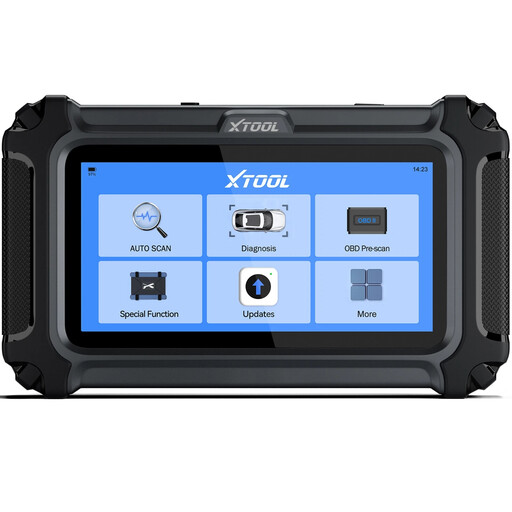
Why it suits this profile: A practical choice for private car owners who want to check fault codes, live data and certain maintenance functions themselves without using a comprehensive workshop tablet.
The product information clearly states that functions may vary by make, model, year and ECU. This avoids creating the expectation that every reset will work on every car.
According to the product information, it supports diagnostics for the engine, transmission, ABS and SRS, as well as AutoVIN, CAN-FD and FCA AutoAuth for compatible vehicles. Software updates are included according to the listing, with no annual subscription fees.
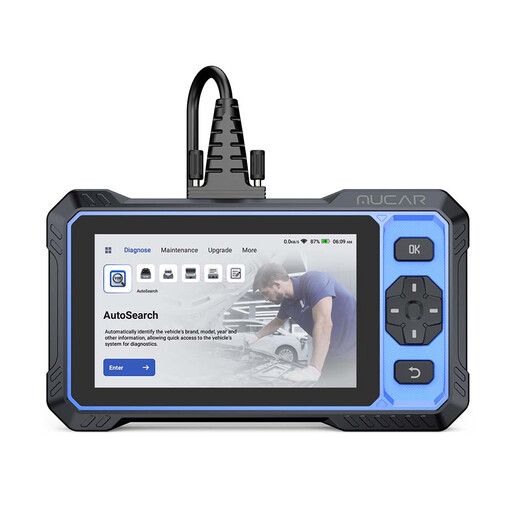
Why it suits this profile: Designed for users who value a large screen, automatic vehicle scanning and extensive diagnostic functions for regular maintenance.
The product description lists the supported systems and distinguishes between general diagnostics and service functions. You should still check coverage for your specific vehicle.
According to the product information, this model offers full-system diagnostics, bi-directional control, more than twenty service functions, CAN-FD, FCA AutoAuth and a 6-inch touchscreen. The listing states that lifetime free updates are included.
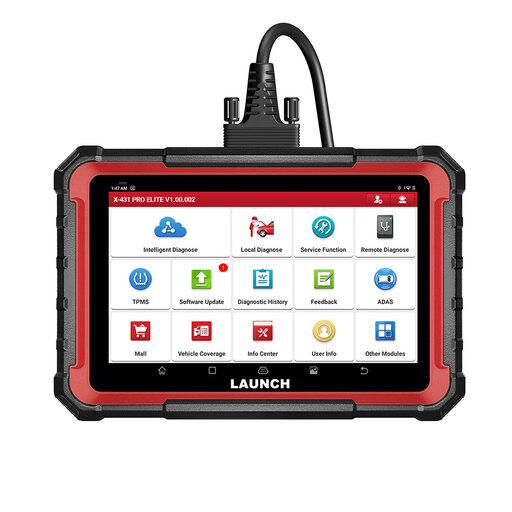
Why it suits this profile: Ideal for garages, mobile mechanics and intensive users who need ECU coding, active tests, reporting and expansion options.
The listing states that ECU coding and active tests are vehicle-specific. Before buying, it is advisable to check compatibility using the vehicle identification number, particularly for coding and secure systems.
According to the product information, the device supports full-system diagnostics, CAN-FD, DoIP, FCA AutoAuth, bi-directional tests, ECU coding and reporting. The software update period is stated in the product listing; check it before ordering.
We have put together a complete, up-to-date list of products that fully meet these strict selection criteria and the applicable European safety regulations.
A scanner can read and clear fault codes, but clearing them does not automatically resolve the underlying cause. Before clearing a code, note down the DTC code, freeze-frame data and relevant live data. Then check the wiring, connectors, fuses and the component concerned.
Extra care is required when using functions such as ABS bleeding, injector coding, DPF regeneration, EPB reset and battery registration. Work with a stable battery voltage and follow the instructions provided by the manufacturer and the vehicle. Only use ECU coding when you know exactly which value or configuration is required.
No. Support varies by make, model, specification, ECU and software version. A device may offer full-system diagnostics while a particular service function is still unavailable. Always check the vehicle and the required function in advance.
When reading fault codes, the scanner receives information from the car. During an active test, the device sends a command to a component via the ECU, depending on the available vehicle function. This can help pinpoint a fault more accurately, but it does not guarantee that the cause will be identified automatically.
This varies by model. Some listings state that lifetime free updates are included, while others specify a particular update period. According to the product information, FCA AutoAuth generally requires separate registration. Always check the current terms on the product page before ordering.
