
Vandaag of morgen in huis

Kwaliteit gegarandeerd

Welkomstaanbiedingen ontgrendelen: GRATIS bezorging | Tot 80% korting | Gratis 30 dagen JoyPlus-proefperiode
Download de app
Choosing a new car accessory often seems straightforward. Yet problems usually only become apparent after purchase: a screen does not work with your phone, a dashcam lacks a suitable memory card, a battery charger is incompatible with the battery, or a charging cable turns out to be too short for the drive.
With this guide, you can compare car accessories based on useful specifications rather than vague marketing terms. The focus is on compatibility, installation, safety and everyday use in the Netherlands.
A device may be suitable for many vehicles but still require specific connections or conditions. For example, a portable CarPlay screen usually works via a 12V socket, while an integrated adapter may require an existing wired CarPlay function.
So check the following in advance:
Resolution is important for a dashcam for your car, but the lens, field of view, storage and recording functions also matter. A 4K camera offers little practical benefit if footage is not automatically protected after a collision or if the memory card fills up quickly.
Look out for features such as loop recording, a G-sensor, night mode and parking monitoring. For 24-hour recording, also check whether a suitable hardwire kit is required. This helps prevent the camera from putting unnecessary strain on the vehicle battery.
A car battery charger must be compatible with the battery technology. This may be lead-acid, AGM, EFB, GEL or a lithium battery. Smart charging is useful, but it does not replace checking the vehicle or battery manual.
With a car jump starter, peak current, engine capacity, cable quality and reverse-polarity protection are important considerations. Do not use a jump starter with a damaged, leaking or frozen battery.
A wireless Apple CarPlay connection is convenient when you do not want to connect a cable every time. Android phones require Android Auto support. Some systems support both, while others are limited to iPhones or only work with a factory display featuring wired CarPlay.
An Android Auto screen or portable CarPlay screen must also offer a suitable audio method. Check whether you can play sound via:
A large screen is not automatically more comfortable if it obstructs your view. Position the device low enough and secure it firmly to the dashboard or windscreen.
For a reversing camera, resolution, water resistance, viewing angle and cable routing are more important than the pixel count alone. A camera mounted outside the vehicle must be suitable for moisture and changes in temperature. Also check whether the camera is supplied with the product or must be purchased separately.
For a dashcam, recording capacity and file protection are practical points to consider. A supplied TF card can simplify installation, but always check the maximum supported storage capacity.
An EV charger Type 2 uses the IEC 62196-2 connection, which is common in Europe and suitable for many electric cars and plug-in hybrids. Also check:
A 7 kW charger cannot automatically be used at that speed in every home or car. Have a fixed wallbox installed in accordance with the applicable installation regulations.
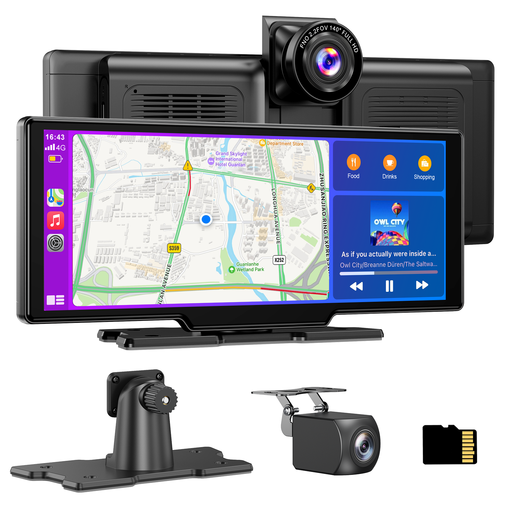
Why it suits this profile: This system combines an Android Auto screen and wireless Apple CarPlay with front and rear cameras. The plug-and-play 12–24V connection is practical for anyone wanting to upgrade an older car without replacing the original radio.
The product description lists 4K front recording, a 1080P rear camera, 64GB storage and loop recording. However, check that the installation location and audio method are compatible with your car.
10.26-inch display, wireless CarPlay and Android Auto support, a 64GB TF card according to the product information, and four audio options.
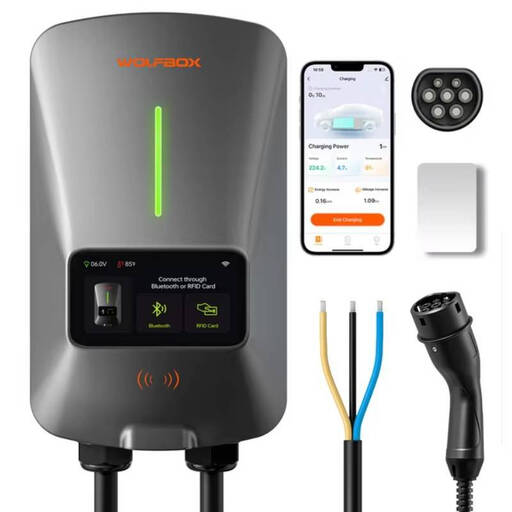
Why it suits this profile: Ideal for EV and PHEV owners who charge at home regularly and want to compare a fixed solution with control features. According to the product specifications, the charger is designed for Type 2 vehicles.
The specifications list Type 2, 7kW, 32A, single-phase operation, an LCD screen, Wi-Fi app control and RFID. Before fixed installation, have an electrician check that the circuit and installation are suitable.
Adjustable 32A current, LCD display, app control and RFID cards according to the product information.
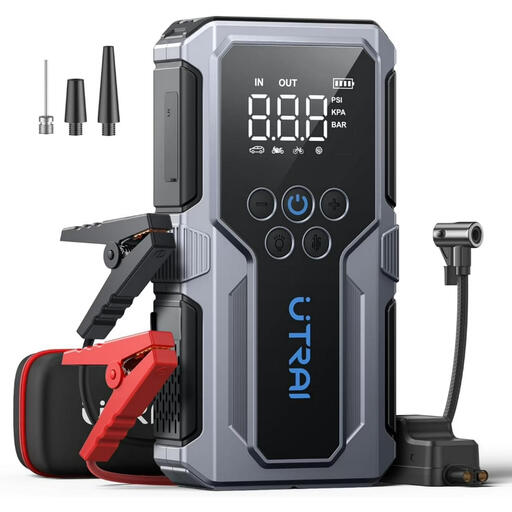
Why it suits this profile: Useful for motorists, campers and families who want one portable device for jump-starting, inflating tyres, emergency lighting and charging devices.
The product information lists protection against reverse polarity, overcurrent and overheating, among other features. According to the instructions, the compressor must not run for more than 10 minutes continuously.
3000A peak current according to the product specifications, a 150 PSI air compressor, LCD screen, USB and USB-C outputs, and three lighting modes.
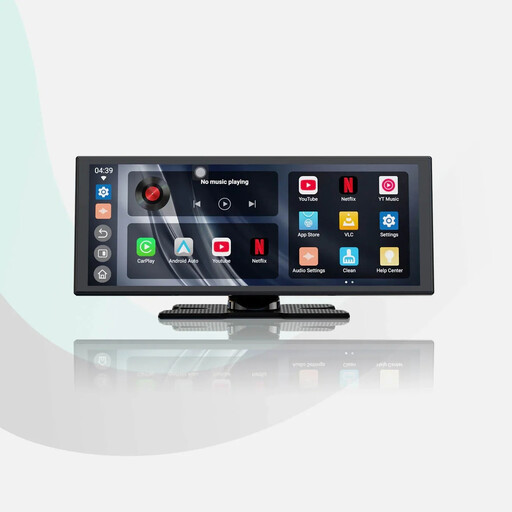
Why it suits this profile: Suitable for drivers who want to add a larger screen with navigation, music and apps without installing a new radio. According to the product description, the system supports wireless Apple CarPlay and Android Auto.
The listed features include an 11.4-inch screen, 1920×720 resolution, dual Wi-Fi and Bluetooth. According to the description, Wi-Fi or a hotspot is required for video services.
11.4-inch HD display, built-in apps according to the product information, wireless smartphone pairing and support for a 1080P reversing camera.
We have put together a complete, up-to-date list of products that fully meet these strict selection criteria and the applicable European safety regulations.
Not every accessory belongs on the dashboard. For roadside emergencies, a car battery charger or jump starter can be useful. For motorcyclists, a waterproof motorcycle CarPlay screen, Bluetooth and a sturdy mount are more important than a large display. With a reversing camera, always check the connection and installation instructions.
Accessories for use around the car may also suit your needs:
Not automatically. Check whether the car has a suitable 12V or USB connection and how the sound is transmitted. For wireless Apple CarPlay, both the phone and the system must support this function. Some adapters also require existing wired CarPlay.
This depends on the power consumption, the condition of the battery and how long the accessories are used. A dashcam with parking mode may draw extra power, particularly when it is connected permanently. For fixed installation, use a suitable hardwire kit and follow the manufacturer’s instructions.
Charging costs depend mainly on the electricity tariff, the amount of energy charged and the car’s efficiency. Multiply the number of kilowatt-hours charged by your tariff. The charger’s maximum power does not automatically determine how much power the car actually draws.
