
Recording on one computer
You’re demonstrating software on the same computer you’re recording on and want to check whether you need extra hardware. OBS Project describes window and screen capture as sources in OBS.


If your demo software is running on the same computer you’re recording on, start with a window or screen source in OBS; as OBS Project explains, you don’t need a capture card for this. For footage from a second computer or another HDMI source, choose a capture card that suits your desired recording resolution, the connection on your recording computer and your audio setup. A higher passthrough resolution doesn’t automatically mean the card can record at that resolution.
You’re demonstrating software on the same computer you’re recording on and want to check whether you need extra hardware. OBS Project describes window and screen capture as sources in OBS.
You want to send the HDMI output from a separate demo computer to your recording computer. The OBS Project documentation, along with product specifications from Elgato and Magewell, can help you match the source, connection and recording software.
You want small interface elements to remain clear, so check the stated recording resolution rather than just what the card can pass through to a monitor. AVerMedia and Elgato publish separate recording and passthrough specifications for the models mentioned here.
Choose this when: your demo software is running on the computer you’re recording on; OBS Project describes window and screen sources for this purpose.
Trade-off: this approach won’t capture the HDMI signal directly from a separate computer. A screen source may also capture other visible windows.
Choose this when: a second computer or another external HDMI source is providing the footage, and your recording computer supports the required USB connection and software.
Trade-off: check the recording resolution separately from the passthrough specification, and make sure the HDMI and USB connections suit your equipment.
Choose this when: your recording computer has a suitable free PCIe slot and you’re looking for an internal card.
Trade-off: the Blackmagic Intensity Pro 4K requires a PCIe connection; Blackmagic Design specifies a Mac Pro with PCIe slots for Mac use.
| What to consider | What to look for when buying | Who is this important for? |
|---|---|---|
| Do you need a capture card? | Check which computer the software is running on and whether OBS can capture the window or screen you need directly. | If I’m only demonstrating software on my recording computer, I don’t want to buy extra hardware if an OBS source will do the job. Around 36% of consumers rank this as their top priority. |
| Connecting an external HDMI source | Check the source’s video output, the required USB or PCIe connection, and compatibility with your recording software. | When my demo is coming from a second computer, its HDMI signal needs to reach my recording computer. Around 29% of consumers make this their top priority. |
| Keeping small details legible | Compare the stated recording resolution with your intended output; treat passthrough as a separate specification. | If small text and controls need to remain visible, I look at recording quality rather than just the monitor output. Around 21% of consumers put this need first. |
| Recording picture and sound | Decide whether you need application audio from the same computer or audio over HDMI from an external source; check the audio sources in your recording software. | When my demo includes sound, I want to know in advance which source to select for the recording. Around 14% of consumers mainly want to get the audio setup and controls right. |
OBS Project describes separate sources for a window, the screen and external video. If the software is running on your recording computer, a window or screen source may be all you need.
Try the relevant OBS source first, and only buy a card if you actually need to bring in an external video signal.
Extra hardware and setup time may be unnecessary.
The maximum resolution passed through to a monitor may differ from the maximum recording resolution. This means a card may not be suitable for the recording you want, even if its passthrough specification is right.
Check both specifications for the exact model, and base your choice for detailed interface footage on the recording resolution.
External models use USB, while the Blackmagic Intensity Pro 4K is an internal PCIe card. Blackmagic Design specifies a Mac Pro with PCIe slots for Mac use.
Before you buy, check the required connection, available port or slot, and supported operating system.
An internal card may require a suitable recording computer.
A screen recording may also capture other visible windows. The Dutch Data Protection Authority states that the exception for personal or household use does not apply to business use.
Where appropriate, use a window source and check the recording for personal or confidential information before sharing it.
The Live Gamer MINI GC311 is an external USB HDMI option if recording at up to 1080p60 is enough for you.
The Game Capture 4K S is an external USB HDMI option if you need to record at up to 2160p60 and your source provides an unencrypted HDMI signal.
USB Capture HDMI Gen 2 connects an HDMI source to Windows, Mac or Linux, among other systems, and is listed as supporting OBS.
Intensity Pro 4K is an internal PCIe card for a recording computer with a suitable slot, particularly if you need analogue connections.
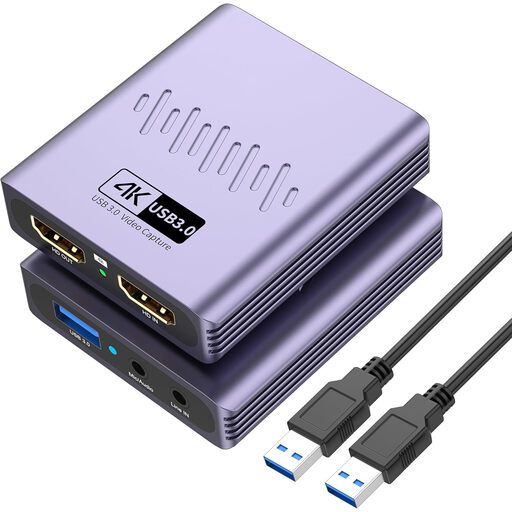
This product pick is for recording footage from an external HDMI source on a recording computer via USB.
 No image available
Suitable when a second computer or another external source sends video via HDMI to a recording computer with USB 3.0.
The product name states that it records at up to 1080p and supports 4K passthrough; passthrough is not the same as 4K recording.
The product name also mentions a microphone input and headphone output.
Send the HDMI output from the demo computer to the card’s HDMI input, then connect the card to the recording computer using the interface required by that model. In OBS, select the device’s video source and make a short test recording to check the picture settings and audio.
According to the Dutch government, online consumer purchases often come with a 14-day cooling-off period. Products must also be of satisfactory quality: in the Netherlands, statutory guarantees apply, with no fixed statutory guarantee period. If there’s a fault, contact the seller; the cooling-off period and your rights when a product is faulty are separate matters.
Not without first considering how the personal data will be processed. The Dutch Data Protection Authority states that the exception for personal or household use doesn’t apply to business use, and that processing personal data requires a lawful basis under the GDPR. Whether publication is allowed in a particular situation depends on the content and purpose.