What should you look for when choosing?
Try the recording feature you already have first. Only choose an external card if you want to record a separate HDMI source through a computer. When comparing options, consider the gameplay quality you want to retain and the recording format you need.
| Consideration |
What should you check? |
Who should pay closer attention? |
| Game audio, commentary and room noise |
Check the audio routing for game audio, microphone and headset. Make a test recording and listen back to it; OBS Studio explains separate audio tracks and notes that noise suppression isn’t designed for high levels of background noise. |
If I want to edit commentary while someone else is using the bedroom, I want to be able to review my voice and game audio separately and identify unwanted room noise. Around 33% of consumers put sound control at the top of their list of buying concerns. |
| Gameplay and HDMI passthrough |
Compare your console and screen outputs with the card’s stated passthrough specifications, including VRR or HDR if you use them. AVerMedia lists a maximum passthrough of 1080p60 for the GC311; check the specifications for the exact model. |
If I want to keep playing on my own screen, I want to know whether the resolution and refresh rate will be maintained. Around 27% of consumers prioritise gameplay quality and passthrough. |
| Connections and existing equipment |
Try your console or PC’s recording feature first. Then check the computer requirements, ports and cables for the card; Elgato lists a USB 3.0 connection for Game Capture Neo and says that no HDMI cable is included. |
If I don’t want to buy unnecessary equipment, I want to know whether my existing recording feature is enough and whether my computer and cables will work with an external card. Around 20% of consumers put compatibility and additional requirements at the top of their list of buying concerns. |
| Recording detail |
Compare the maximum recording resolution of the exact model with the format you want to use when editing your guide. Elgato lists a maximum recording resolution of 1080p60 for Game Capture Neo and 2160p30 for HD60 X. |
If small interface elements need to stay legible in my guide, I want to match the recording resolution to the finished file, not just the screen. Around 20% of consumers put recording detail at the top of their list of buying concerns. |
Joybuy products
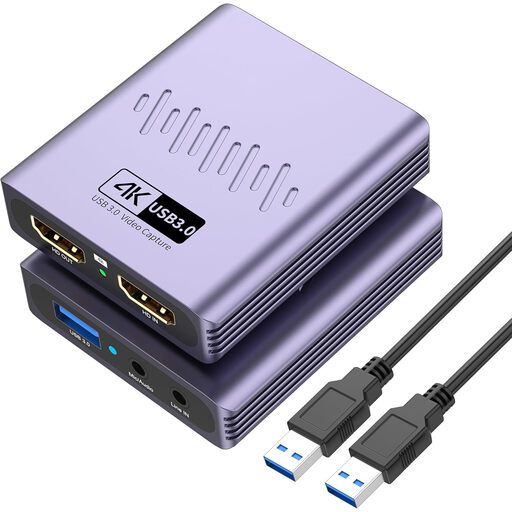
This product selection is aimed at recording an HDMI source through a computer, with 4K passthrough and recording up to 1080p. Check that this recording format will capture the details you want to show in your guide.
 No image available
VIELLAN HDMI Video Capture Card, USB 3.0
Could suit an HDMI setup where 4K passthrough is enough and recording up to 1080p works for your finished guide.
The product name lists 4K passthrough and video recording up to 1080p; passthrough isn’t the same as recording.
The product name lists USB 3.0, a microphone input, a headphone output and driver-free installation. Check that these connections and your recording computer will work with your setup.
Joybuy
Frequently asked questions
Can I get started on a short PS5 strategy guide without a capture card?
Yes, if the built-in recording feature and recording duration suit the way you work. PlayStation says you can record up to one hour of gameplay; check whether that’s enough for your guide.
How do I connect a card if I want to keep playing on my own screen?
With a card that has HDMI passthrough, connect the HDMI source to the card’s input, the output to your screen and the USB connection to your recording computer. Before you buy, compare the output signal from your source and screen with the specifications for the exact model.
Will noise suppression in OBS remove my housemate’s voice?
Don’t rely on it. OBS Studio describes its noise suppression filter as useful for light background or fan noise, but generally not for high levels of background noise. Listen back to a test recording and, if necessary, record your commentary at a more suitable time.
What extra equipment and purchase terms should I check?
Check what’s in the box: according to Elgato, Game Capture Neo doesn’t come with an HDMI cable. For online purchases from a business, you generally have a 14-day cooling-off period, according to the Dutch Government. This cooling-off period is separate from your rights if a product is faulty; the Dutch Government says there is no fixed statutory guarantee period in the Netherlands.
Can I publish footage online that includes audible or visible housemates and game content?
First, consider which rights and privacy rules apply. The Dutch Data Protection Authority treats identifiable audio recordings as personal data and distinguishes between strictly private use and wider publication. Also check the rights to music, images and the game; the Dutch Government explains that you may need the creator’s permission to use copyright-protected material. This is neither blanket permission nor a general ban on all gameplay videos.


