
Home worker with a second PC
Wants to record a desktop, demonstration or everyday video from another computer and is mainly looking for a suitable, straightforward connection.


To record from a second PC, choose a capture card based on the recording output you need and the picture you want to keep on your own screen. Then check the recording and passthrough specifications separately, along with the USB connection or available PCIe slot and the audio settings. A high passthrough specification doesn’t automatically mean the card can record at that setting.
Wants to record a desktop, demonstration or everyday video from another computer and is mainly looking for a suitable, straightforward connection.
Wants to capture more detail than 1080p, so needs to distinguish recording output from the signal that is only passed through to a display.
Wants to record the picture from a second PC, which may be used for gaming, while checking whether the display can keep its desired high refresh rate.
Start with the resolution and frame rate you want to record. Then check whether the card can pass through the display signal you need and is compatible with your recording computer.
| What to consider | What should you check? | Who is this important for? |
|---|---|---|
| Basic 1080p recording | Check the maximum recording output and whether the second PC provides an unencrypted HDMI signal. | If I mainly need a straightforward 1080p recording from my second PC, I don’t want recording requirements beyond what I need. Around 33% of consumers make basic 1080p recording their top priority. |
| True 4K recording | Look up the maximum recording resolution and frame rate; don’t assume these from the HDMI input or passthrough alone. | If I want to record in 4K, the recording output must genuinely support that resolution. Around 25% of consumers prioritise true 4K recording. |
| Keeping a high refresh rate | Compare the resolution, Hz, HDR and VRR you want for both passthrough and recording. | If I want to keep using my high-refresh-rate display through the capture card, I’ll check the passthrough and, if needed, accept a different recording setting. Around 25% of consumers make keeping their display’s refresh rate their top priority. |
| Connection and audio | Check the required USB speed or available PCIe slot, then test whether audio is recorded in your recording software. | If the ports on my recording PC or the audio route are key factors, I want to know in advance how the card connects and how it captures audio. Around 17% of consumers base their choice mainly on connection and audio. |
Recording and passthrough may have different maximum specifications. For example, the European j5create JVA14-N is specified for 4K30 recording and 4K60 passthrough.
For the card you choose, compare recording output and passthrough separately, including the frame rate.
Supported frame rates can differ between display passthrough and recording, and may also depend on HDR, software and operating system. AVerMedia links the stated 4K144 recording for the GC575 to Streaming Center.
Check the combination of resolution, frame rate, HDR, recording software and operating system you plan to use.
An external card may need a specific USB connection; an internal card needs a suitable, available PCIe slot. Elgato says that USB 3.2 Gen 2 at 10 Gbps is required for the full specified USB performance of the 4K X. According to Elgato, the Game Capture Neo does not come with an HDMI cable.
Before buying, check the available connections, your preferred audio route and what’s included in the box.
If you don’t have the required connection or cable, you may need extra accessories before you can use the setup.
Among the models reviewed, Elgato offers external USB cards and an internal PCIe option, with different recording and passthrough settings.
The models reviewed offer an internal PCIe option and an external USB option.
The European JVA14-N is an external capture card with HDMI input and output, as well as analogue audio connections.
The DeckLink Mini Recorder HD is an internal card with HDMI and SDI inputs, for a recording PC with a suitable PCIe slot.
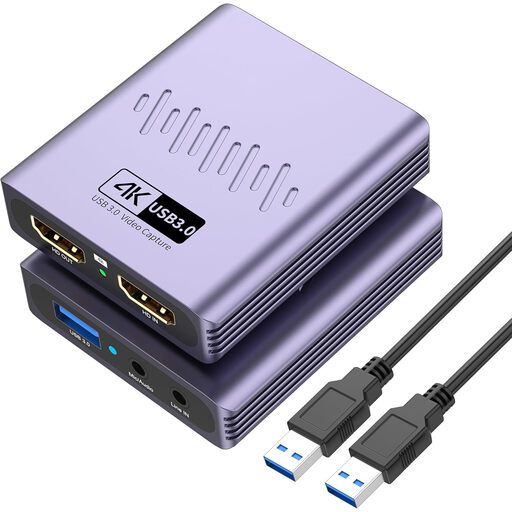
This Joybuy selection focuses on an external USB capture card for recording from a second PC at up to 1080p; the stated 4K passthrough does not mean 4K recording.
 No image available
Worth considering if you want to record from a second PC via HDMI and recording at up to 1080p suits your needs.
The product name specifies USB 3.0 and capture at up to 1080p; the stated 4K passthrough does not mean 4K recording.
The product name also mentions driver-free installation, a microphone input and a headphone output.
Connect a suitable, unencrypted HDMI output from the source PC to HDMI IN on the capture card, then connect the card to the recording PC using the required connection. In OBS, add the card as a video capture source. If you’re using HDMI OUT for your display, check that the card can pass through the display setting you want.
First, check that the source PC is sending audio through the HDMI output you’ve chosen. Then check the audio source, output mode and meters in OBS. According to OBS, the ‘Capture Only’ setting won’t automatically let you hear audio through monitoring. Make a short test recording to check that the sound is audible and included in the recording.
Don’t assume that an HDCP-protected signal can be captured. The Elgato models reviewed specify unencrypted HDMI input, so check the source and the specifications of the model you’re considering.
When you buy remotely from a business, you’ll usually have 14 days to change your mind, but exceptions and the seller’s circumstances may be relevant. You’re also entitled to receive a product that works as it should in the Netherlands, and the seller is your point of contact if it’s faulty. There is no fixed two-year statutory warranty period for all products.
Electrical and electronic equipment sold in the Netherlands must meet the applicable European product requirements, including the required CE marking. Check the information about the specific capture card and the seller, especially if it’s imported from outside the EU.