
Musician with one HDMI camera
Wants to use an existing camera as a video source in streaming software and manage the music audio separately. Elgato and Magewell describe single-channel HDMI capture solutions.


If you want to connect a compatible HDMI camera to your computer, a single-channel capture card may be enough; first check that your camera outputs a suitable HDMI signal. For vocals or instruments you want to connect directly, you’ll need suitable audio inputs, while multiple camera angles are better served by a video switcher. Test the complete mix before going live, and check which music and image rights apply to your stream.
Wants to use an existing camera as a video source in streaming software and manage the music audio separately. Elgato and Magewell describe single-channel HDMI capture solutions.
Needs a suitable audio input as well as camera capture, and wants to monitor the sound during the stream. RØDE describes a combo input, while OBS documents audio sources and level meters.
Wants to switch between views during a performance, so needs to compare the number of HDMI inputs and the features of the exact model. Blackmagic Design describes the ATEM Mini range as a video switcher.
Choose this setup: if you’re using one compatible camera and connecting vocals or instruments through a separate audio solution.
Bear in mind: a single-channel card won’t manage your music audio by itself.
Choose this setup: if you want to connect a microphone or instrument directly, as well as one HDMI source.
Bear in mind: one combo input won’t necessarily be enough for several separate microphones and instruments.
Choose this setup: if you actually want to switch between multiple HDMI cameras during the performance.
Bear in mind: check the connections and model-specific features; this is a more advanced setup than a single-channel card.
For people looking to stream a music performance from a student bedroom, the percentages indicate which reason for buying may take priority.
| What to consider | What should you check? | Who is this important for? |
|---|---|---|
| Camera compatibility | Check that the camera outputs a suitable HDMI signal without menu overlays, which video formats are supported, and whether the cable and power supply are suitable. | If I want to use my existing camera, it needs to keep providing a usable picture throughout the performance. Around 36% of consumers put camera compatibility first. |
| Music audio | Count the microphones and instruments you’ll use at the same time, then make a test recording in OBS and check the levels and left and right channels. | If you want to connect vocals or instruments directly, you’ll need suitable inputs and a mix you can monitor. Around 29% of consumers prioritise this audio requirement. |
| A tidy setup | Map out the connections from your camera and audio equipment to your computer and streaming software; check how many USB ports and what power supply you’ll need. | If space is limited, I want to use only the devices and connections my stream needs. Around 21% of consumers prioritise a simple setup. |
| Multiple camera views | Count the cameras that need to stay connected at the same time, and check the inputs and features of the exact switcher model. | If you want to switch between camera angles during the performance, enough inputs and a suitable switcher are important. Around 14% of consumers cite multiple views as their main reason. |
Capture and HDMI pass-through are different features. A 4K label alone doesn’t tell you what resolution and frame rate your computer will actually receive.
For the exact model and your software, compare the supported input, capture and pass-through specifications separately.
One HDMI audio connection or combo input won’t automatically combine all your vocal and instrument sources into a suitable mix.
Count the sources you need to use at the same time and test the complete mix in a recording. You may need an additional audio interface, mixer or suitable cables.
Menu overlays, automatic shut-off or limited battery life can interrupt the camera output.
Test your camera with clean HDMI output and a power supply in a recording that’s as long as your planned stream.
Check in advance that you have a suitable power supply for your camera and an appropriate HDMI cable.
BumaStemra distinguishes between using music through certain platforms and holding music events on your own website or earning money from them. A stream may also be blocked by other rights holders.
Before announcing the performance, check the repertoire, use of existing recordings, publishing platform and any income.
Cam Link 4K is a single-channel HDMI-to-USB solution for a compatible camera and computer.
Streamer X combines HDMI capture with connections for a microphone or instrument, among other things.
USB Capture HDMI Gen 2 is a single-channel capture device with embedded HDMI audio for computer software.
The ATEM Mini range is designed to present multiple camera views as a single USB webcam source.
Live Gamer ULTRA 2.1 GC553G2 is a gaming-focused capture card with HDMI pass-through.
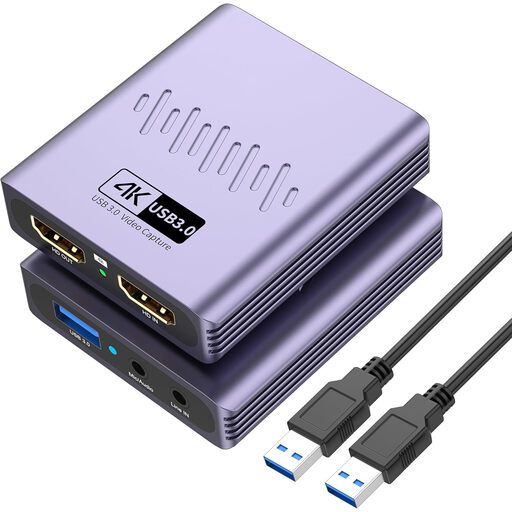
This Joybuy product is an HDMI-to-USB capture option for a compact music streaming setup; check that its inputs suit your camera and audio equipment.
 No image available
Could be suitable if you want to capture an HDMI video source over USB and the listed microphone and headphone connections work for your setup.
The product title lists USB 3.0, driver-free installation, video capture up to 1080p and 4K pass-through; 4K isn’t listed as a capture resolution.
The title mentions a microphone input and headphone output. Check that the number and type of connections are suitable for all the audio sources you’ll use at the same time.
Not to bring in the existing webcam signal. An HDMI capture card is mainly an option if you want to use your camera’s HDMI output as a video source on your computer; first check whether your current setup meets your needs.
Before livestreaming, make a test recording in OBS with the capture card as the video source and your chosen audio devices. Listen back to the result and check the levels and left and right channels; OBS warns that adding the same audio source twice can cause an echo.
Check that you have the right HDMI cable, a suitable power supply for your camera and enough audio inputs; also check what’s included with the specific offer. The Dutch government states that consumers are entitled to a legal guarantee when they buy goods. For online purchases, a 14-day cooling-off period applies in many cases; check the terms that apply to your purchase.
This depends, among other things, on the repertoire, platform and any income. BumaStemra states that, subject to the conditions described, no separate BumaStemra licence is needed to use music by its members through YouTube, Facebook, Instagram or Twitch, but warns that a platform may still block the stream because of other rights. A licence may be needed for a music event on your own website or where the specified income or fees apply; check the relevant terms before broadcasting. Existing music recordings may also involve neighbouring rights.
Don’t automatically assume this falls under the exception for personal or household use. The Dutch Data Protection Authority makes clear that sharing with a wide audience may fall outside this exception. Decide in advance how you’ll handle recognisable people, or keep them out of shot.