For one compatible HDMI camera, an HDMI-to-USB capture card is a good fit, provided the camera delivers a supported, clean signal and can connect to your computer. For vocals and instruments, you may need a separate audio interface or mixer; if you want to switch between multiple cameras, you’ll need a multi-channel solution or a separate video switcher. Test the audio, video and synchronisation together before you stream.
Who is this choice for?
Solo performer with one camera
You want to use your camera as a video source in streaming software, and check that its HDMI output is clean and can remain active for long enough. Elgato recommends checking camera compatibility and the HDMI signal when using Cam Link 4K.
Musician with a separate audio mix
You want to record vocals and instruments through a separate audio source, and test levels, duplicate audio sources and audio-video synchronisation before going live. OBS warns that using the same audio source in two places can cause an echo.
Creator with multiple camera angles
You want to switch between camera views during a performance, and need to choose between multiple inputs on a computer and a separate video switcher. Elgato describes Cam Link Pro as a solution with four HDMI inputs; Blackmagic Design lists four HDMI inputs for the ATEM Mini Pro.
What should you look for?
Start by choosing based on the number of cameras and how you’ll handle your music audio. Then check that your camera, capture device, computer and streaming software all work together.
| What to consider |
What should you check? |
Who is this important for? |
| Camera compatibility |
Check that the camera continues to deliver a clean HDMI signal, and that its resolution and frame rate are supported by the card. |
If I’m using one camera, I want to avoid camera menus appearing on screen or the signal not working; around 40% of consumers put camera compatibility first. |
| Music audio and synchronisation |
Decide whether audio will run through HDMI or a separate interface or mixer. Make a test recording and listen back to it. |
If I’m connecting vocals and instruments separately, I want to check the levels and synchronisation and avoid echo; around 40% of consumers give music audio top priority. |
| Camera angles and switching |
Count how many cameras need to be connected at the same time, and check whether your computer has PCIe slots or you need a separate switcher. |
If I want to switch between camera angles during a performance, I need more than one HDMI input; around 20% of consumers prioritise switching between cameras. |
Common buying mistakes
-
Assuming a high HDMI resolution means the same capture resolution
Input, the resolution of the captured stream and any HDMI pass-through are different features. A 4K pass-through specification does not, by itself, mean that the capture is also in 4K.
For the exact model, compare the supported HDMI input, capture output and pass-through separately.
-
Expecting the capture card to connect all your music audio
A card that captures HDMI video won’t automatically have the connections you need for vocal microphones or an instrument mix. Duplicate audio sources can cause echo in OBS.
Before buying, map out how your camera, microphones and instruments will connect to your streaming software, and test the setup with a recording. Depending on the equipment you already have, you may need extra cables, an interface or a mixer.
-
Assuming a technically successful stream clears all music rights
A platform accepting your stream doesn’t mean that you have permission to use all the music and recordings in it. The Government of the Netherlands states that permission is needed for public use of protected music. BumaStemra outlines arrangements for its members’ repertoire on certain platforms, but these don’t automatically cover all rights.
Before you go live, check who manages the rights and which terms apply to your platform, repertoire and any income.
Brands to compare
Elgato
Cam Link 4K is designed to connect one HDMI camera via USB 3.0; Cam Link Pro is a PCIe card with four HDMI inputs.
- Elgato lists four HDMI inputs and multiview for Cam Link Pro; Cam Link 4K doesn’t have these features.
- For Cam Link 4K, the camera must deliver a supported, unencrypted HDMI signal. Check camera and computer compatibility.
AVerMedia
Live Gamer MINI GC311 is an option for one HDMI source if you also want HDMI pass-through.
- AVerMedia lists an HDMI input, HDMI pass-through and a micro-USB connection.
- The manufacturer positions this model for Full HD. HDMI pass-through isn’t the same as the video preview in streaming software.
Magewell
USB Capture HDMI Gen 2 is a USB solution for one HDMI source with embedded audio.
- Magewell lists support for OBS and various operating systems.
- The actual capture frame rate may be limited by USB bandwidth and internal processing. Check the exact revision and signal settings.
Blackmagic Design
ATEM Mini Pro is a separate video switcher for productions using multiple HDMI cameras.
- Blackmagic Design lists four HDMI inputs, an audio mixer and a USB webcam output for this model.
- This is a more advanced setup than a single-channel USB capture card. Check how to connect your existing microphones or mixer.
Capture cards at Joybuy
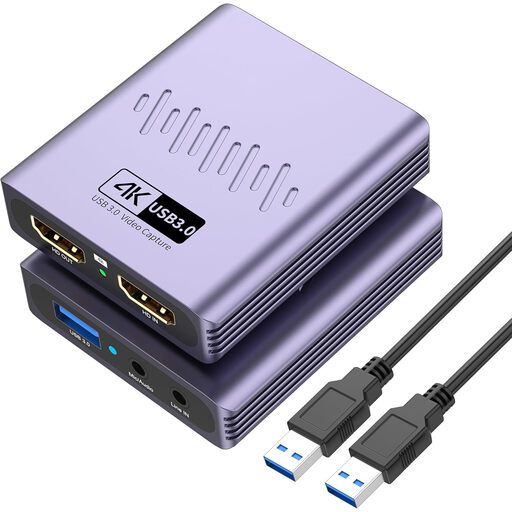
This Joybuy product selection is aimed at capturing one HDMI video source via USB, with microphone and headphone connections.
 No image available
VIELLAN HDMI Video Capture Card with USB 3.0
Suitable for a setup with one HDMI video source and a USB 3.0 connection. The title also lists a microphone input and headphone output.
4K pass-through; capture up to 1080p. 4K pass-through is not the same as 4K capture.
View at Joybuy
Frequently asked questions
Do I always need a capture card for my camera?
No, not just because you want to stream. If you choose an HDMI-to-USB setup, check that your camera delivers a suitable signal, that on-screen information can be switched off and that the camera can keep running for long enough. If you want to use it directly as a webcam, check the capabilities of your specific camera.
How do I connect vocals and instruments and avoid echo?
If you’re using a separate audio interface or mixer, add it as an audio source in OBS and check the levels with a test recording. OBS warns that using the same source both as a general audio input and as a source in a scene can cause echo.
What should I check besides the capture card?
Check whether your setup needs a suitable HDMI cable, continuous camera power or a separate audio interface. For the exact model, also check which accessories are included, which computers it supports and the warranty terms.
Can I livestream covers or music recordings from a spare room?
Not automatically: being in your own home doesn’t mean you can use protected music publicly without permission. The Government of the Netherlands explains that permission may be needed to use someone else’s protected music publicly. BumaStemra lists arrangements for its members’ repertoire on YouTube, Facebook, Instagram and Twitch, but these don’t necessarily cover all rights. Different licensing terms may apply if you use your own platform or run a music event that generates income or includes artist fees. Also check the rights for any recordings you use and the terms that apply to your specific stream.


