
Mod maker with one gaming PC
You want to show a mod and provide commentary from the same PC, and first find out whether software recording will do the job. OBS Project describes Game Capture as a way to capture a game directly.


If you’re playing and presenting the mod on the same Windows PC, try OBS Game Capture first; you generally won’t need a separate capture card. If your footage comes from a console or a second PC, choose a card based on its recording quality, monitor passthrough and how you want to separate game audio, commentary and room noise.
You want to show a mod and provide commentary from the same PC, and first find out whether software recording will do the job. OBS Project describes Game Capture as a way to capture a game directly.
You play on a console or second PC and want to send the footage to another computer for recording, while continuing to play on a screen. Manufacturers such as Elgato and AVerMedia describe capture cards for this type of HDMI setup.
You want to manage your commentary and game audio, and avoid accidentally capturing a housemate recognisably on camera or in the audio. The Dutch Data Protection Authority provides information about recognisable people in footage; OBS Project also explains how to configure audio sources.
Start with the source: a game running on the same Windows PC calls for a different approach from footage coming from a console or second PC.
| What to consider | What to look for | Who is this important for? |
|---|---|---|
| Avoid buying an unnecessary capture card | Test OBS Game Capture with your game and work out whether the source really is a second device. | If you’re playing the mod on the same PC, first find out whether software recording will do the job. Around 33% of consumers prioritise avoiding unnecessary hardware. |
| Separate HDMI source and gameplay display | Check the recording and passthrough modes separately, and make sure the source, screen, computer and card are compatible. | If your footage comes from a console or second PC, you’ll want to record it while keeping your gameplay on a screen. Around 25% of consumers prioritise connecting a separate HDMI source. |
| Commentary and room noise | Check which game, microphone and monitoring sources are active in OBS, then listen back to a test recording. | In a shared bedroom, you’ll want to keep your commentary clear and make sure conversations with housemates don’t end up in your presentation. Around 25% of consumers prioritise audio control. |
| Required picture quality | Compare the recording and passthrough specifications separately, and check the software, operating system and USB port requirements too. | If you need a higher recording or display mode, the entire signal chain must support it. Around 17% of consumers prioritise a specific higher picture mode. |
For capturing a PC game directly, OBS Project recommends trying Game Capture first. You don’t automatically need a separate card if the game and OBS are running on the same PC.
Test the game in OBS first, and only buy a card if you need to bring in footage from a separate HDMI source.
This helps you avoid unnecessary hardware and extra cables.
Elgato Game Capture Neo and AVerMedia StreamLine MINI+ GC311G2 are specified by their manufacturers as recording at 1080p60 and offering 4K60 passthrough. These two functions therefore have different stated resolutions.
Check the recording and passthrough specifications separately for the exact model.
Elgato states that Game Capture Neo does not include an HDMI cable in the box.
Check what’s in the box and compare it with the cables you need for your source, capture card and screen.
You may need to buy a separate HDMI cable for this connection.
A picture test won’t automatically check which audio sources are being captured or whether housemates are recognisable in the footage or audio. The Dutch Data Protection Authority distinguishes between use for personal or household purposes only and sharing with a wider audience.
Before publishing, check the footage, commentary, game audio and whether any housemates can be identified in a test recording.
Elgato offers models for different HDMI setups, including Game Capture Neo, HD60 X and 4K X.
The StreamLine MINI+ GC311G2 and Live Gamer ULTRA 2.1 GC553G2 are HDMI capture cards with different stated capabilities.
According to Razer, Ripsaw HD is designed for HDMI recording from a console or separate gaming PC, for example, using a recording computer.
ezcap269 Game Live offers an HDMI setup that also lists connections for headset commentary or party chat.
This Joybuy selection focuses on recording footage from a separate HDMI source and passing it through to a screen.
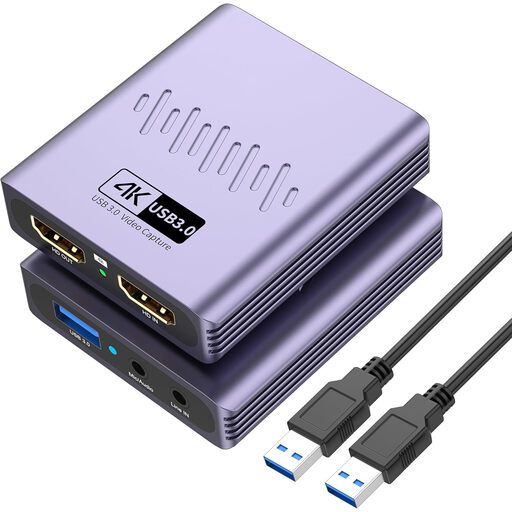 No image available
This HDMI capture card is designed for footage from a separate HDMI source. Its listed microphone and headphone connections may be useful for commentary during a presentation.
The product name lists USB 3.0, 4K passthrough and video recording up to 1080p. 4K passthrough does not mean that it records in 4K.
The product name also lists a microphone input and headphone output.
Connect the HDMI source to the capture card, then connect the card to the recording computer. In OBS, add a Video Capture Device source. Select the device and a resolution and frame rate combination that the model actually supports.
OBS can record the card’s audio without sending it to your listening device. Check the audio output and audio monitoring settings, then listen back to a test recording to check for duplicate audio sources.
No, copy protection may block an HDMI source. For example, Elgato explains that HDCP can prevent gameplay recording on a PlayStation 4 and can be disabled during gameplay; this does not give you permission to record protected films or services.
Not necessarily. According to the Dutch Data Protection Authority, recognisable people in footage are personal data, and the exception for use solely for personal or household purposes does not apply when sharing with a wider audience. Keep housemates out of shot, and check whether they can be identified in the audio before you publish.
When you buy online from a business, you’ll often have a 14-day cooling-off period, according to the Government of the Netherlands. You’re also entitled to a product that meets reasonable expectations. The Netherlands has no fixed statutory guarantee period, and if a product is faulty, you should contact the seller.