
Creators with one gaming PC
If you’re showcasing a mod running on the same computer you’re recording on, try a game or display capture source in OBS first. OBS Project explains both types of source.


If your mod runs on the same computer as OBS, try a suitable game or display capture source first. A capture card is mainly useful when you want to record video from a separate device. When comparing cards, look at capture quality, display passthrough and audio connections separately: passing through a 4K signal doesn’t automatically mean you can record it in 4K.
If you’re showcasing a mod running on the same computer you’re recording on, try a game or display capture source in OBS first. OBS Project explains both types of source.
If you’re using a second PC or console for your showcase, check how the HDMI video gets to your recording computer and which signals the card can capture and pass through.
If you want to keep playing while recording and capture both your voice and game audio, check the display mode and audio setup separately.
First, work out whether your video is coming from the same computer or a separate HDMI device. Then compare the recording quality with your preferred display mode, and check how sound and commentary will be connected.
| What to consider | What should you check? | Who is this important for? |
|---|---|---|
| Do you need a card? | Work out where the mod runs. If you’re using one PC, try the relevant OBS game or display capture source first. | If the mod is already running on my recording PC, I want to know whether OBS can capture the video directly before choosing extra equipment. Consumers who want to establish whether they need hardware first account for around 37% of consumers with this buying question. |
| Clear recordings | Compare the capture resolution and frame rate, and test whether small mod details remain visible in your intended recording. | If small details matter in my showcase, I want to assess the actual recording quality, not just the display passthrough. Consumers who prioritise clear mod details account for around 27% of consumers with this buying question. |
| Display mode | Check the resolution and frame rate of both the HDMI input and output for your intended setup. | If I want to keep a particular display mode while playing, the whole combination of source, card and display needs to support it. Consumers who prioritise their preferred display mode account for around 18% of consumers with this buying question. |
| Audio and connections | Map out the route for game audio, microphone and monitoring. Also check the USB connection and which cables are included. | If I want to record commentary alongside game audio, I want to know in advance how both audio signals will reach the recording. Consumers whose main concern is audio and connections account for around 18% of consumers with this buying question. |
OBS offers sources for capturing a game or display on the same computer. You don’t automatically need a capture card if those sources already show the video you want.
Try the relevant game or display capture source in OBS first, and check that the mod and interface are visible.
Extra equipment can also mean extra cables. Elgato notes that an HDMI cable isn’t included with the Game Capture Neo.
For example, the Elgato Game Capture Neo and AVerMedia StreamLine MINI+ GC311G2 are specified for capture up to 1080p60, even though their manufacturers say these models support 4K60 passthrough.
Check the specifications for capture and passthrough separately for the exact model.
A working video connection doesn’t automatically mean that commentary and game audio will both be included in the recording. NZXT highlights audio as a separate consideration for a two-PC setup.
Check what’s in the box and map out the routes for video, game audio and microphone before you buy.
According to Elgato, the Game Capture Neo and Game Capture 4K S offer different capture limits for an external HDMI source.
The StreamLine MINI+ GC311G2 is an example of a card offering 1080p60 capture with 4K60 passthrough. The Live Gamer ULTRA 2.1 GC553G2 is worth considering if you need a higher display mode.
The Signal HD60 is an example of a card for recording a separate HDMI source.
These product picks are designed for recording an external HDMI source. Both models have a stated maximum recording resolution of 1080p.
 No image available
Suitable for recording video from a separate HDMI source when 1080p60 capture is enough.
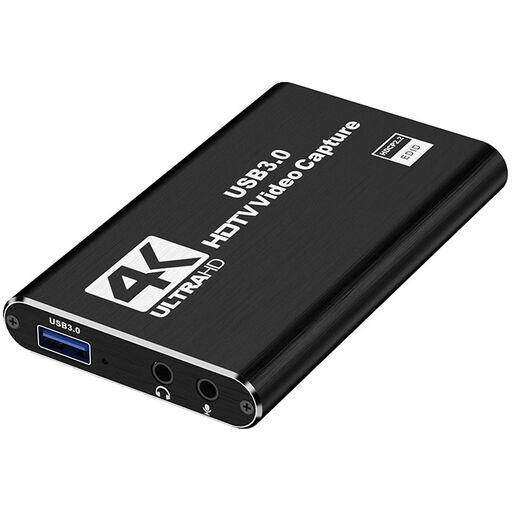
HDMI input up to 4K 30 Hz; capture up to 1080p60; HDMI loop-out for a second display; microphone input and headphone output.
An HDMI input of up to 4K 30 Hz doesn’t mean that the recording is in 4K.
 No image available
Suitable for recording an external HDMI video source when capture up to 1080p meets your needs for a showcase.
USB 3.0; capture up to 1080p; 4K HDMI passthrough; UVC and UAC support; microphone input and headphone output.
The stated 4K passthrough doesn’t guarantee 4K recording.
In OBS, add a Video Capture Device source and select the card. Then check for a supported resolution, frame rate and audio mode. According to OBS Project, an unsupported video setting can result in no picture.
No, not with every model. According to their manufacturers, the Elgato Game Capture Neo and AVerMedia GC311G2 support passthrough up to 4K60 but specify capture up to 1080p60. Check both figures separately for the exact model.
Check separately whether the HDMI source is sending audio, which source OBS is capturing and whether your preferred monitoring is set up. According to NZXT, the audio setup needs particular attention with a two-PC configuration.
When you buy remotely from a business, you’ll often have a 14-day cooling-off period; whether this applies depends on the purchase. You’re also entitled to a product that meets reasonable expectations. The Dutch government says that, in principle, you should contact the seller if there’s a problem with a product.
That depends on what can be recognised in the video or heard in the audio, and on the rights to the material. The Dutch Data Protection Authority distinguishes between personal or household use and footage posted online for an unrestricted audience. Also check the rights or permissions for music, images and other third-party material. A capture card doesn’t grant you those rights.