What should you look for when choosing one?
Start with the video source: slides on the recording computer call for a different solution from an external HDMI camera. Then decide how you want to connect audio and any monitoring equipment.
| What to consider |
What should you check? |
Who is this important for? |
| Screen capture or capture card |
Check whether you really have a separate HDMI source; test screen, window and audio sources in OBS. |
If my slides are already on the recording computer, I don’t want to connect an extra HDMI device. Around 27% of consumers prioritise avoiding unnecessary capture hardware. |
| Connecting an HDMI camera |
Check for unprotected HDMI output, supported resolution and frame rate, USB connection and the system requirements for the exact model. |
If I want to use a single external camera as a video source, it needs to work with both the capture signal and my computer. Around 27% of consumers give this camera connection top priority. |
| Pass-through to a monitor |
Check whether the model has HDMI pass-through and look at the maximum pass-through and recording settings separately. |
If I want to see my presentation computer on a separate screen while recording, I need pass-through. Around 20% of consumers prioritise this screen connection. |
| Voice and computer audio |
Decide where each audio source will connect and listen back to a test recording. Selecting the same audio source twice in OBS can cause echo. |
If my voice, HDMI audio or computer audio needs to come through clearly in the recording, I want to know in advance which connection route will work. Around 13% of consumers choose mainly based on this audio connection. |
| Multiple HDMI sources |
Count your sources and decide whether you want to switch between them live. Blackmagic Design says the ATEM Mini Pro has four HDMI inputs. |
If I want to switch between multiple HDMI sources during my presentation, I may need a mixer rather than a single capture input. Around 13% of consumers prioritise live source switching. |
Brands and their setups
The features below are product specifications as described by the manufacturers; they are not independent performance tests. Always check that the version is suitable for your sources and computer.
Elgato
The Cam Link 4K is designed to connect a single suitable HDMI source to a computer via USB.
- According to Elgato, the Cam Link 4K supports unprotected HDMI sources and recording up to 1080p at 60 fps.
- Elgato lists different system requirements for revisions 1, 2 and 3. Check the revision of the version on offer.
AVerMedia
The Live Gamer MINI GC311 is an option for sending a single HDMI source to a recording computer and a screen via pass-through.
- AVerMedia specifies HDMI pass-through, recording up to 1080p60 and a built-in H.264 encoder.
- According to AVerMedia, the GC311 doesn’t support 4K or HDCP-protected signals. Check your computer’s system requirements too.
StarTech.com
The UVCHDCAP is designed for a single unprotected HDMI source, with pass-through and a separate stereo audio input.
- StarTech.com specifies 1080p60 recording, HDMI pass-through, a USB-C connection and a 3.5mm stereo audio input.
- To use it with USB-A, you’ll need the right connection; check which connection is compatible with your computer.
Magewell
According to Magewell, the USB Capture HDMI Plus combines one HDMI input, pass-through and a 3.5mm microphone input.
- Magewell lists a 4K input and pass-through for this model.
- According to Magewell, the USB Capture HDMI Plus scales down to a maximum of 2048 × 2160 pixels for recording or streaming. So the stated pass-through capability is not the same as the recording resolution.
Blackmagic Design
The ATEM Mini Pro is a video mixer with multiple inputs, designed for presentations where you want to switch between external HDMI sources.
- Blackmagic Design describes four HDMI inputs, a USB output that works as a webcam and recording to a USB drive on the Pro version.
- This is a more advanced mixer setup than a single HDMI capture input. The USB webcam output and recording to a USB drive are separate functions.
Capture cards at Joybuy
This product selection focuses on HDMI capture with pass-through and connections for separate audio in a presentation setup.
 No image available
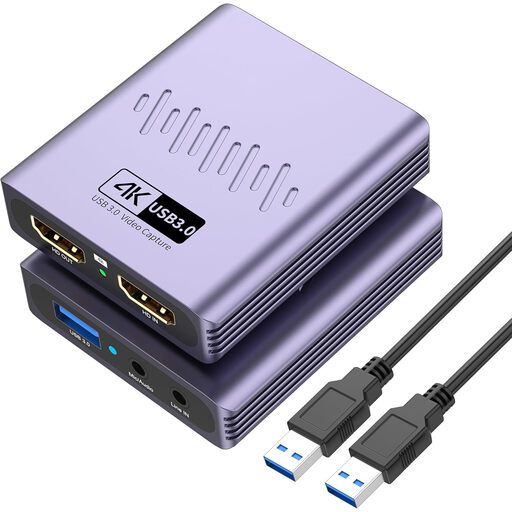
VIELLAN HDMI Video Capture Card, USB 3.0, 4K pass-through
Suitable for a setup with a separate HDMI source and a monitor connected via HDMI pass-through.
The product name lists capture up to 1080p and 4K pass-through; it doesn’t claim 4K recording.
The listed connections are USB 3.0, a microphone input and a headphone output.
View at Joybuy
Frequently asked questions
Do I need a capture card for slides on my own computer?
Not necessarily: OBS Studio can capture a screen or window directly as a source. A capture card is useful if you also want to bring in a separate HDMI signal, such as a camera or second computer.
How do I make a test recording with a capture card?
Connect a suitable HDMI source to the input and connect the capture device to the recording computer. In OBS, select a video capture source and check the microphone and other audio with a short recording too; the exact connections vary by model.
Why is there no sound, or why can I hear echo in my recording?
Check which microphone, HDMI audio and computer audio sources are selected in OBS. The OBS Project documentation warns that adding the same audio source both globally and separately can cause echo, so test your recording before your presentation.
Does 4K pass-through mean the recording is also in 4K?
No, pass-through and recording are separate specifications. Check both for the exact model. Magewell, for example, says that the USB Capture HDMI Plus scales down to a maximum of 2048 × 2160 pixels for recording or streaming.
Can I record a business presentation featuring identifiable participants?
If identifiable people appear in a business recording, the GDPR applies. The Dutch Data Protection Authority says that processing requires a valid legal basis and that people must be told what happens to their personal data and why. Consent is one possible legal basis; whether a particular recording is lawful depends on its purpose and circumstances.


