
Game comparison creator
Wants to record different games in a consistent video format. Elgato and AVerMedia distinguish between recording and HDMI pass-through in their product specifications, so check both for your chosen display mode.


First, choose a recording format that works for both games. Then check recording quality, HDMI pass-through and computer requirements separately. If you’re recording commentary in a shared bedroom, a short test recording and separate audio tracks in OBS are more useful than simply choosing a higher quoted video resolution. If you’re playing and recording on the same PC, you generally don’t need a capture card, according to NZXT Support Center.
Wants to record different games in a consistent video format. Elgato and AVerMedia distinguish between recording and HDMI pass-through in their product specifications, so check both for your chosen display mode.
Wants to monitor commentary and game audio without assuming that a capture card will remove room noise. OBS Project explains how to assign audio to separate tracks.
Wants to use a display mode that suits their monitor while recording. Elgato’s product specifications show why you should check the stated pass-through separately from the recording resolution.
If you’re playing and recording on the same PC without capturing a second HDMI source, you generally don’t need a capture card. If you’re recording a console or a second PC, first choose a suitable recording format, then check that the card passes your preferred gaming mode through to your monitor.
| Priority | What to look for | Who this matters to |
|---|---|---|
| Comparable video recordings | Check the recording resolution and frame rate for both games; compare these values separately from HDMI pass-through. | When comparing two games side by side, I want to record them in the same format so I can judge the differences fairly. Around 33% of consumers prioritise comparable video recordings. |
| Game audio and commentary | Check how game audio is captured, whether you’re using a separate microphone and whether your test recording includes the audio tracks you need. | When recording in a shared bedroom, I want to be able to check commentary and game audio without accidentally capturing room noise. Audio monitoring is a priority for around 27% of consumers. |
| Gameplay on your monitor | Compare the exact pass-through mode, including resolution and frame rate, with your source and monitor. | While recording, I want to keep the display mode my monitor can handle, not just get a suitable recording file. Around 20% of consumers prioritise gameplay display and HDMI pass-through. |
| Computer and connections | Check the required USB port, operating system and recording software for the exact card you’re considering. | Before buying, I want to know that the card, USB connection and software will work with my recording computer. Computer compatibility is the main concern for around 20% of consumers. |
According to Elgato, the Game Capture Neo passes through up to 4K60, but records at a maximum of 1080p60. The AVerMedia Live Gamer MINI GC311 also has a pass-through limit of 1080p60.
For the display mode you want to use, check the specifications for input, pass-through and recording separately.
Elgato doesn’t list an HDMI cable as included with the Game Capture Neo. For the 4K X, Elgato says that using a USB 3.2 Gen 1 port may reduce the available recording resolution.
Check what’s in the box, then compare your cables and USB port with the card’s requirements.
Separate audio tracks in OBS can help with editing, but you need to check the settings; they won’t make a shared room quiet.
Before a long session, record a short clip with your microphone and game audio, then check the tracks in your editing workflow.
If commentary and game audio have already been combined on one track, separating them afterwards may mean extra editing work.
The Game Capture Neo, 4K S and 4K X have different recording and pass-through modes. The details below apply to these models, not the entire product range.
The Live Gamer MINI GC311 is designed for a Full HD setup, while the Live Gamer ULTRA 2.1 GC553G2 is intended for setups with higher HDMI modes.
The Razer Ripsaw HD RZ20-02850 is a model with HDMI pass-through and analogue audio connections.
This selection focuses on HDMI recording up to 1080p, with 4K pass-through and connections for a microphone and headphones. Check the recording and pass-through modes separately for your own setup.
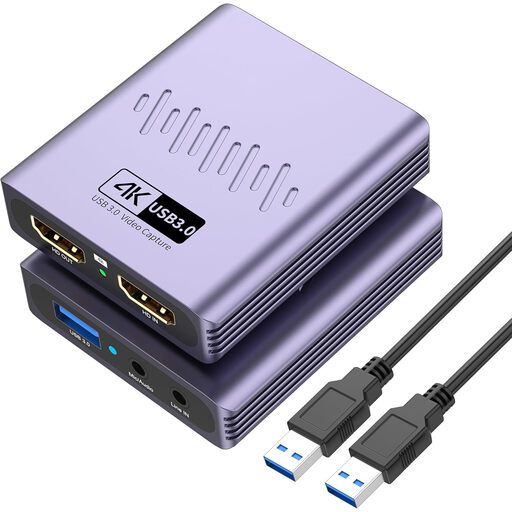 No image available
Could suit a setup where recording at up to 1080p is enough and you want to connect a microphone and headphones.
The product title lists USB 3.0, driver-free installation, recording up to 1080p, 4K pass-through, a microphone input and a headphone output. The pass-through specification doesn’t mean it records in 4K.
Generally not, unless you need to capture an external HDMI source. According to NZXT Support Center, a capture card may be useful if you’re recording a console or a second gaming PC.
In OBS, assign different audio sources to separate recording tracks and make a test recording first. OBS Project notes that standard video players often play only one track at a time, so check the result in your editing workflow too.
Don’t assume that you can. Elgato specifies unprotected HDMI input for the models mentioned; AVerMedia says the GC311 can’t record an HDCP-protected signal. Check the settings and terms for your own source, and don’t try to bypass protections.
According to ACM ConsuWijzer, online purchases generally come with a statutory 14-day cooling-off period from the date of delivery, subject to legal exceptions. Your statutory guarantee is separate from any manufacturer’s or seller’s guarantee.
If you share footage of an identifiable person more widely than for personal or household use, don’t assume the household exemption applies. The Dutch Data Protection Authority explains this distinction; check which privacy rules apply to your recording and publication before sharing the footage.