What should you look for?
Start with the picture quality you want for gaming and streaming. Then check that your PC, software and audio setup are compatible with the card.
| Buying concern |
What should you check? |
Who is this important for? |
| Keeping your gaming picture |
Compare the resolution, refresh rate, HDR and VRR of your console, card and screen. Check recording and pass-through separately. |
If I play at a high refresh rate, I want to know whether pass-through will maintain my preferred screen settings. Keeping the gaming picture is the main buying concern for around 33% of consumers. |
| Game audio and party chat |
Check the audio connections, headset connection and console settings; make a test recording before streaming. |
I want game audio, my microphone and, if needed, party chat all included in the stream. This is the main buying concern for around 27% of consumers. |
| PC and software compatibility |
Check the required USB port and speed, operating system, and capture mode in OBS or the software you use. |
If I want to use my existing computer, the card I choose needs to work with my connection and software. Compatibility comes first for around 20% of consumers. |
| The right recording quality |
First decide on your preferred streaming and recording formats. Passing through a 4K signal does not automatically mean the card also records in 4K. |
I want a card that suits my 1080p stream, without paying for recording capacity I don’t need. A simple setup like this is the top priority for around 20% of consumers. |
Brands to compare
These brands offer examples of different capture card features. The features listed apply to the models mentioned, not every product from each brand.
Elgato
The Game Capture Neo is an option for 1080p60 recording, while the 4K S and 4K X are designed for higher recording formats.
- Elgato lists recording up to 1080p60 for the Game Capture Neo and up to 2160p60 for the 4K S.
- Elgato lists HDR recording for the 4K X on Windows only. Check that the software and signal combination you want is supported by your setup.
AVerMedia
The Live Gamer ULTRA 2.1 GC553G2 is worth comparing if high pass-through and party chat are important to you.
- AVerMedia lists a built-in party chat feature and recording up to 4K144 with Streaming Center on Windows.
- The manufacturer lists different limits for OBS on Mac and Streaming Center on Windows. Don’t assume that software-specific specifications are interchangeable.
NZXT
The Signal HD60 is an option if you’re looking for 1080p recording and want to compare 4K pass-through.
- NZXT says the Signal HD60 can pass through a 4K signal.
- According to NZXT, this model cannot record the signal to the PC in 4K and does not support HDR colour.
Razer
The Ripsaw HD is an external option with separate audio connections for a streaming PC.
- Razer lists 1080p60 recording, 4K60 pass-through, and microphone and headphone connections for the Ripsaw HD.
- The stated system requirements are for Windows; don’t assume Mac support based on the HDMI connections.
Joybuy product selection
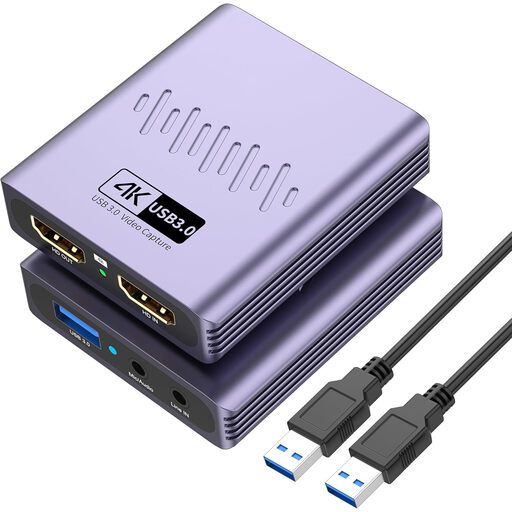
This Joybuy product selection focuses on an HDMI capture card for streaming via a PC, with recording up to 1080p and 4K pass-through.
 No image available
VIELLAN HDMI video capture card, USB 3.0
For a PC streaming setup where recording up to 1080p is enough and 4K pass-through is useful.
The product name lists USB 3.0, 4K pass-through and video recording up to 1080p, so this isn’t the right choice for 4K recording.
The product name also lists a microphone input and headphone output. Check that the audio connections and your preferred screen settings suit your setup.
Joybuy
Frequently asked questions
Do I always need a capture card to livestream from a PS5 or Xbox?
No. PlayStation explains how to broadcast using Broadcast on PS5, and Xbox explains how to livestream directly from the console. Choose a capture card if your setup requires a separate console signal in PC software, or if you need features that the built-in broadcast option doesn’t offer.
Does 4K pass-through mean my recording will also be in 4K?
No. Pass-through and recording are separate features. For example, NZXT says the Signal HD60 can pass through a 4K signal but cannot record it to the PC in 4K. Check both specifications for the exact model.
What should I check if I get a black screen in OBS?
First, check that the card is selected as a video capture device and that your console isn’t sending an HDCP-protected signal. Elgato says its capture devices cannot capture HDMI signals with HDCP protection enabled. This is not a suggestion to record protected films or apps.
How can I avoid missing or duplicated audio?
Before your first broadcast, make a short test recording of game audio, your microphone and, if needed, party chat. OBS warns that selecting the same audio source both in a scene and globally can cause an echo. PlayStation advises letting party members know in advance when their voices will be broadcast.
Can I livestream all game footage and music publicly?
No. Buying a capture card does not in itself give you the right to publish content. Under Dutch copyright law, the creator generally has the exclusive right to make a work publicly available, subject to legal exceptions. Whether a particular game, music or broadcast is permitted depends on the relevant rights and permissions.


