
Console explainer
You want to show gameplay while continuing to play on your own screen. Elgato and NZXT describe models with HDMI passthrough for this type of console setup.


For close-ups of your hands and buttons, a camera-focused HDMI-to-USB solution is a good fit, provided your camera outputs a compatible, unprotected HDMI signal without a menu overlay. For console footage, choose a card with the right HDMI passthrough and a recording setting that suits your requirements; passthrough is not the same as recording. To show gameplay and your hands at the same time, check both video sources and make a test recording of the picture and sound.
You want to show gameplay while continuing to play on your own screen. Elgato and NZXT describe models with HDMI passthrough for this type of console setup.
Your tutorial focuses on grip, buttons and finger placement. A camera with a suitable HDMI signal can serve as a separate video source; Elgato recommends the Cam Link 4K for this.
You want to bring together footage of your hands, gameplay and spoken commentary, and check each source separately. OBS supports capture cards and other video devices as video sources.
First decide which footage you want to record and whether you need a separate screen while playing. If the game and recording software are running on the same PC, first consider whether recording directly in software will be enough.
| Consideration | What to look for when buying | Who is this important for? |
|---|---|---|
| Gameplay with a separate screen | Check the HDMI input, HDMI output, passthrough to your screen and the separate recording mode. | I want to keep playing on my own screen while recording gameplay; around 33% of consumers make gameplay their main priority. |
| Close-up of hands and controller | Check that your camera outputs a compatible, unprotected HDMI signal and can record without a menu overlay. An existing webcam may be enough. | If buttons and finger movements are the focus, I want to see whether my camera provides usable footage; around 25% of consumers make footage of their hands their main priority. |
| Combining gameplay and footage of your hands | Check whether OBS recognises both video sources, whether you have enough connections and how the microphone and game audio sound in the recording. | I want to explain gameplay and show my hands at the same time, while being able to assess each source separately; around 25% of consumers combine sources. |
| Higher video modes | Compare the exact input, HDMI passthrough and recording settings, along with any software and platform requirements. | If I want to retain a particular resolution, frame rate or HDR mode, I check that it works with my entire setup; around 17% of consumers prioritise higher video modes. |
On some models, the supported screen passthrough differs from the resolution your computer can record at. For example, Elgato states that Game Capture Neo supports passthrough up to 2160p60 and recording up to 1080p60.
For the signal you plan to use, compare the input, screen passthrough and recording mode separately.
If the recording setting does not meet your needs, you may need a different card.
An HDMI input for camera footage does not automatically mean the card can also pass a console signal through to a separate screen. Elgato describes the Cam Link 4K as a camera-focused HDMI-to-USB solution.
Before buying, decide whether you need camera footage, console footage with screen passthrough, or both.
For a console setup with a separate screen, you may need a different card or extra connection equipment.
According to Elgato, the Cam Link 4K requires a compatible, unprotected camera signal. System requirements vary by hardware revision; Elgato states that an HDMI cable is not included with Game Capture Neo.
Check your camera output, the requirements for the specific hardware revision and computer, and what’s included with the exact model.
Depending on the connection, you may need a suitable HDMI cable.
Elgato offers both cards for console footage with screen passthrough and a separate HDMI-to-USB solution for cameras.
According to AVerMedia, Live Gamer ULTRA S GC553Pro is designed for console recording with a range of video modes.
The Signal HD60 and Signal 4K30 show that models in the same product range can have different recording and passthrough capabilities.
According to Razer, Razer Ripsaw X is a camera-focused capture card for using an HDMI camera as a video source.
These Joybuy products are designed for recording console footage while using a separate screen.
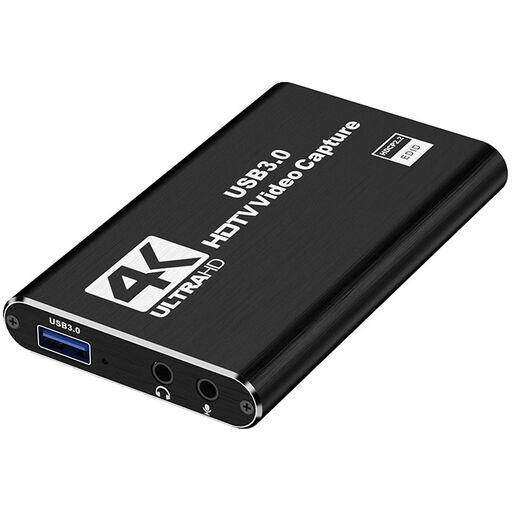 Image unavailable
An option for recording console footage while using a second screen.
HDMI input up to 4K30; recording up to 1080p60.
The product description lists HDMI loop-out, USB 3.0, a microphone input and a headphone output.
 Image unavailable
An option for recording console footage and using a separate screen via HDMI passthrough.
The title lists 4K passthrough and video recording up to 1080p.
The title also mentions UVC and UAC, a microphone input and a headphone output.
Add the capture card and camera as separate video sources in OBS. If your camera only has HDMI output, check whether you need a second suitable input. Then make a test recording and check that both video sources and the audio are included.
Check that you are not confusing HDMI passthrough with the supported recording mode, and that OBS is using the right device and resolution. On a PS4, HDCP can block external capture; PlayStation says it can only be disabled for gameplay, not for films or streaming services.
Make a short test recording and check the individual level meters and monitoring in OBS. Listen back to the recording, as visible meters alone do not confirm that the final mix or timing sounds right.
When you buy online, the seller must give you information about the product and your cooling-off period, which is usually 14 days according to the Dutch government. You are also entitled to a product that works as it should; if there is a problem, contact the seller for a solution rather than assuming the manufacturer is responsible.
Not automatically. The Dutch Data Protection Authority distinguishes between limited personal or household use and sharing images more widely. If people are recognisable, check the legal basis for publishing the footage, and check the rights for music and other protected material separately; a capture card does not give you the right to publish it.