If you play and stream on the same PC, you generally won’t need a capture card. But if you’re streaming from a console or second PC via a separate computer, an external card could be right for you. Choose one based on the HDMI pass-through your gaming display needs, and how you’ll route game audio, team chat and your microphone. In a shared bedroom, getting your headset and audio mix set up properly is often more important than adding extra capture quality.
Who is this choice relevant to?
Co-op host with team chat
You’re streaming from a console or second PC and want to keep the game, your teammates and your own voice clear, without duplicating audio sources. OBS Project warns that setting up an audio source twice can cause echo; Razer and AVerMedia describe models with audio and party chat connections or features.
Console gamer with a high-refresh-rate display
You play on a separate display, so you’ll want to assess HDMI pass-through separately from capture quality. NZXT, Elgato and AVerMedia list different pass-through modes in their specifications; check which one suits your source and display.
Streamer with a compact laptop setup
You’re short on space and want to check in advance that your laptop connection and recording software will work with the card. OBS Project describes capture cards as video sources; Elgato lists OBS as supported software for the 4K S.
What should you look for?
First decide whether you need a capture card. Then compare the audio mix, display pass-through and recording requirements for your chosen setup.
Streaming on the same PC
Choose this if: OBS can capture the game on that same computer and you don’t need to connect a separate HDMI source.
Worth noting: you generally won’t need an extra card, but you’ll need to set up game audio, voices and your microphone properly in OBS. NZXT Support Center makes this distinction for streaming from the same PC.
External card for 1080p60 recording
Choose this if: you’re streaming from a console or second PC and 1080p60 recording is enough.
Worth noting: 1080p60 recording alone doesn’t tell you anything about 4K recording or chat mixing. Razer lists separate microphone and headphone connections for the Ripsaw HD; NZXT says the Signal HD60 can pass through 4K, but can’t record in 4K.
External card for 4K60
Choose this if: you want to record in 4K60 and the specified 4K60 pass-through suits your gaming display.
Worth noting: Elgato lists a 3.5mm line-in for the 4K S, but no confirmed headphone output. Elgato also states that HDR recording is only available on Windows.
HDMI 2.1 pass-through
Choose this if: your source and display can use a pass-through mode supported by the card, and you want to include party chat.
Worth noting: AVerMedia links its GC553G2’s 4K144 recording claim to Streaming Center on Windows and MJPEG. Don’t assume that mode also applies to every OBS or Mac setup.
| Concern |
What should you check? |
Who should prioritise this? |
| Game, chat and microphone audio |
Check which audio ports are inputs or outputs, how team chat reaches the card, and whether the microphone is duplicated in OBS. |
If I want to listen through a headset in a shared bedroom and keep the game, team chat and my voice clear, I’ll focus on the audio mix. Around 36% of consumers put this concern first. |
| Pass-through to the gaming display |
Compare resolution, refresh rate, HDR and VRR separately for the source, card and display. |
If I play on a separate display, I want to keep the picture mode I need and avoid confusing pass-through with recording quality. Around 29% of consumers give display pass-through top priority. |
| Laptop and recording software |
Check the required USB connection, operating system and software support for the exact model. |
If I stream from a compact laptop, I want to know in advance whether the card and my recording software will work together for the setup I have in mind. Around 21% of consumers prioritise connectivity and software compatibility. |
| Recording quality required |
Check the capture mode for your software and operating system; a 4K specification may refer to pass-through only. |
If I really want to record at a higher resolution, I want to know which mode my chosen software supports and whether I need that extra capability. Around 14% of consumers prioritise recording quality. |
Common buying mistakes
-
Assuming ‘4K’ applies to both recording and pass-through
A card can pass through a 4K signal without recording it in 4K. NZXT makes this distinction explicitly for the Signal HD60.
Compare the capture and pass-through specifications separately for the exact model.
If the card doesn’t support the recording mode you want, you may need a different one.
-
Assuming every 3.5mm port is for headphones
Elgato describes the connection on the 4K S as a line-in; Razer lists separate microphone and headphone ports on the Ripsaw HD.
Check the function and direction of each port against your headset and chat setup.
Depending on your setup, you may need a different audio connection.
-
Mistaking a duplicated audio source for a faulty card
OBS Project warns that selecting the same audio source globally and as a scene source can cause echo.
Before your first public stream, make a test recording and check the OBS mixer and monitoring with a headset.
-
Treating an old product page as proof that an item is available
Elgato marks the HD60 X as no longer available on its Dutch-language EU page.
Check the exact model and current retailer before buying; an old specification page doesn’t tell you whether a product is currently on sale.
Brands and models to consider
Elgato
The 4K S is an external card worth considering if you’re looking for 4K60 recording and HDMI pass-through.
- Elgato lists an analogue line-in and OBS support for the 4K S.
- The line-in isn’t a confirmed headphone output; according to Elgato, HDR recording is only available on Windows. Elgato marks the HD60 X as no longer available on its Dutch-language EU page.
AVerMedia
The Live Gamer ULTRA 2.1 GC553G2 is designed for HDMI 2.1 pass-through and capturing co-op commentary or party chat.
- AVerMedia lists 4K144 pass-through and a built-in party chat feature.
- According to AVerMedia, the 4K144 recording claim applies to Streaming Center on Windows and MJPEG. The manufacturer lists 4K60 via OBS on Mac; check the mode you need for your software and operating system.
Razer
The Ripsaw HD is worth considering if wired microphone and headphone connections are important and 1080p60 recording is enough.
- Razer lists a microphone input, headphone port, 1080p60 recording and 4K60 pass-through.
- For this older model, check that the connections suit your computer and preferred audio setup.
NZXT
According to NZXT, the Signal HD60 is designed for an external console or second-PC source when 1080p recording is enough.
- NZXT says the card can pass through a 4K signal.
- NZXT says the Signal HD60 can’t record that signal to a PC in 4K. Its guide to a dual-PC setup treats audio routing as a separate challenge.
Joybuy products for this setup
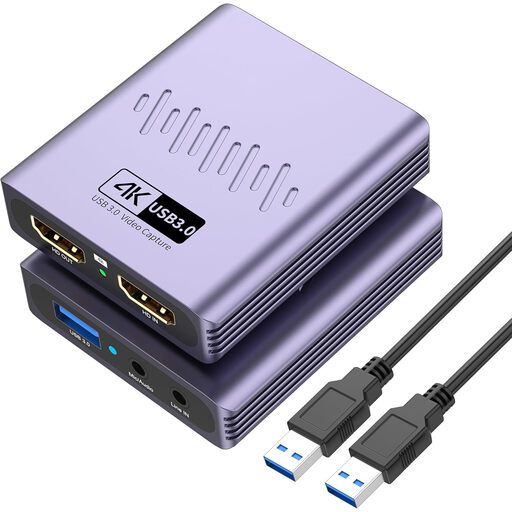
This selection focuses on an external HDMI capture card for recording at up to 1080p, with a wired microphone and headphone connection.
 No image available
VIELLAN HDMI video capture card with USB 3.0
Suited to an external HDMI source if recording at up to 1080p and using a wired microphone and headphone connection work for your setup.
Recording up to 1080p; 4K pass-through; USB 3.0; microphone input and headphone output.
Here, 4K pass-through doesn’t mean the card records in 4K. Also check that the connection and software are compatible with your computer.
Joybuy
Frequently asked questions
Do I need a capture card if I play and stream on the same PC?
Generally, no. NZXT Support Center distinguishes streaming from the same PC from capturing a console or second PC; OBS can manage game and audio sources on the streaming computer.
Why does my voice sound doubled, or why can’t I hear the game?
Check your audio sources and monitoring in OBS. OBS Project warns that selecting the same source both globally and in a scene can cause echo; game audio may also need monitoring or an audio output to be configured.
What should I check if my PS5 screen is black?
For Elgato cards, Elgato says that an HDMI signal protected by HDCP can’t be recorded, and that HDCP is enabled by default on the PS5. For a supported gaming setup, follow the instructions for the exact model; this does not give you permission to capture protected films or TV programmes.
Can my housemate appear recognisably in a public stream?
Don’t assume so without discussing it first. The Dutch Data Protection Authority explains that recognisable people in publicly shared images are personal data, and that the exception for personal or household use no longer applies. Agree in advance who will be on camera, and keep the shared space out of shot if anyone prefers not to appear.
Can music in the room automatically be included in my stream?
A capture card doesn’t deal with music rights. BumaStemra warns that livestreams featuring music may be blocked on platforms such as Twitch or YouTube; check the specific music use and the platform’s terms separately.


