
Console streamer with a small desk
You want to stream from a separate console through your computer, but have little room for extra equipment and cables. Check the HDMI input, USB connection and any pass-through to your screen.


If you’re playing a game on the same computer you’re streaming from, try OBS Game Capture first. For a separate console, you may need a capture card to get the HDMI picture onto your streaming computer. Choose one based on the HDMI pass-through your gaming screen needs and the recording quality you want, and check the USB connection, cables and audio mix too.
You want to stream from a separate console through your computer, but have little room for extra equipment and cables. Check the HDMI input, USB connection and any pass-through to your screen.
You want to keep your gaming screen’s resolution and refresh rate while streaming. Compare the stated pass-through specifications with the recording limit, as these can vary between models.
You want both game audio and your voice to come through clearly on your stream. OBS Project describes game audio and other audio sources as separate settings; test them together before you go live.
For a stream from a small desk, start with the source: are you playing on the computer you’re streaming from, or sending the picture from a separate HDMI console to that computer?
| What to consider | What should you check? | Who should pay more attention to this? |
|---|---|---|
| Source compatibility | Work out whether the game is running on the computer you’re streaming from or coming in from a separate HDMI source. For the latter, check the connections and software compatibility. | If I’m using a separate console, I want to know whether its HDMI picture will reach my streaming computer. Around 33% of consumers put source compatibility first. |
| Screen pass-through | Compare your preferred screen resolution and refresh rate with the pass-through specifications; check the maximum recording quality separately. | I want to keep using my screen’s settings while I play, even if I record at a different quality. Around 27% of consumers give screen pass-through top priority. |
| Audio mix | Identify your game audio, any party chat and your microphone separately; check the OBS audio meters and make a test recording. | I want viewers to hear both the game and my commentary. Around 20% of consumers put the audio mix first. |
| Space and connections | Plan the connections from the source to the card and screen, and from the card to the computer; check the dimensions, ports and cables included. | With limited desk space, I want to know in advance which devices and cables I’ll need to fit in. Around 20% of consumers give their set-up and connections top priority. |
For the Game Capture Neo, Elgato lists pass-through up to 2160p60, but recording up to a maximum of 1080p60. Pass-through and recording are separate specifications.
For the exact model, compare the maximum resolution and refresh rate for both pass-through and recording.
AVerMedia lists the GC311 as supporting up to 1080p60 for both pass-through and recording; according to the manufacturer, the model doesn’t support 4K, HDR or high refresh rates.
Before buying, check the screen settings you actually use and compare them with the stated pass-through specifications.
If those settings aren’t supported, you may need a different card or an adjusted screen set-up.
Seeing the game doesn’t confirm that the game audio and microphone are coming through properly on your stream. OBS Project describes audio as separate sources that you need to check in OBS.
Check the audio meters and make a short test recording with both game audio and commentary before you go live.
Razer documents an HDMI input and USB 3.0 connection for the Ripsaw X, but no HDMI pass-through output among the connections shown.
Check whether the exact device has both the HDMI input you need and an output to your gaming screen.
If you want to play on a separate screen, you may need extra equipment if suitable pass-through isn’t available.
External models range from 1080p60 recording to options with more capable combinations of pass-through and recording.
The Live Gamer MINI GC311 is a compact external option if 1080p60 is sufficient for both playing and recording.
Razer positions the Ripsaw X primarily for HDMI cameras, so it isn’t automatically suitable as a console capture card with screen pass-through.
An HDMI-to-USB card described on the French product page is another option to compare for 1080p60 recording with 4K60 pass-through.
These USB capture cards connect an HDMI source to a computer for capturing gameplay and streaming.
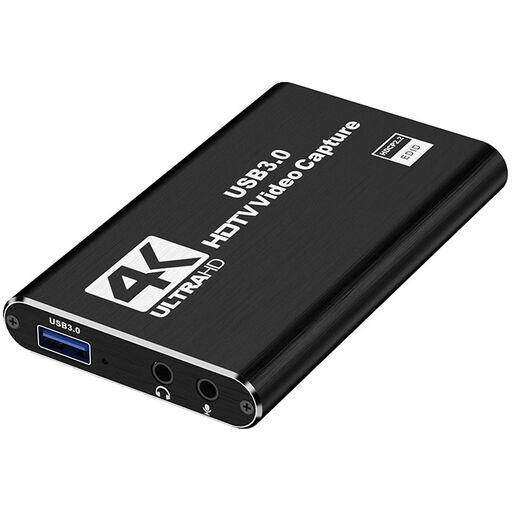 No image available
An option to compare if you want to connect an HDMI source to a PC or laptop.
The product title lists HDMI input up to 4K 30Hz and recording up to 1080p60.
The title mentions USB 3.0 and compatibility with PC and laptop.
 No image available
The listed microphone and headphone connections may be worth considering when deciding how the card’s audio features fit into your set-up.
The product title lists recording up to 1080p, 4K HDMI pass-through and support for UVC and UAC.
The title mentions a microphone input and headphone output.
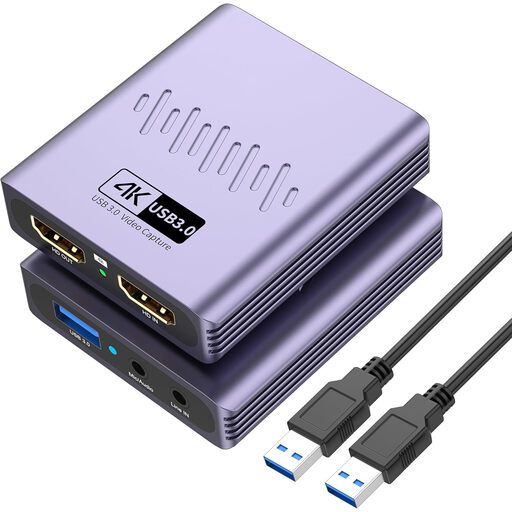 No image available
This version is worth comparing if you’re considering HDMI pass-through and audio connections.
The product title lists USB 3.0, 4K pass-through and video recording up to 1080p.
The title mentions a microphone input and headphone output.
Make a test recording in OBS before you go live. Check that the card displays a picture as a video source, that your chosen resolution is supported and that both game audio and your microphone show up on the audio meters. OBS Project recommends testing your set-up in advance.
First, check the cables and selected input. If HDCP is blocking the connection, PlayStation describes a setting for turning off HDCP when using external HDMI capture devices. This doesn’t give you permission to stream protected films or music.
According to the Dutch government, many online purchases come with a 14-day cooling-off period, subject to exceptions. Your statutory guarantee is separate from any manufacturer’s warranty; check the terms that apply to your purchase.
Don’t assume that you can. The Dutch government states that permission from the rights holder may be needed to use copyright-protected music in public. The Dutch Data Protection Authority considers identifiable people to be personal data; the rules that apply to your situation depend on the circumstances.
No, not every donation is tax-deductible. The Dutch Tax and Customs Administration cites factors including the status of the recipient organisation and the conditions attached to the donation. Check its ANBI status and the applicable rules before promising that a donation is deductible.