
Console player with a laptop
You want to bring your console’s HDMI output into OBS. Check that your console, capture card, laptop and OBS all work together. OBS Project describes a capture card as a source for video input.


If you’re playing a game on the same computer that’s running OBS, try the built-in capture source first. OBS Project describes Game Capture for Windows and a different screen-capture source for macOS. If you want to stream a console to a laptop over HDMI, a capture card is a suitable option. First check the connections, then compare the display mode on your gaming screen with the separate capture limit. Test the audio before you go live, too.
You want to bring your console’s HDMI output into OBS. Check that your console, capture card, laptop and OBS all work together. OBS Project describes a capture card as a source for video input.
You want to keep playing on your own screen while streaming. Compare the HDMI pass-through with the capture quality, as these specifications can vary between models.
You want to include your voice or a conversation as well as gameplay. Plan and test in advance how your console, microphone, headset and OBS audio settings will work together.
First decide whether you need to capture video from an external console. Then compare the connection, the display mode on your gaming screen and the capture quality. Finally, check that your test recording includes all the audio sources you want.
| What to consider | What to look for | Who is this important for? |
|---|---|---|
| Source and connections | Check the HDMI output, USB connection, operating system and support as a video source in OBS. The Switch Lite has no TV mode and isn’t suitable for capture via a dock, according to Nintendo and OBS Project. | If I want to send a console’s video to my laptop, I want to know in advance that all the connections and software will work together. Around 29% of consumers prioritise this compatibility. |
| Image on the gaming screen | Compare your preferred resolution, refresh rate and any HDR with the HDMI pass-through of the exact model. AVerMedia specifies pass-through of up to 1080p60 for the GC311; Elgato lists 4K60 pass-through for Game Capture Neo. | If I want to keep playing on my own screen while streaming, I look at the pass-through and not just the capture quality. Around 24% of consumers prioritise keeping their preferred display mode. |
| Captured image | Check the maximum capture or recording resolution and frame rate separately. Elgato specifies recording of up to 1080p60 for Game Capture Neo, even though its stated pass-through is higher. | If the stream itself needs to look sharp and smooth, I want to know the capture limit rather than just the input specification. Around 18% of consumers prioritise the captured image. |
| Audio and commentary | Check which audio connections the model has and how OBS captures and plays audio. Before you go live, make a test recording with gameplay, your microphone and, if needed, group chat. | If I commentate while playing or chat with others, I want to make sure their voices are recorded along with the game audio. Around 17% of consumers prioritise this audio setup. |
| Whether you need a card | If the game is running on the same computer as OBS, try the appropriate capture source first. A capture device is another option for bringing a separate HDMI console source into OBS. | If I only need the card for one charity stream, I want to buy equipment only if my setup requires it. Around 12% of consumers prioritise avoiding an unnecessary purchase. |
A card may pass a higher display mode through to a gaming screen than it can record in OBS. For example, Elgato specifies up to 4K60 pass-through and up to 1080p60 recording for Game Capture Neo.
For the exact model, compare the input, HDMI pass-through and recording specifications separately.
If the game and OBS are running on the same computer, you may be able to use a capture source in OBS instead of an external card.
Try the appropriate OBS source before buying hardware. A capture card is an option for a separate video source, such as a console connected over HDMI.
If you can record your session without a capture card, this check could help you avoid buying a device you don’t need.
Seeing the game on screen doesn’t automatically mean your commentary and group chat will be included in the recording.
Make a full test recording in advance and listen back using the same microphone, headset and console settings you’ll use during the stream.
Privacy rules apply to recognisable people in footage shared publicly. BumaStemra explains that, under certain platform conditions, you don’t need a separate BumaStemra licence for music by its members, but other rights holders may still have rights.
Keep people who aren’t taking part out of shot, make sure you have an appropriate legal basis for showing identifiable participants where necessary, and check the rights for any music you use before going live.
Game Capture Neo is an external HDMI capture card to consider if you want a higher display pass-through resolution than the capture quality.
The Live Gamer MINI GC311 is worth comparing if 1080p60 is enough for both pass-through and recording.
Model 25773-AMZ is worth comparing if you’re looking for HDMI loop-out.
The TUF Gaming Capture Box-CU4K30 is worth comparing if you need the specified headset or gamepad audio connections.
Signal HD60 is worth comparing if you want 4K pass-through but are happy with a 1080p stream.
These product options are external HDMI capture cards for recording an HDMI source on a computer. The models listed have different pass-through, recording and audio connection specifications.
 No image available
An option if you want to use an HDMI source with a computer or laptop.
The product title lists HDMI input up to 4K 30Hz and recording up to 1080p 60Hz.
The title also lists USB 3.0 and compatibility with PCs and laptops.
 No image available
An option if you want to capture HDMI video and need a microphone and headphone connection.
The product title lists capture up to 1080p and 4K HDMI Pass-through.
It also lists USB 3.0, UVC and UAC support, a microphone input and a headphone output.
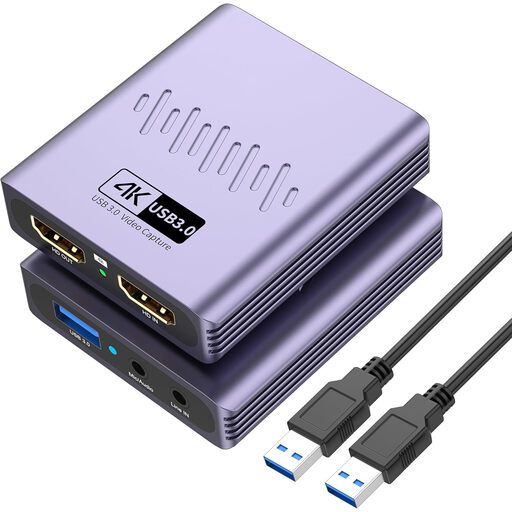 No image available
An option if you want to capture an HDMI source while also passing the picture through.
The product title lists capture up to 1080p, 4K Pass-through and USB 3.0.
It also lists a microphone input and a headphone output.
Yes, if you’re playing the game on the same computer that’s running OBS. OBS Project describes Game Capture for Windows and a different screen-capture source for macOS. For a separate console that needs to be used as an HDMI source, OBS describes a capture device as one option.
Connect the HDMI source to the card, then connect the card to your computer. If the model has HDMI pass-through, connect a gaming screen as well. Add a Video Capture Device source in OBS and make a test recording to check the picture, console audio and microphone.
The Nintendo Switch Lite doesn’t support TV mode, so it isn’t suitable for capture via a dock, according to Nintendo and OBS Project. AVerMedia and ASUS state that the models mentioned don’t capture HDCP-protected signals; this doesn’t mean you have general permission to bypass protections.
For online purchases in the Netherlands, there is generally a statutory 14-day cooling-off period after delivery, with some exceptions. ACM ConsuWijzer also explains that you’re covered by the statutory guarantee if a product doesn’t do what you could reasonably expect under normal use. Before buying, check the seller, product description and terms that apply to your order.
Not necessarily. The Dutch Data Protection Authority says privacy rules apply when identifiable people are shared publicly, and that an appropriate legal basis is generally needed. BumaStemra explains that a licence for music by its members isn’t always needed under certain platform conditions, but other rights holders may still have claims. So make a note of the participants, music you’ll use and platform you’ve chosen in advance.