If you’re recording a PC game on the same computer you’re playing on, try software capture first. For a console or a second gaming PC, an HDMI capture card can send the video to a separate recording computer. Choose based on both the recording and pass-through modes, and check the connections and audio with a short test recording. 4K pass-through doesn’t automatically mean 4K recording.
Who is a capture card for?
Console guide creator
You want to record gameplay from a console while viewing the picture on your gaming screen at the same time. OBS Project describes capture cards as a possible video source; also check that the card supports the HDMI pass-through you need.
Creator making narrated tutorials
You want to talk through your steps and monitor game audio and your voice while recording, or edit them separately afterwards. OBS Project explains how to check audio levels in the mixer and record to multiple audio tracks.
PC guide creator using high display settings
You want to know whether software capture is enough or whether you need a second gaming PC and a capture card to pass through your preferred display mode. OBS Project offers Game Capture for games on Windows; for an external source, compare the recording and pass-through specifications of the exact card model.
What should you look for when choosing one?
| What to consider |
What should you check? |
Who is this important for? |
| Game source and connection |
For a single PC, try software capture first. For a console or second PC, check the HDMI connections, the computer interface and whether it’s recognised in OBS. |
If I’m recording a PC game on the same computer, I want to know whether software is enough; around 27% of consumers are mainly looking to match the source to the recording computer. |
| Recording and display pass-through |
Compare the maximum recording mode separately with the HDMI pass-through and the output mode of your source and display. |
If I’m showing menus and map details, I want a clear picture without losing my preferred gaming mode; around 27% of consumers prioritise picture quality and pass-through. |
| Commentary and game audio |
Check which audio sources are picked up in OBS. Make a short test recording and listen back before recording a full guide. |
When I’m narrating gameplay, I want to monitor my voice and game audio and edit them separately if needed; around 26% of consumers prioritise audio and editing. |
| Features you need |
Choose recording and pass-through modes that suit your source and display. Check extra features only if your setup needs them. |
If a simpler mode is enough for my guide, I don’t want to choose features my recording doesn’t need; around 20% of consumers are mainly looking for features that suit their needs. |
Common buying mistakes
-
Confusing 4K pass-through with 4K recording
A card may pass a 4K signal through to a display even though the recorded video has a lower resolution. For example, Elgato lists recording up to 1080p60 and pass-through up to 2160p60 for Game Capture Neo.
For the exact model, compare the recording and pass-through tables separately with your source and display settings.
-
Choosing a high HDMI mode without checking the software requirements
AVerMedia links the advertised 4K144 recording on the Live Gamer ULTRA 2.1 GC553G2 to Streaming Center on Windows. The manufacturer lists a different recording mode for OBS on Mac.
Check the combination of operating system, recording software, resolution and frame rate for your own setup.
-
Recording a long guide without testing the audio
If game audio, your microphone or group chat isn’t recorded on the intended audio tracks, your spoken explanation could be missing or difficult to edit.
Record a short test clip, listen back and check the track assignments before you start.
-
Treating an older ranking as a current stock list
PCGamesN’s list of capture cards was updated on 17 October 2025. Elgato says on its European product page that the HD60 X is no longer available.
Use rankings as historical context only, and check the latest product information for the model you’re considering before buying.
Brands and models to consider
Elgato
The Neo and 4K S are external models with different recording and pass-through modes; the 4K Pro is a PCIe model for a compatible desktop PC.
- Elgato lists recording up to 1080p60 and pass-through up to 2160p60 for Game Capture Neo. For the 4K S, it lists recording up to 2160p60.
- Elgato limits HDR recording on the Neo and 4K S models mentioned to Windows. Check the correct mode for the exact model.
AVerMedia
The Live Gamer MINI GC311 and Live Gamer ULTRA 2.1 GC553G2 are designed for different HDMI setups.
- AVerMedia lists Full HD pass-through via HDMI and a micro-USB connection for the GC311.
- The advertised 4K144 recording on the GC553G2 is linked to Streaming Center on Windows; don’t assume it applies to OBS or other systems.
Razer
Razer positions the Ripsaw HD for setups where 1080p gameplay recording and 4K60 pass-through are useful.
- Razer lists 1080p recording and 4K60 pass-through for the Ripsaw HD.
- The 4K60 mode listed is for pass-through, not a confirmed 4K60 recording mode. Also check support for the exact model.
NZXT
NZXT positions the Signal HD60 for setups that don’t need HDR, higher frame rates or 4K30 recording.
- NZXT’s guide distinguishes the Signal HD60 from the Signal 4K30 based on the modes you need.
- For a two-PC setup, NZXT highlights the audio routing as something to consider. This is the manufacturer’s advice for the models mentioned, not an independent test.
Capture cards at Joybuy
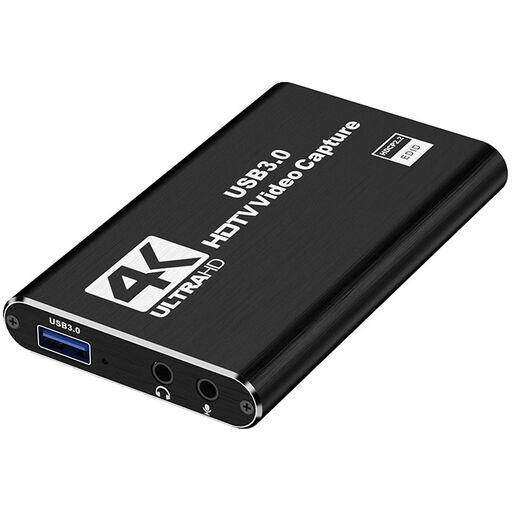
These are external HDMI capture cards for recording gameplay from a source such as a console or second gaming PC, with recording, display pass-through and spoken commentary in mind.
 No image available
HDMI capture card, USB 3.0, 1080p60, black
An option for recording an external HDMI source on a PC or laptop and passing the picture through HDMI to a second display.
- Recording up to 1080p60; HDMI input up to 4K 30Hz.
- USB 3.0 connection and HDMI loop-out.
- The product description mentions HDMI audio, a microphone input and headphone monitoring.
- The product information lists use with OBS on a PC or laptop.
Joybuy
 No image available
VIELLAN HDMI Video Capture Card, 1080p recording
This model is designed for recording an external HDMI source; the stated pass-through and recording capabilities are separate modes.
- Video recording up to 1080p; 4K HDMI pass-through.
- USB 3.0 with UVC and UAC support, according to the product description.
- The product information mentions a microphone input, headphone output and use with OBS on Windows, Mac or Linux.
Joybuy
Frequently asked questions
Do I need a capture card to record a PC game on my only computer?
Not necessarily: OBS Project offers Game Capture for games on Windows. Try a short software recording first; if a game isn’t recognised properly, OBS Project suggests window capture as an alternative.
How do I connect a console and check the audio?
With a capture card that has HDMI pass-through, connect the console to HDMI IN and the gaming display to HDMI OUT; also connect the card to the recording computer. Add the card to OBS as a Video Capture Device, then listen back to a test recording to check that the game audio and microphone have been captured. The cables included vary by model.
Can I edit game audio and spoken commentary separately later?
Yes, using separate audio tracks if you configure the recording settings in OBS accordingly. Check the track assignments and test the result: OBS Project warns that standard video players usually play only one audio track at a time.
Can I record and publish protected HDMI video or other people’s music?
A capture card doesn’t automatically give you permission to record or publish protected material. Elgato says its capture cards won’t record an HDMI signal when HDCP protection is enabled. The Government of the Netherlands says you can’t make copyright-protected music or films available to the public without permission; check which permissions apply to the game, music and method of publication you plan to use.
Who can help if a capture card breaks too soon during normal use?
According to ACM ConsuWijzer, the seller is responsible if a product breaks sooner than you could reasonably expect during normal use. Depending on the circumstances, the seller must resolve the problem free of charge, for example by repairing or replacing the product. A manufacturer’s warranty is separate from this legal right.


