
Vandaag of morgen in huis

Kwaliteit gegarandeerd

Welkomstaanbiedingen ontgrendelen: GRATIS bezorging | Tot 80% korting | Gratis 30 dagen JoyPlus-proefperiode
Download de app
It's a familiar scenario: just as you need to print an important document, your printer's indicator light starts flashing. The ink has run out. A quick online search reveals a bewildering array of options. You're looking for a Canon PGI-570/CLI-571 multipack but are inundated with alternatives, XL versions, and codes that look just slightly different. It's tempting to go for the cheapest option, but this often leads to disappointment.
Many users fall into the same traps. They buy a 'compatible' cartridge that produces streaky prints or, worse, damages the printhead. Or they accidentally order the wrong model code and are left with an unusable product. Another common mistake is misjudging the capacity, which means a 'budget-friendly' purchase ends up being more expensive in the long run. This guide will help you avoid these problems and make the right choice for your Canon printer.
Before making a purchase, there are a few specifications you should check. This prevents buyer's remorse and ensures your printer continues to perform optimally.
The ink cartridge market is divided into two camps: original brand cartridges and alternative (or 'compatible') cartridges. Although alternatives are often cheaper, original Canon ink is specifically developed and calibrated for the technology in your PIXMA printer. According to Canon, this delivers consistent print quality and reliability, reducing the risk of malfunctions or damage to the printhead. If you want certainty about colour accuracy and the lifespan of your printer, an original cartridge is a wise choice.
The PGI-570 and CLI-571 cartridges may look the same, but they have different functions. It's crucial to know the difference:
Your printer needs both types to function correctly. A Canon ink value pack typically contains all the necessary cartridges.
Canon offers both standard and XL cartridges. The XL versions contain significantly more ink. Although the initial purchase price is higher, the cost per printed page is often lower. If you print regularly, for a home office or for studying, an XL multipack can be more cost-effective in the long run. Always check the page yield stated on the packaging to make a proper comparison.
Based on these criteria, we have selected a number of products that suit different user profiles.

Why it's a match: This is the official Canon PGI-570/CLI-571 multipack, the exact set for popular printers like the Canon PIXMA MG5750 ink cartridge and Canon TS5050 ink. Ideal for those who print documents and the occasional photo and want to avoid any risk with compatibility.
You are buying the original, Canon-made set. This prevents issues with compatibility, poor print quality, or damage to your printer.
Contains all five required cartridges (PGI-570 pigment black, CLI-571 black, cyan, magenta, and yellow) in one convenient pack.
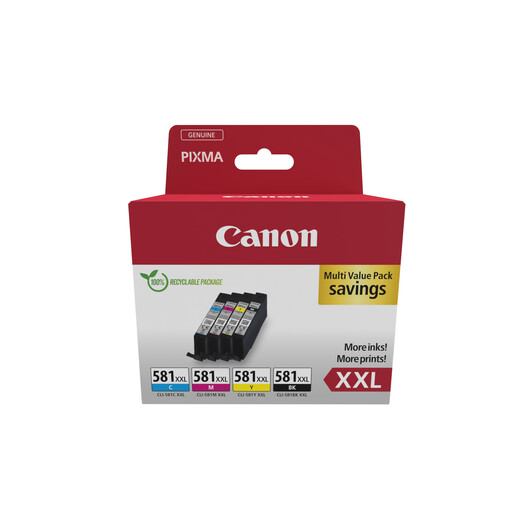
Why it's a match: If you have a newer model PIXMA printer (like the TS6150 or TR8550), it likely uses the PGI-580/CLI-581 series. This product is the correct choice for those specific printers and highlights the importance of checking your model number.
Prevents the common mistake of buying the 570/571 series for a printer that requires the 580/581 series. Always check for compatibility.
Original Canon quality, specifically designed for a different, newer generation of PIXMA printers for optimal performance.
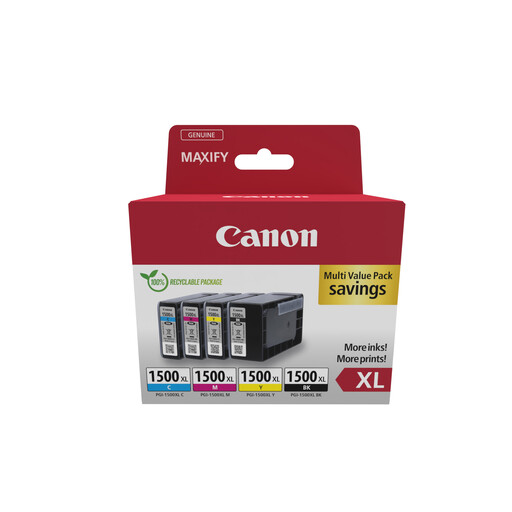
Why it's a match: Canon MAXIFY printers are designed for office use and require their own ink series (PGI-1500). This XL set is intended for users who print a high volume of documents and need high capacity and durable, smudge-proof ink.
Prevents an office user from accidentally buying PIXMA ink (like the 570/571) for a MAXIFY printer, which will not work and leads to frustration.
The high (XL) yield provides a lower cost per page, which is ideal for a high-volume printing environment.
The PGI-570 contains pigment ink and is intended for sharp text on plain paper. The CLI-571 cartridges contain dye-based ink and are optimised for vibrant colours in photos and images. Your printer needs both types for all-round results.
An unopened, original Canon ink cartridge typically has a shelf life of up to 24 months after its production date, provided it is stored in its original, sealed packaging in a cool, dark place. The exact expiration date is often printed on the packaging.
No, that is not necessary. Printers that use the PGI-570/CLI-571 series have individual ink tanks. You only need to replace the cartridge that is actually empty. The LED light on the cartridge will indicate which one needs to be replaced.
