
Vandaag of morgen in huis

Kwaliteit gegarandeerd
Download de app
Categorieën

The 'Ink is running low' notification appears on your screen. It's a familiar moment for anyone with a Canon printer. The next step is finding the right replacement, but the selection can be overwhelming. Buying the wrong Canon ink cartridge means not just unnecessary expense, but also delays. This guide will help you select the correct, genuine Canon ink for your printer right away, without the guesswork.
The selection process is simpler than it seems. By paying attention to a few specific details, you'll avoid making the wrong purchase.
The most reliable method for finding the correct ink is to check the cartridge number. This number is almost always printed on the cartridge itself. Open your printer's cover and wait for the cartridge carriage to move to the centre. The label on the old cartridge will have a code, such as PG-545 (black) and CL-546 (colour). These are the numbers you need. Have you already discarded the old cartridges? Consult your printer's manual or search online using your printer model.
Canon offers different cartridge sizes, tailored to your printing habits.
When buying printer ink, you might also come across third-party brands. According to Canon, genuine Canon ink cartridges produce an average of 35% more high-quality prints than imitation cartridges. They state that the ink and the printer's print head are designed to work in harmony, resulting in consistent quality and reliability.
Below is a selection of popular Canon ink cartridges, based on their specifications and applications.
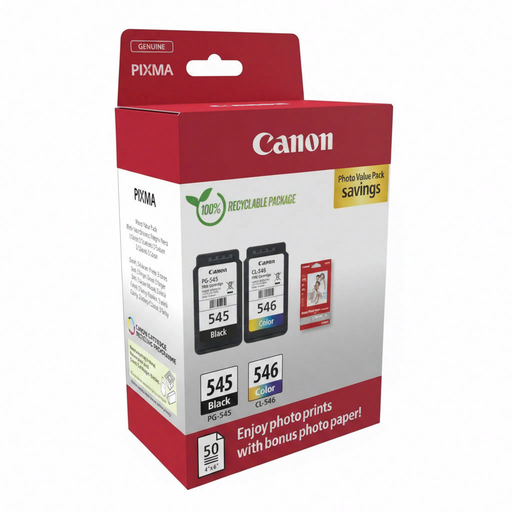
Why We Chose It This package is a complete solution for home users. It includes not only a black and a colour ink cartridge but also 50 sheets of glossy photo paper. This allows you to get started printing both documents and photos right away.
Benefits
Who is this for? This pack is ideal for owners of a compatible Canon PIXMA printer who print occasionally and want an all-in-one package to produce high-quality documents and photos.
View Product Details and Price
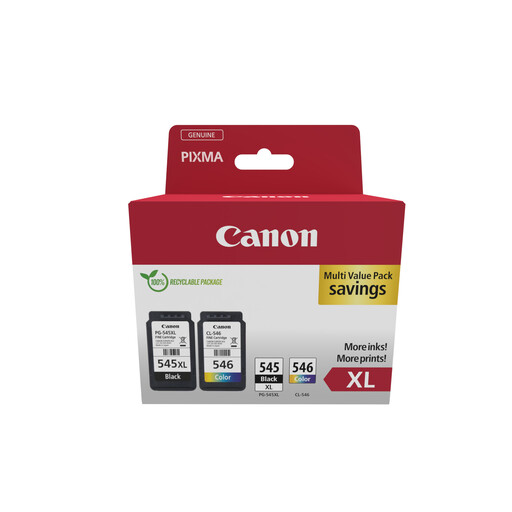
Why We Chose It This XL value pack is focused on cost-efficiency. The XL cartridge versions contain significantly more ink than the standard cartridges, which lowers the cost per printed page and means you replace them less frequently.
Benefits
Who is this for? For home users or small offices (SOHO) who print regularly and want to reduce operational costs. If you print multiple documents weekly, this is a logical choice.
View Product Details and Price
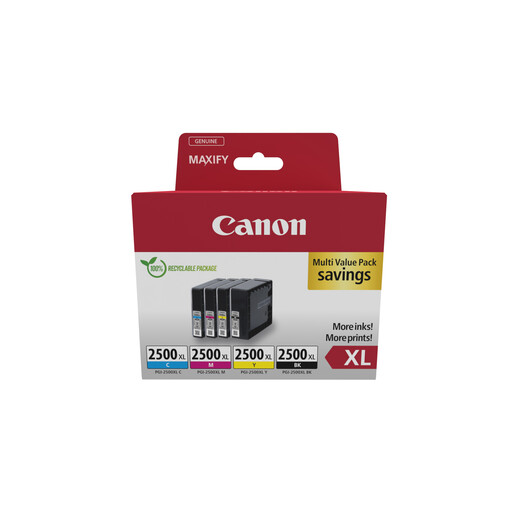
Why We Chose It Specifically designed for the Canon MAXIFY printer series, which is aimed at business use. This ink multipack contains all four required XL cartridges (black, cyan, magenta, and yellow) for high productivity and professional-grade document quality.
Benefits
Who is this for? This pack is intended for small businesses and home offices that use a Canon MAXIFY printer for printing high volumes of documents, reports, and marketing materials.
View Product Details and Price
Canon's range is extensive, covering cartridges for many printer models released over the years. If the products listed above don't match your printer, you will likely find the right cartridge in our full selection. Use your printer's model number or the cartridge number in the search bar for instant results.
Shop All Genuine Ink Cartridges on Joybuy
1. What is the difference between an XL and a standard Canon cartridge? An XL cartridge physically contains more ink than a standard cartridge. Although the purchase price is higher, the cost per printed page is lower. This makes XL cartridges a more economical choice for anyone who prints regularly.
2. How do I know which Canon ink cartridge I need? The most foolproof method is to check the number on your old cartridge (e.g., PG-545). You can also find this number in your printer's manual or on the manufacturer's website by looking up your printer model.
3. Can I replace only the black cartridge if it's empty? Yes, with most Canon printers, you can replace cartridges individually. If only the black ink has run out, you only need to replace the black cartridge. Printers with a combined colour cartridge (like the CL-546) require the entire cartridge to be replaced, even if only one colour is depleted.
Written by the Joybuy Product Recommendation Officer
Our recommendations are based on product parameters and specifications to help you make an informed choice.